1-4
&KDSWHU%()25(23(5$7,21
1
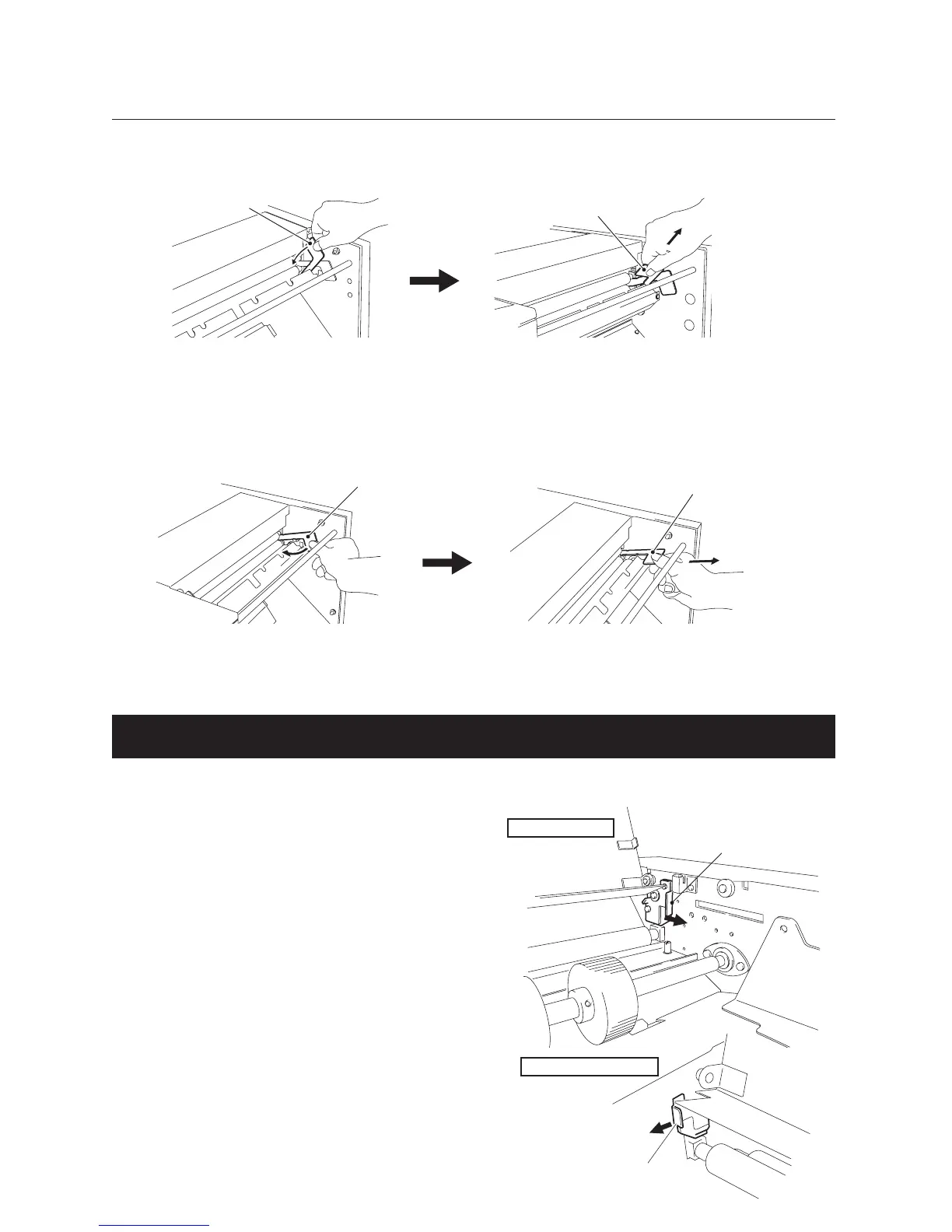
To remove the press release lever (A) on the non-operator's side, push it inwards
and pull it out.
Press release lever (A)
Press release lever (A)
2
To remove the press release lever (A) on the operator's side, push it inwards and
pull it out.
3
To remove the press release lever (B) on the non-operator's side, push it inwards
and pull it out.
Press release lever (B)
Press release lever (B)
4
To remove the press release lever (B) on the operator's side, push it inwards and
pull it out.
2-3. Locking the Bearing Support Levers
The bearing support levers are released at shipment to prevent the rubber roll from becoming
distorted. After removing the press release levers, be sure to lock the bearing.
Bearing support lever
Operator’s side
1
Turn the bearing support lever on the
operator's side in the direction of the
arrow.
The bearing will be locked.
Bearing support lever
Non-operator’s side
2
Turn the bearing support lever on the
non-operator's side in the direction
of the arrow.
The bearing will be locked.


 To Next Page