4-10
&KDSWHU7528%/(6+227,1*
4. Troubleshooting
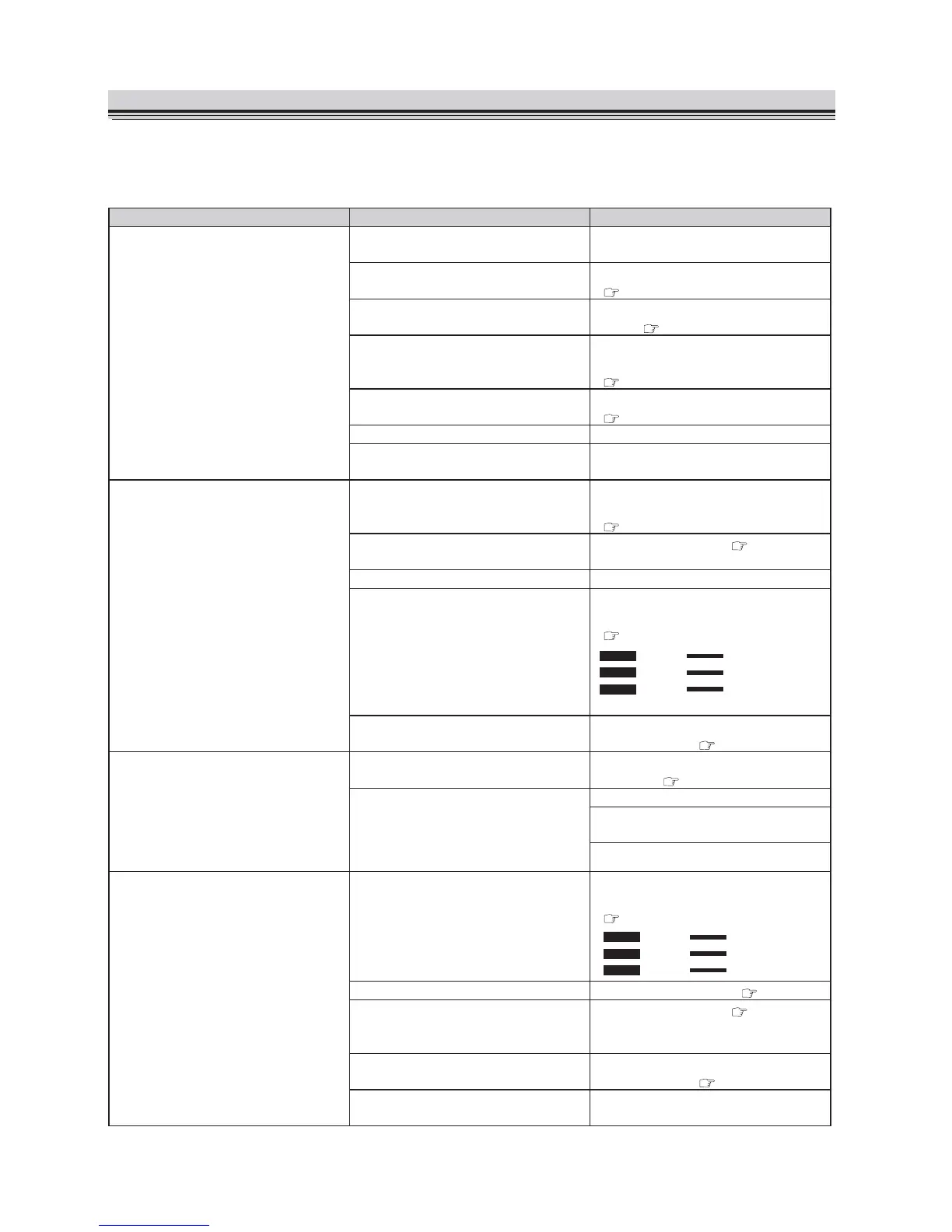
:KHQWURXEOHKDVRFFXUUHG¿QGWKHV\PSWRPIURPWKHWDEOHEHORZDQGVROYHWKHWURXEOHDFFRUGLQJWR
the solution. If you cannot solve the trouble, contact your dealer.
Symptom &DXVH Solution
The machine does not start
even when the Start button is
pressed.
The power cord is not inserted to
the wall socket.
Insert the power cord to the wall
socket.
The power is not on. Turn on the power switch.
S
There is no paper on the paper
feed table.
Stack paper on the paper feed
WDEOH
S
Paper has not reached the guide
plate of the paper feed table.
Push in the paper until its lead
edge touches the guide plate.
S
A paper jam has occurred. 5HPRYHWKHMDPPHGSDSHU
S
The top cover is open. &ORVHWKHWRSFRYHU
A trouble has occurred inside the
machine.
&DOO\RXUGHDOHU
:KHQWKH6WDUWEXWWRQLVSUHVVHG
the paper feed rings rotate but no
paper is fed.
The paper feed table has been
lowered.
/RZHUWKHSDSHUVHWOHYHUWRUDLVH
the paper feed table.
S
The paper has not been fanned
well.
)DQWKHSDSHUZHOO
S
The paper is curled. Straighten the paper curl.
The paper is thick. Set the paper feed pressure
adjustment knob to “Thick paper.”
S
ĸ
The paper is outside the
VSHFL¿FDWLRQV
Use paper that meets
VSHFL¿FDWLRQV
S
The paper is not folded at the
proper folding position.
The paper folding plate is not
installed properly.
Install the paper folding plate
SURSHUO\
S
Static electricity has occurred in the
paper.
Fan the paper well.
6SUD\DFRPPHUFLDOO\DYDLODEOHDLU
duster on the rubber roll.
Use thicker paper.
3DSHULVGRXEOHIHGIUHTXHQWO\ The paper feed pressure
adjustment knob is set to “Thick
paper.”
Set the paper feed pressure
adjustment knob to “Thin paper.”
S
ĺ
The paper separator is dirty. &OHDQLWZLWKDOFRKRO S
The sheets of paper are sticking
to each other and cannot be
separated.
)DQWKHSDSHUZHOO
S
The paper is outside the
VSHFL¿FDWLRQV
Use paper that meets
VSHFL¿FDWLRQV
S
A trouble has occurred inside the
machine.
&DOO\RXUGHDOHU


 To Next Page