3-6
&KDSWHU$'9$1&('23(5$7,21
0LVDOLJQPHQW´
S
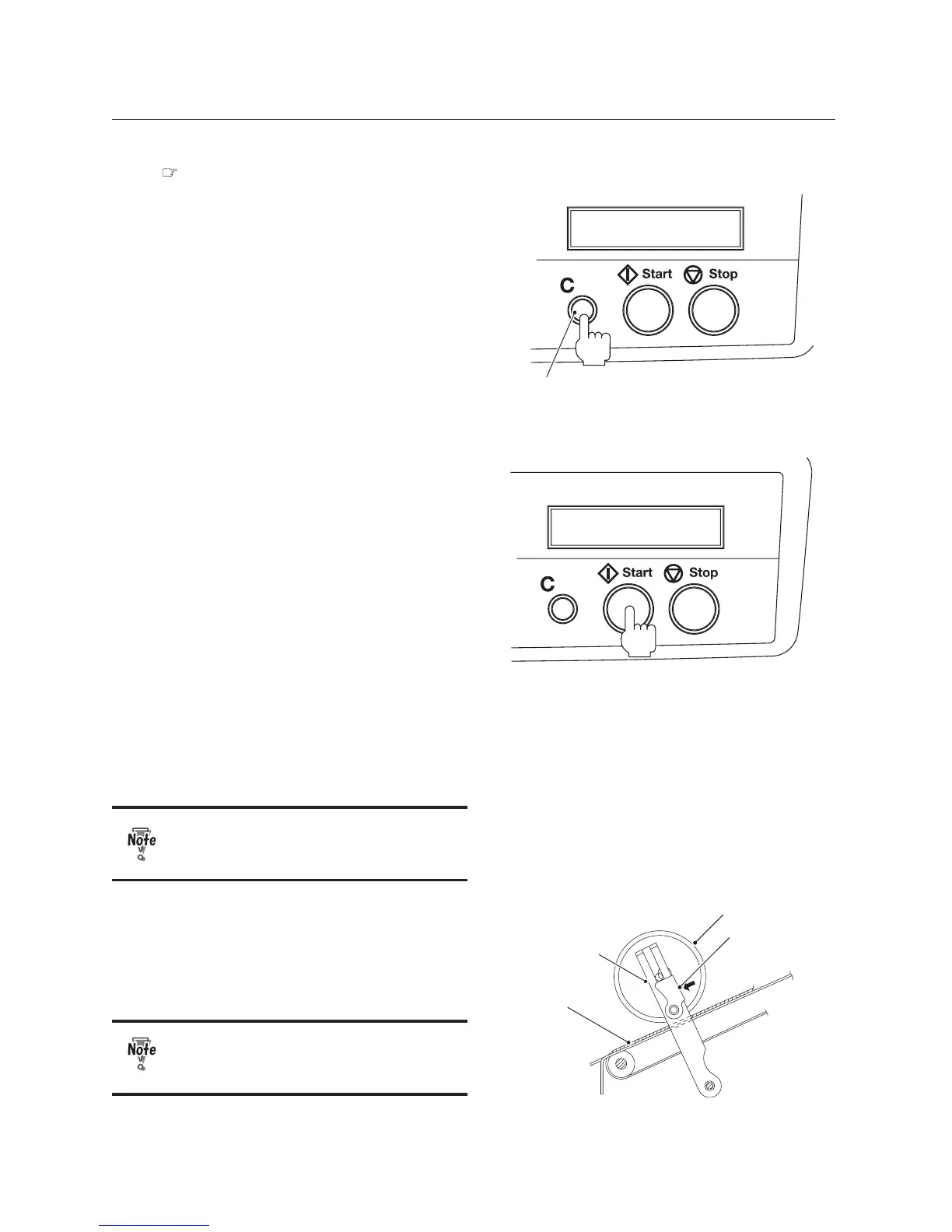
Clear button
11
After completing adjustments, press
the C (clear) button for more than
two seconds to clear the counter to
"0."
12
Press the Start button to start folding
operations.
Press the Stop button to interrupt or stop
the operations. Pressing the Start button
again will resume operations.
:KHQWKHUHLVQRSDSHURQWKHSDSHUIHHG
table, the machine will stop automatically
DQGWKHFRXQWHGQXPEHUDQG123$3(5
will be displayed alternately.
:KHQSDSHULVORDGHGRQWKHSDSHUIHHG
table, only the counted number will be
GLVSOD\HG,I\RXSUHVVWKH&EXWWRQIRU
more than two seconds, the counter returns
WR,I\RXSUHVVWKH6WDUWEXWWRQZLWKRXW
SUHVVLQJWKH&EXWWRQIROGLQJRSHUDWLRQV
will resume and the accumulated number
will be displayed on the counter.
Note that you cannot move onto the
next procedure until you place paper
on the paper feed table.
Stacker roller
Lever
Belt
Stacker lever
13
After the operations have completed,
move the left and right levers
attached to the stacker lever in the
direction of the arrow.
If the stacker rollers are left lifted up,
problems will occur when the normal
paper size is used.


 To Next Page