6
Setting Alarm Clock
You can set four alarm clocks for this wake-up light. (Note: clock 3 & clock 4 can only be
set to APP)
Take clock 1 setting as an example:
Note: When the set light time arrives, the light will slowly turn from dark to the preset
brightness level. OFF means turning off the light. Set the light state to OFF when you do
not need a light to wake up.
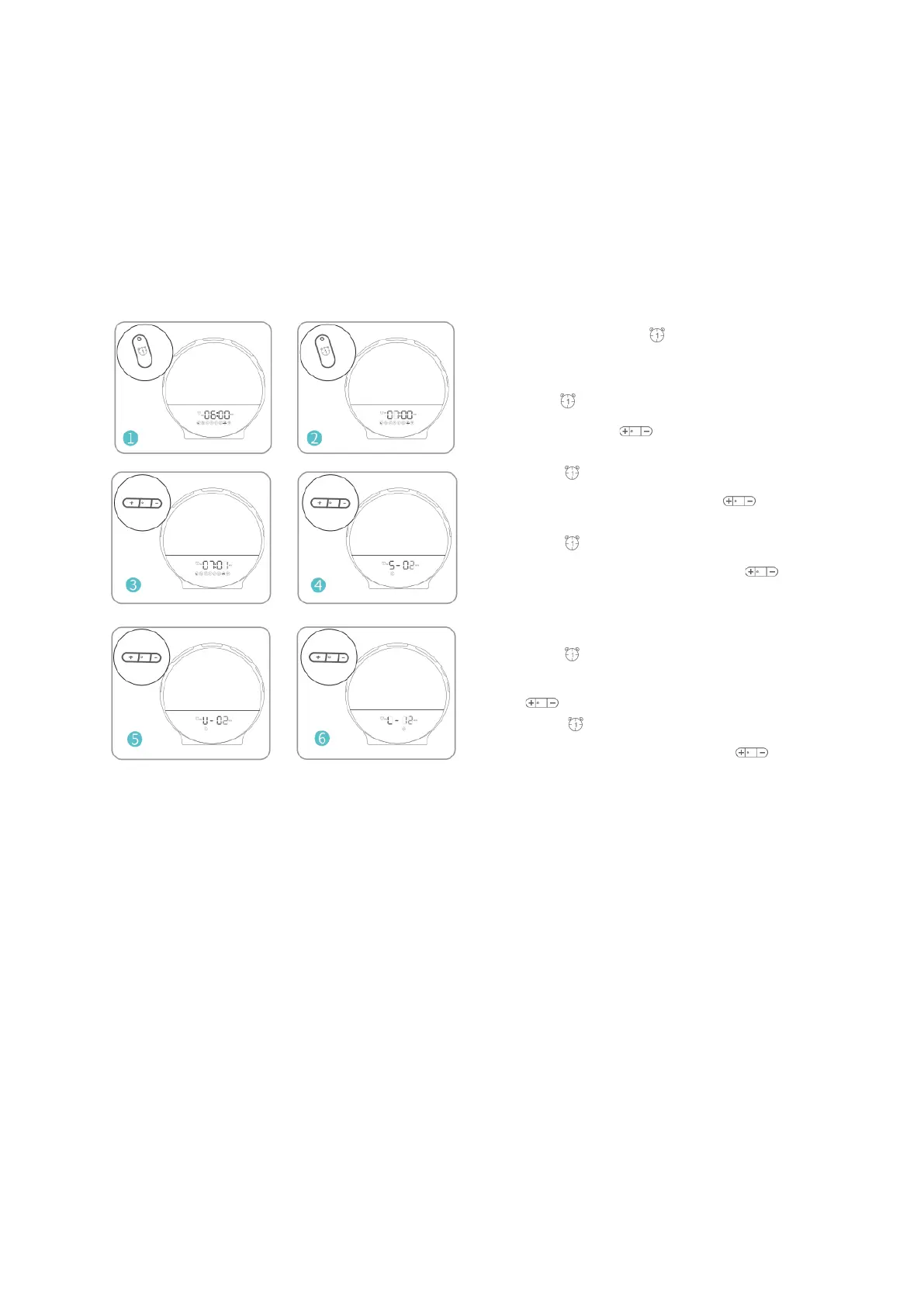
1. In time state press to turn on alarm, the alarm
symbol appears on the display when you turn on it, and
dissapears when you turn off the alarm.
2. Hold for 3 seconds until the hour time begins to
blink, and use to adjust the hour time
3. Press second time to confirm the hour time and
move to the minutes, and use to adjust the
minutes.
4. Press third time to confirm the minutes and move to
choose the alarm sound, and use to adjust your
choices. (You can choose between 7 pre-set sounds
or FM radio as a wake-up sound.)
5. Press fourth time to confirm the alarm sound and
move to set the wake-up sound volume, and press
to adjust the volume.
6. Press fifth time to confirm the volume and move to
set the wake-up light, and press to adjust the light
intensity. (OFF, L-01~L-20)


 To Next Page