7 - PLACING A CUE POINT
A Cue point is a marker that you can place in a music track. It lets you start playback
of the track from that point.
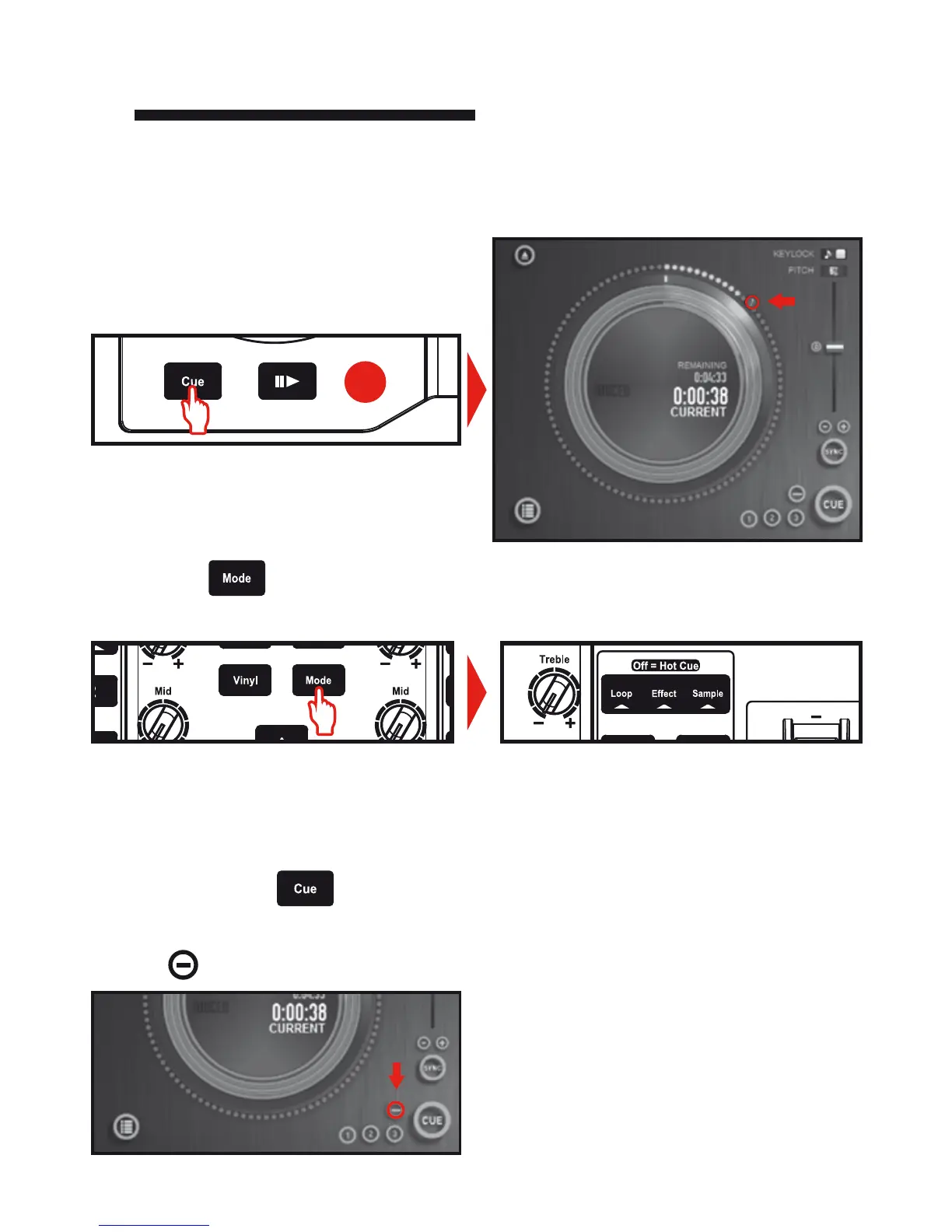
7.1 Press the Cue button to place a Cue
point in the track loaded on deck A, for
example.
7.2 Press the button until none of the three Loop / Eect / Sample mode
indicators are lit up. You are now in Hot Cue mode.
7.3 Press button 1 to place Hot Cue 1, button 2 to place Hot Cue 2, etc. Once this is done,
when you are in Hot Cue mode (none of the three Loop / Eect / Sample mode indicators
are lit up), simply press one of buttons 1 to 4 to access the corresponding marker in the
track.
When you press the , button, playback starts from the last Cue point you have
placed in the track.
Click on (in DJUCED™) to delete a Cue point.
You can place up to 4 markers, known as
Hot Cue points.
A





 To Next Page