Flashing yellow and blue - with high-high-high-low tone sequence (dah-dah-dah-doh): GPS glitch
or GPS failsafe activated.
Flashing red and yellow - with rising tone: EKF or Inertial Nav failure
Flashing purple and yellow: Barometer glitched
Solid Red: Error. Usually due to cannot detect SD card (please try to re-plug or replace SD card),
MTD device, or IMU sensors. Analysis can be found in BOOT.txt in SD card.
Solid Red with SOS tone sequence : SD Card missing (or other SD error like bad format etc.)
Not lighting up: No firmware detected or firmware corrupted.
RTK Use Operation
Base/Rover Survey by Mission Planner
This part of the tutorial uses Mission Planner ground software and Arducopter-4.0.3 flight
firmware for operating instructions.
At the time of writing this document, PX4 firmware does not support CAN RTK yet.
RTK mode requires a base station. The following tutorial Use "Here+" base stations as an
example. Users can also use other uBlox M8P/F9P base stations (such as HerePro, etc.), or
use the local wireless RTK correction service.
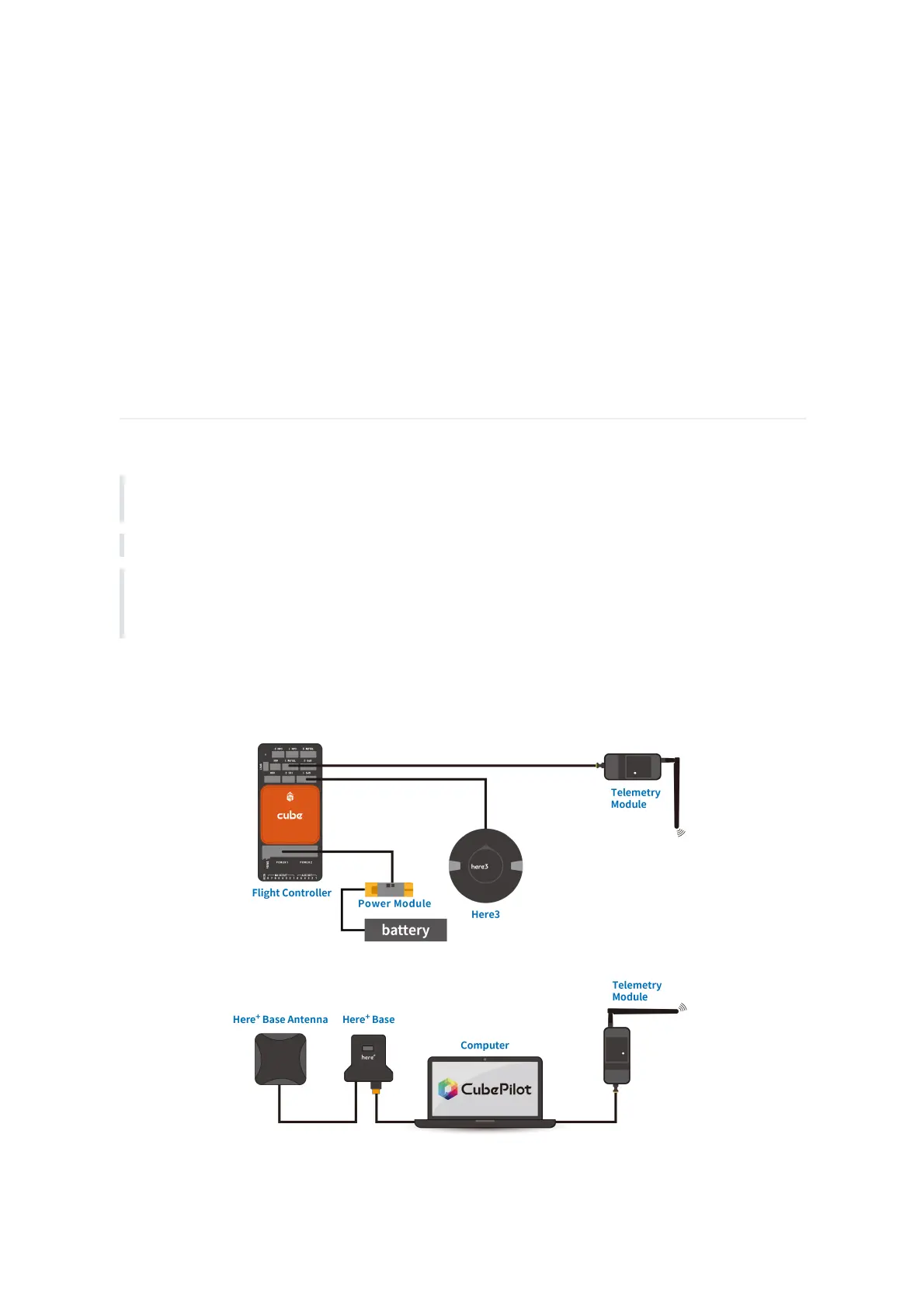
To use Here3 on a UAV, you need the following hardware: Computer, telemetry modules, Here3 ,
Base Antenna, Base, Tripod(Stand)



 To Next Page