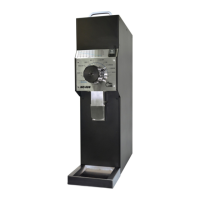
The HC-600 ODG V1 is a commercial on-demand coffee grinder designed for use in coffee shops, espresso bars, hotels, and restaurants. It grinds whole roasted coffee beans into a variable, user-selectable powder, from super fine to coarse, and doses it directly into an espresso machine's portafilter or other containers.
- This grinder is not intended for use by persons (including children) with reduced physical, sensory, or mental capabilities, or lack of experience and knowledge, unless supervised or instructed by a person responsible for their safety. Children should be supervised to ensure they do not play with the grinder.
- Care is needed when handling cutting grindstones during cleaning to avoid injury.
- To prevent electrical hazards, a damaged power cord or any damaged electrical accessory must be replaced by the manufacturer, its service agent, or a similarly qualified person.
- The grinder's entire technical handling, including installation, maintenance, and service, should only be performed by certified personnel or your local dealer.
- Never operate the grinder if the bean hopper is not fully secured to the top grindstone holder. Before removing the hopper for any reason, ensure the power supply is disconnected.
- Avoid clearing foreign objects from the grinding chamber or hopper when the grinder is plugged into a power socket.
- Never insert fingers or any foreign objects into the grinding chamber or grindstones.
- Be aware that grindstones continue rotating for a short while even after the grinding operation has ended.
- Always disconnect the power supply before any maintenance or cleaning.
- If the grinder malfunctions or grindstones need replacement, do not attempt to service it yourself.
- Do not change or tamper with the grinder.
- Do not use the grinder barefoot or with damp hands or feet.
- Do not use the cable wire to pull and disconnect the power plug.
- Always keep the grinder dry (internally and externally).
- Never put ground coffee into the hopper or try to grind coffee powder twice.
- Never attempt to grind anything other than coffee beans.
Correct Disposal of the Product:
This product should not be disposed of with other household waste within the EU. To prevent environmental harm and health risks from uncontrolled waste disposal, it should be recycled responsibly to promote the sustainable reuse of material resources. To return a used device, utilize return and collection systems or contact the retailer where the product was purchased for environmentally safe recycling.
The manufacturer provides a minimum 1-year warranty, starting from the date the grinder is sold to the end-user, in accordance with the legislation of the customer's country of residence. The warranty covers defects in material or workmanship only. Repairs under warranty must be carried out by an authorized service center. An original bill of purchase with the purchase date must be submitted when making a warranty claim.
The warranty will not apply in cases of:
- Normal wear and tear and/or incorrect use, such as overloading the grinder or grinding substances other than coffee beans.
- Usage of non-approved accessories or non-original spare parts.
- Use of force or damage caused by external influences.
- Damage caused by non-observance of the user manual, such as connection to an unsuitable mains supply or non-compliance with installation instructions.
- Partially or completely dismantled grinders.
Important Technical Specifications:
- Dimensions:
- Height: 610mm
- Width: 210mm
- Length: 350mm
- Weight: 11.5Kg
- Burrs diameter: 64mm
- Hopper capacity (whole beans): 1500gr
- Electrical Specifications:
- Voltage: 110V/230V 50Hz/60Hz (according to grinder's label)
- Power: 350W
- Duty Cycle: 6S ON/25S OFF
- Grinding capacities (@Espresso setting): 2.5-3.0 gr/sec
General Description and Components:
The grinder features several key components:
- Beans hopper lid
- Beans hopper
- Grind size setting dial
- Grinder controller
- Beans hopper door
- Grinder body
- Demand switch
- Porta filter handle holder
- Powder outlet pipe
- Main switch
- Run indication lamp
- Residue tray
Unpacking and Installation:
- After opening the box, ensure the grinder is intact and free of visible damage. If any doubt, do not use the grinder and contact your local dealer.
- Unpack carefully. It is recommended to store all packaging materials for future transportation needs.
- Place the grinder on a stable, flat counter in a dry area, away from water or splashes.
- Position the coffee residue tray underneath the body in front of the appliance.
- Before installing the beans hopper, identify the beans hopper, silicone ring, and hopper's locking screw.
- Install the beans hopper firmly into its position on top of the body inside the top grindstone holder.
- Fasten the hopper to the grinder body using the locking screw (Fig. 4.3). Ensure the screw is inserted completely through both holes in the hopper and the top grindstone holder.
The Hopper locking screw is a SAFETY DEVICE. Before removing the hopper, disconnect the electric power cord. Never operate the grinder if the beans' hopper is not fully secured.
Before plugging in the electrical cord, ensure:
- The grinder voltage and frequency rating (according to the bottom cover label) matches the supply mains.
- The wall socket has an efficient ground contact. Do not plug the grinder into the supply mains if the ground system has not been positively checked for compliance with current safety rules.
- The power/current consumption of the grinder (according to the backside label) is consistent with the capacity of the relevant main socket.
- The main socket is protected against short circuits and power surges.
- Do not use extension cables, plug adapters for multiple sockets, or makeshift connections.
- IT IS COMPULSORY TO EARTH THE GRINDER. The manufacturer is not responsible if this requirement is not complied with.
Plug in the grinder. Upon first operation, and before placing beans in the hopper, VISUALLY check that the grindstone rotation direction is clockwise by switching the grinder ON for a few seconds. If the rotation direction is wrong, do not use the grinder and contact your local dealer.
Operation:
The grinder is equipped with a 2-state power switch (ON-OFF). Switch ON by turning the main knob from Off to ON, and OFF by turning it back to OFF.
Before grinding coffee, familiarize yourself with the ODGV1 on-demand grinding controller (Fig 5.2), which includes:
- Counter mode
- Display mode button
- Jog button
- Display screen
- Single cup mode selector
- Time setting dial
- Double cup mode selector
- Triple cup mode selector
Operational Modes:
The ODG V1 operates in 3 pre-dosed modes. Activate or deactivate each mode by a single short press on its respective mode button; the LED will illuminate when activated.
- Single cup mode: Press the demand switch (Fig 5.3) to activate the grinder. Release it to stop grinding, or it will stop when the pre-set time elapses. The pre-dosed time can be changed using the time set dial. Alternatively, press the mode selector button continuously for longer than 2 seconds to grind the entire pre-dosed amount without using the demand button.
- Double cup mode: Similar to single cup mode, but for a double dose.
- Triple cup mode: Similar to single cup mode, but for a triple dose.
JOG Button: Pressing the JOG button allows the user to incrementally correct the amount of coffee powder in the filter basket holder.
Programming Grinding Time for Single/Double/Triple Cup Mode:
The grinder is factory-set with estimated time values for single, double, and triple dose grinding periods. These values are estimates, and users should set their own times based on their coffee grinding requirements. Generally, a coarser grind requires a shorter grinding time for the same desired dose. Different coffee blends and coffee shops may also require different dose sizes (e.g., 6.5-9.5gr for single cup, 11-18gr for double cup, 14-24gr for triple cup). The HC-600 ODG supports frequent modification of grinding time settings.
To modify the time setting for any preset mode:
- With the desired mode selected (LED ON), the display shows the current set time (in seconds and tenths of seconds).
- Rotate the time setting dial knob to increase or decrease the time value. The new time value will blink.
- Confirm the new time by pressing the relative mode selector button. If not confirmed, the time setting will revert to the previous setting after 3 seconds.
Hands-Free Feature:
The grinder is equipped with a "hands-free" feature for easier grinding. The portafilter holder can be adjusted by loosening two side screws with a 2.5mm hexagon screwdriver. The demand active screw can also be adjusted with a 2mm hexagon screwdriver. Both screwdrivers are provided in the tooling bag.
Dose Counting Display:
The HC-600 ODG V1 grinder has 3 independent dosing counters.
- To view the content of each counter, press the counter's selector once. The display will show the next counter's content, and the relative counter's LED will turn on.
- Two of the counters (middle and right side) are resettable. A zero reset can be achieved by continuously pressing the counter selector for 5 seconds.
- In single cup mode, each coffee demand increases the counting on all 3 counters by 1.
- In double cup mode, each coffee demand increases the counting on all 3 counters by 2.
- In triple cup mode, each coffee demand increases the counting on all 3 counters by 3.
- Pressing the Jog button will not be counted.
Grind Size Setting Adjustment:
- The grinding blades' distance is factory pre-adjusted to satisfy different common coffee grinds (from super fine to coarse), corresponding to a gap distance from 0.05mm to 0.75mm.
- Turning the grinding dial incrementally counterclockwise makes the grind finer, and turning it clockwise makes it coarser (Fig 5.5).
- Grind a small amount of coffee and test its coarseness with your espresso machine.
- As coffee beans' qualities and characteristics change over time, it is recommended to repeat this adjustment occasionally.
Safety Devices:
- Thermal Overload Protection: The motor is equipped with an overheat protection device to cut off power if it reaches a high temperature, eliminating fire risk.
- If thermal protection trips due to malfunction (e.g., jammed grindstones, worn bearings, foreign object in grinding chamber), immediately turn off the grinder's main switch and disconnect the power plug. Contact your local service provider and allow the grinder to cool down before further maintenance.
- If thermal protection trips due to long continuous operation, allow the grinder to cool down and reset the thermal cutoff protection by unplugging the main cable. After resetting, observe grinding quality and noise level. If irregularities persist, shut down the grinder and call a certified technician for a complete analysis.
- Grinding Chamber Hopper Fixing Screw: The grinding chamber is a hazardous area. To avoid hand contact with running grindstones, do not operate the grinder without the hopper fully placed and fixed by its fixing screw (Fig 4.3).
Maintenance and Service:
All technical handling operations, including installation, maintenance, and service, must be performed by certified personnel or your local dealer.
- Periodically check the state of the grindstones (approximately every 50kg of ground coffee). Good condition grindstones ensure high-quality grind and prevent overheating. Replace grindstones every 400kg of ground coffee (when using original replacement parts).
- Be aware of the grinder's noise level. If the noise is higher than normal or irregular, have certified personnel perform an overall check of the grinder.
Cleaning:
BEFORE ANY CLEANING ROUTINE, DISCONNECT THE GRINDER POWER SUPPLY. Never use running water to clean the main body and dispenser. Use only perfectly clean cloths or brushes. Do not use abrasive cleaning products as they may wear out the grinder coating.
Cleaning the Bean Hopper:
- Remove the bean hopper by releasing the Bean Hopper safety screw (Fig 4.3).
- Rinse it thoroughly with water and soap. Since the hopper is made of clear polymer, use only liquid detergent (free of abrasive components) and a soft sponge.
- Before reinstalling, ensure the hopper is thoroughly dried.
- Clean the bean hopper periodically to ensure great coffee taste.
Cleaning the Grinding Chamber and Grinding Parts:
Follow these steps for cleaning:
- STEP 1: Take off the hopper screw using a screwdriver.
- STEP 2: Take off the grinding dial by using a screwdriver to remove the dial safety screw first.
- STEP 3: Pull out the upper blade holder; be careful not to lose the three supporting springs of the upper blade.
- STEP 4 (for certified technician only): Use a screwdriver and nuts spanner to release the bottom knife holder. Pull out the knife holder to reveal the grinding house.
- STEP 5: Use a brush, a dry cloth, and a vacuum cleaner to thoroughly clean the grinding chamber.
- STEP 6: Use a brush, a dry cloth, and a vacuum cleaner to thoroughly clean the upper and lower blade.
Important Cleaning Notes:
- Do not use sharp objects to scrape coffee residue off the grindstones.
- Examine the grindstones' condition and replace them if necessary.
- The replacement and assembly of a new set of grindstones is a delicate task. Only skilled technical personnel should perform grindstone removal and assembly.
- If a more thorough clean is required, the operation must be performed by skilled technicians.
- After all cleaning and replacing tasks, ensure all parts and safety screws are assembled correctly. If anything does not fit back together or if there are leftover parts, do not attempt to operate the grinder; call for technical assistance.
To ensure long-lasting grinder use and fresh coffee taste, the cleaning procedure described above should be repeated routinely and at least once per month, or as necessary based on grinder usage and coffee bean quality.

 Need help?
 General

 To Next Page