6
© HeyCafé Co., LTD. Version 1.0, Dec. 2019
5) OPERATION
Grinding coffee with HC-600 On Demand Grinder:
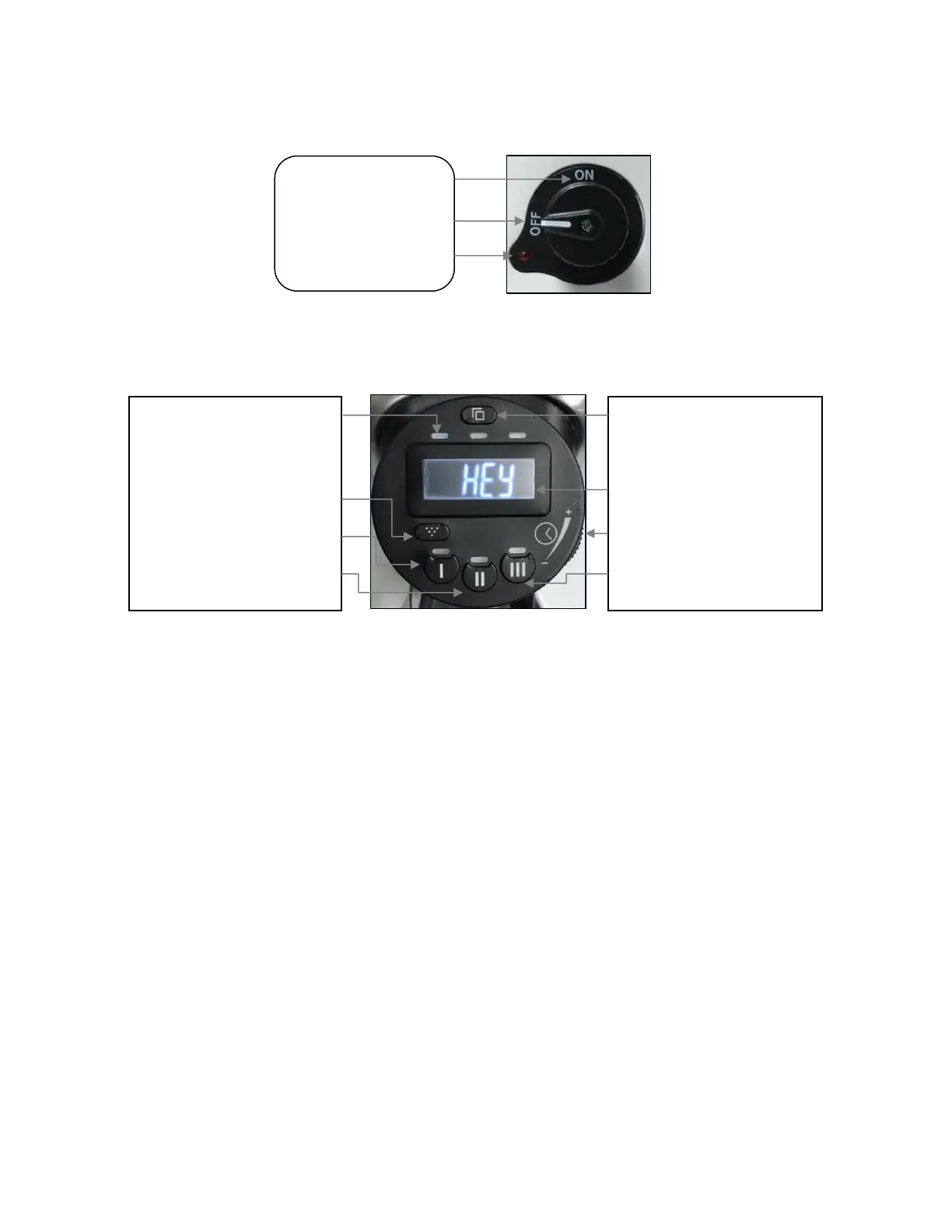
The grinder is equipped with a 2-state power switch ON-OFF. (Fig 5.1).
Switch ON the grinder by turning the main knob to direction from Off position to ON position.
Switch OFF the grinder by turning the main knob back to OFF point.
Fig 5.2
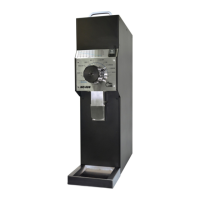
Before start grinding coffee please spend few minutes to learn and understand the concept of the ODGV1 on
demand grinding controller (Fig 5.2)
Operational Modes:
The ODG V1 can be operated in 3 pre-dosed modes. Activating (or deactivating) each one of the modes, is
achieved by single short pressing on the relative mode button. Once activated the LED will turn on.
Single cup mode, in single cup mode press on the demand switch (Fig 5.3) to activate the grinder
release it to stop grinding or press till time elapses. (pre-dosed time change achieved by time set dial)
Alternatively press the mode selector button continuously for longer than 2 sec, to grind the entire pre
dosed without using the demand button.
Double cup mode, in double cup mode press on the demand switch (Fig 5.3) to activate the grinder
release it to stop grinding or press till time elapses. (pre-dosed time change achieved by time set dial)
Alternatively press the mode selector button continuously for longer than 2 sec, to grind the entire pre
dosed without using the demand button.
Triple cup mode, in single cup mode press on the demand switch (Fig 5.3) to activate the grinder
release it to stop grinding or press till time elapses. (pre-dosed time change achieved by time set dial)
Alternatively press the mode selector button continuously for longer than 2 sec, to grind the entire pre
dosed without using the demand button.
Counter mode
Jog button
Single cup mode selector
Double cup mode selector
Display mode button
Display screen
Time setting dial
Triple cup mode selector
Main power On
Off
Running indicator


 To Next Page