The Protoss-PW11 is a device designed to facilitate data transfer from RS485 serial interfaces to TCP/IP networks, essentially acting as an RS485 to Wi-Fi converter. It integrates a TCP/IP controller, memory, a Wi-Fi transceiver, and a fully developed TCP/IP network stack. An embedded web server is included for device configuration, making it a comprehensive solution for connecting serial port devices to networks. The device is optimized for various applications, including industrial control, smart grids, personal medical applications, and remote control, particularly where data rates are lower and data transmission/reception is infrequent.
Function Description:
The primary function of the Protoss-PW11 is to enable serial devices to communicate over Ethernet networks using the TCP/IP protocol. It supports various network protocols such as IP, TCP, UDP, DHCP, DNS, HTTP Server/Client, ARP, BOOTP, AutoIP, ICMP, Web socket, Telnet, uPNP, NTP, and Modbus TCP. This broad protocol support allows for flexible integration into existing network infrastructures.
The device can operate in multiple Wi-Fi network modes: STA (Station), AP (Access Point), and AP+STA.
- AP Network: In AP mode, the Protoss-PW11 acts as a central access point, allowing other STA devices (like laptops, phones, or tablets) to connect to its Wi-Fi network and transfer data to a PLC device via the RS485 interface. It's important to note that in this mode, connected STA devices cannot communicate with each other as the PW11 does not support router functionality.
- STA Wireless Network: In STA mode, the Protoss-PW11 connects to an existing wireless router (operating in AP mode). This allows the product to connect to user devices via its RS485 interface, effectively extending the reach of the wireless network.
- AP+STA Wireless Network: This mode allows the Protoss-PW11 to function as both an AP and a STA simultaneously. The STA interface can connect to a remote server via a router, while the AP interface allows local devices (phones, tablets) to connect for monitoring or configuration of serial devices. This dual functionality offers flexibility for monitoring devices without altering their original settings. However, when using AP+STA mode, the STA interface must connect to another router, and the AP and STA parts must be set to different sub-networks to ensure proper operation and avoid issues like data loss due to continuous scanning. The device does not support Wi-Fi repeater functionality, meaning a PC connected to the device's AP cannot access the internet if the device is in AP+STA mode (where STA connects to a router).
The Protoss-PW11 also supports Modbus TCP to RTU conversion and Modbus Master Function, which is crucial for industrial automation and control applications. It facilitates RS485 to Wi-Fi conversion, making it easier to integrate legacy RS485 devices into modern wireless networks.
Important Technical Specifications:
- Processor/Frequency: 160MHz
- Flash/SDRAM: 2MB/352KB
- Operating System: mbed
- Wi-Fi Standard: 802.11 b/g/n
- Wi-Fi Frequency: 2.412GHz-2.484GHz
- Network Mode: STA/AP/STA+AP
- Security: WEP/WPAPSK/WPA2PSK
- Encryption: WEP64/WEP128/TKIP/AES
- Tx Power:
- 802.11b: +18dBm (Max.)
- 802.11g: +16dBm (Max.)
- 802.11n: +15dBm (Max.)
- Rx Sensitivity:
- 802.11b: -89dBm
- 802.11g: -81dBm
- 802.11n: -71dBm
- Antenna: SMA Interface Antenna
- Serial Port: RS485
- Data Bits: 7, 8
- Stop Bit: 1, 2
- Check Bit: None, Even, Odd
- Baud Rate: TTL: 300 bps~230400 bps
- Flow Control: No Flow Control, Software Xon/Xoff flow control
- Security Protocol: TLS v1.2, AES 128Bit, DES3
- Industrial Temperature: -40 to +85°C
- Dimensions (L x W x H): 102.03 x 64.95 x 27.50 mm
- Installation: C45 rail installation
- Power Input (Protoss-PW11-H): 100~240VAC@50~60Hz
- Power Input (Protoss-PW11-M): 9~48VDC@1A
- Working Current: ~200mA
- Power Consumption: <700mW
- Storage Temperature: -45~105°C, 5~95% RH (no condensation)
Usage Features:
- Easy Configuration: The device can be configured via a webpage or a PC IOTService tool. This provides flexibility for users to set up parameters according to their specific needs.
- SmartLink V8 Smart Config: The Protoss-PW11 supports SmartLink V8 Smart Config, which simplifies the process of setting up Wi-Fi parameters, especially for mobile applications. An accompanying APP is provided for this purpose.
- Heartbeat and Register Packet Function: This feature allows the device to send periodic heartbeat packets and register packets, which can be useful for maintaining connections and device registration in network management systems.
- Webpage OTA Wireless Upgrade: The device supports Over-The-Air (OTA) wireless firmware upgrades via a webpage, allowing for convenient updates and maintenance without physical access to the device.
- RS485 Interface: The RS485 interface uses two wire links (A+ and B-) for communication. It supports up to 32 RS485 devices and a cable length of up to 1200 meters. For cable lengths over 300 meters, a 120 Ohm terminal resistor is recommended. Connecting GND together is suggested in environments with severe interference.
- LED Indicators: The device includes several LED indicators for status monitoring:
- Power LED: Indicates power input status (On for OK, Off for NG).
- Net LED: Shows network status (Boot OK, SmartLink Config Mode, STA/AP mode connection status, No Wi-Fi Connection).
- Active LED: Indicates UART data transfer activity (Off for no data, blinking for TX/RX, On for bidirection).
- Link LED: Shows server connection status (On for netp Socket connection OK, Off for no netp Socket connection).
Maintenance Features:
- Reload Button: A short press (0.2s to 1.5s) after power-up puts the module into "SmartLink" config mode, allowing an APP to set password and other information.
- Reset Button: A long press (>4s) after power-up restores the module to factory settings, which is useful for troubleshooting or reconfiguring the device from scratch.
- Webpage OTA Wireless Upgrade: As mentioned, this feature simplifies firmware updates, reducing the need for manual intervention and ensuring the device runs the latest software.
- Industrial Temperature Range: The wide operating temperature range (-40 to +85°C) and storage temperature range (-45 to +105°C) with 5-95% RH (non-condensing) ensure robust operation and reliability in demanding industrial environments, minimizing the need for frequent maintenance due to environmental factors.

 Need help?
 General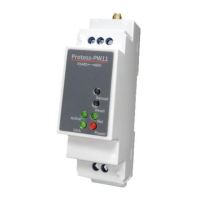

 To Next Page