
 Need help?
Do you have a question about the HighPoint Rocket 1120 and is the answer not in the manual?
The HighPoint Rocket 1120 (R1120) is a Host Bus Adapter (HBA) designed to connect U.2 NVMe Solid State Drives (SSDs) to a computer system via a PCIe 3.0 x16 interface. This device serves as a crucial component for users looking to expand their storage capabilities with high-speed NVMe technology, particularly in server environments, workstations, or high-performance desktop setups where fast data access is paramount. The HBA facilitates the integration of up to four U.2 NVMe drives, allowing for significant improvements in data throughput and reduced latency compared to traditional SATA-based storage solutions.
The primary function of the Rocket 1120 HBA is to provide a high-bandwidth pathway between U.2 NVMe SSDs and the host system's central processing unit (CPU) and memory. By utilizing a PCIe 3.0 x16 interface, the card can leverage the full potential of NVMe drives, which are designed to operate directly over the PCIe bus, bypassing the bottlenecks associated with older storage protocols like SATA. This direct connection ensures maximum performance for demanding applications such as large file transfers, video editing, database management, and virtual machine hosting.
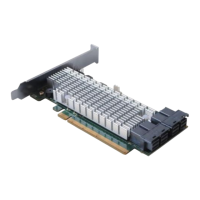
The card features four SFF-8643 connectors, which are designed to interface with SFF-8643 to U.2 SFF-8639 cables. These cables are essential for physically connecting the HBA to the U.2 ports on the NVMe SSDs. Each SFF-8643 connector on the HBA can support a single U.2 NVMe drive, enabling the system to access up to four such drives simultaneously. This multi-drive capability is beneficial for creating high-capacity, high-performance storage arrays, which can be configured for various purposes, including RAID (Redundant Array of Independent Disks) for data redundancy and performance, or as individual, independent storage volumes.
The Rocket 1120 is compatible with a wide range of operating systems, making it a versatile solution for diverse computing environments. It supports Windows 11, 10, and various Windows Server versions (2022, 2019, 2016), including Microsoft Hyper-V, which is critical for virtualization platforms. For Linux users, the HBA is compatible with popular distributions such as RHEL, Debian, Ubuntu, Fedora, Proxmox, and Xenserver, provided they are running a Linux kernel version 3.10 or later. Apple macOS users can also integrate the Rocket 1120 into their systems, with support for macOS versions ranging from 10.13.6 to 13.x. Additionally, it supports FreeBSD 12.1 and later, catering to users of this Unix-like operating system. This broad operating system support ensures that the HBA can be deployed in a multitude of professional and enthusiast setups without significant compatibility concerns.
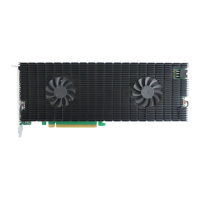
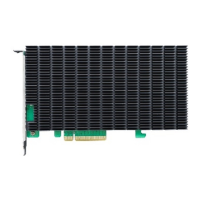
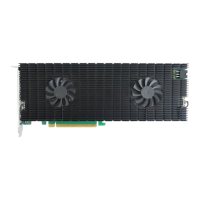
The HBA's design, featuring a heatsink, indicates a focus on thermal management. NVMe SSDs, especially under heavy load, can generate considerable heat. The heatsink on the Rocket 1120 helps dissipate heat from the card's components, ensuring stable operation and preventing thermal throttling, which could otherwise degrade performance. This attention to thermal design is crucial for maintaining consistent high performance over extended periods of operation, particularly in environments where the HBA and connected SSDs are subjected to continuous read/write cycles.
Integrating the Rocket 1120 into a system is a straightforward process, designed for ease of installation. The first step involves preparing the computer system by removing its cover to gain access to the internal components. The HBA requires an available PCIe 3.0 or 4.0 x16 slot on the motherboard. The card is physically inserted into this slot, ensuring it is seated firmly to establish a reliable electrical connection. The choice of a PCIe 3.0 or 4.0 slot is important, as a PCIe 4.0 slot, if available, can provide even greater bandwidth, though the card itself operates at PCIe 3.0 speeds.
Once the HBA is installed in the PCIe slot, the next step involves connecting the U.2 NVMe SSDs to the card using the appropriate SFF-8643 to U.2 SFF-8639 cables. These cables are specifically designed for this purpose and are crucial for establishing the data link between the HBA and the drives. Each cable typically includes a 15-pin SATA power connector in addition to the SFF-8639 data connector. The SFF-8639 end of the cable connects to the U.2 port on the NVMe SSD, while the SFF-8643 end connects to one of the four ports on the Rocket 1120 HBA. The 15-pin SATA power connector must be connected to the system's power supply to provide the necessary power to the NVMe SSDs. This dual-connection requirement (data and power) for each drive ensures that the SSDs receive both the high-speed data interface and stable power for operation.
A critical aspect of the installation process, and a key usage feature, is the emphasis on secure cable connections. The documentation explicitly warns that loose connections can lead to a variety of problems, including system instability, slower than expected performance, and even dropped disks. This highlights the importance of ensuring that all SFF-8643 cables are firmly seated in both the HBA's device ports and the NVMe SSDs or backplane. This attention to detail during installation is vital for achieving optimal performance and reliability from the storage solution.
After all connections are made and verified, the system cover can be closed, and the computer can be powered up. Upon booting, the operating system will typically detect the Rocket 1120 HBA and the connected NVMe SSDs. Depending on the operating system and existing drivers, additional driver installation might be required, though many modern operating systems have built-in support for standard NVMe devices. Once recognized, the NVMe SSDs can be formatted and partitioned like any other storage device, ready for use. For advanced configurations, such as RAID, specific software utilities or BIOS/UEFI settings might be necessary, which are usually provided by the HBA manufacturer or the operating system.
The Rocket 1120 is designed to be a "plug-and-play" solution in many respects, simplifying the integration of high-performance NVMe storage. Its ability to support multiple NVMe drives makes it suitable for creating high-capacity, high-speed storage pools, which can be particularly useful in data centers, professional workstations, and gaming rigs where fast loading times and quick access to large datasets are essential. The card's robust design, including its heatsink, contributes to its reliability, allowing it to operate efficiently even under sustained heavy workloads.
The HighPoint Rocket 1120 HBA is largely a low-maintenance component once properly installed. Its design focuses on reliability and passive cooling, minimizing the need for active maintenance. The primary "maintenance" aspect revolves around ensuring the integrity of its physical connections and keeping its firmware and drivers up to date.
The most crucial maintenance recommendation is to ensure all cables are securely connected. As highlighted in the installation guide, loose connections can lead to performance degradation and system instability. Therefore, periodic checks of the SFF-8643 to U.2 SFF-8639 cables, particularly in systems that are frequently moved or subjected to vibrations, can prevent potential issues. This involves visually inspecting the connections at both the HBA and the NVMe SSD ends, and gently pressing on them to confirm they are fully seated. This simple check can help maintain consistent performance and prevent unexpected drive disconnections.
Another aspect of maintenance involves keeping the HBA's firmware and drivers updated. HighPoint Technologies typically releases updated firmware and drivers to improve compatibility, enhance performance, fix bugs, and introduce new features. Users are encouraged to visit the R1120 Series Product Page on the HighPoint website for the latest documentation, including driver and firmware downloads. Regularly checking for and applying these updates can ensure the HBA operates with optimal efficiency and compatibility with the latest operating system versions and NVMe SSD models. This proactive approach to software maintenance is key to long-term reliability and performance.
The passive cooling design, featuring a heatsink, means there are no moving parts like fans on the HBA itself, which reduces potential points of failure and eliminates the need for fan cleaning. However, maintaining good airflow within the computer chassis is still important. Ensuring that the system's cooling fans are clean and functioning correctly will help dissipate heat from the HBA and the connected NVMe SSDs, preventing thermal issues that could impact performance or longevity. Dust accumulation within the system can impede airflow and reduce cooling efficiency, so periodic cleaning of the computer's interior is a general maintenance practice that benefits all components, including the HBA.
In terms of troubleshooting, the documentation provides resources for customer support. If problems arise that cannot be resolved through basic checks or driver updates, users are directed to contact HighPoint's Customer Support Department. This indicates that while the device is designed for reliability, professional assistance is available for more complex issues. The availability of web support and direct contact options ensures that users can get help when needed, contributing to the overall usability and maintainability of the product.
Overall, the Rocket 1120 HBA is designed to be a robust and reliable component for high-performance storage solutions. Its maintenance requirements are minimal, primarily focusing on ensuring secure physical connections, keeping software up to date, and maintaining good system airflow. These simple practices help ensure the HBA delivers consistent, high-speed performance for its intended lifespan.
 General
| Form Factor | Low Profile |
|---|---|
| Category | SATA Controller |
| Operating System Support | Windows, Linux |
| Maximum Data Transfer Rate | 6 Gbps |
| RAID Support | 0, 1 |
| Supported Devices | SATA III HDD/SSD |



 To Next Page