EasyManua.ls Logo

HIK VISION DS-K4H258D - Page 7

Default Icon
9 pages
Print Icon
To Next Page IconTo Next Page
To Previous Page IconTo Previous Page
Loading...
Title:
DS-K4H250/450/258 series magnetic lock
connect to DS-K2800 series Access Controller
Version:
v1.0
Date:
01/11/2018
Product:
Access Control Device
Page:
7 of 9
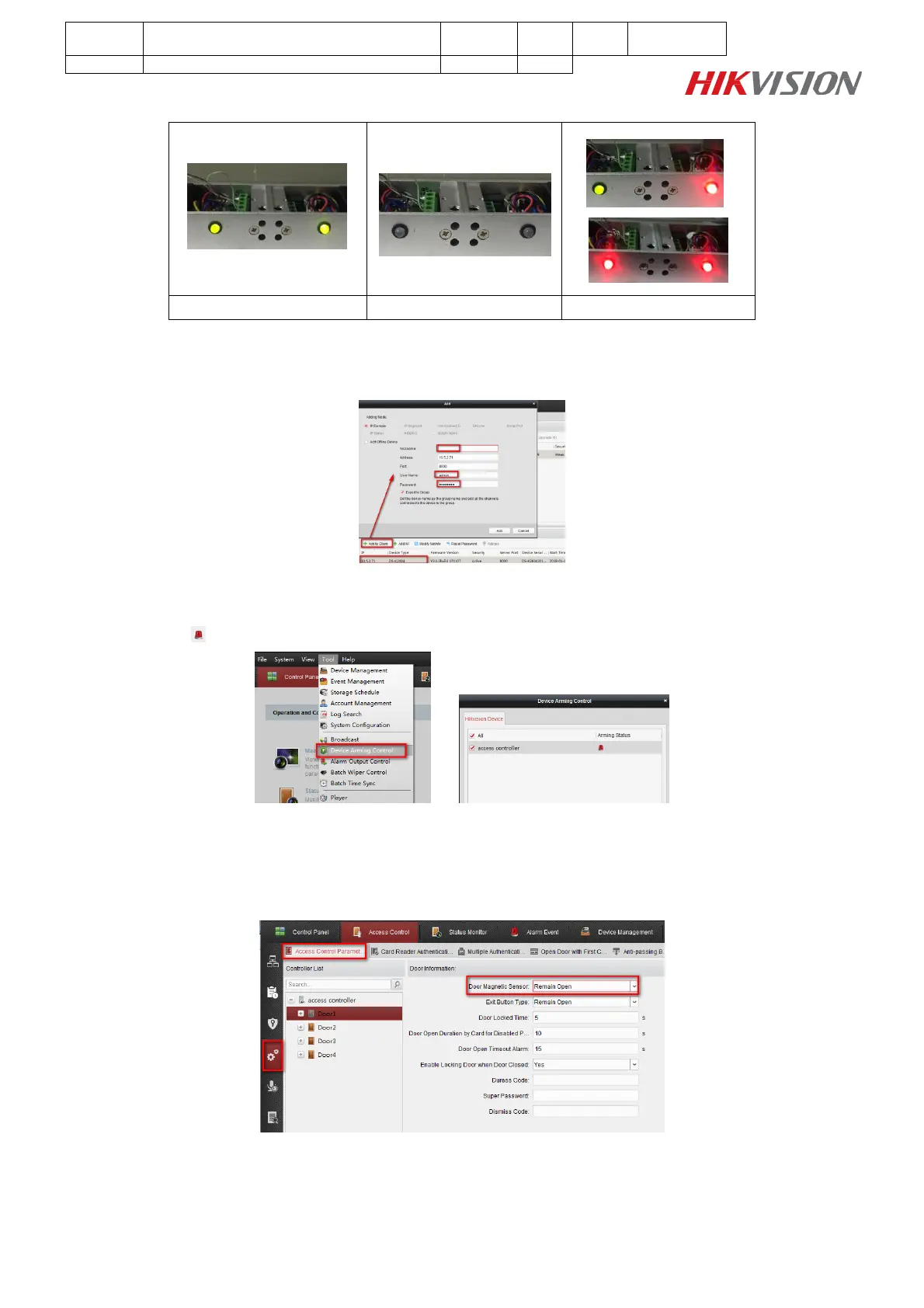
Magnetic lock LED status:
Normal(Close Door)
Normal(Open Door)
Abnormal
Step 2:
Add access controller to iVMS-4200 Client;
Step 3:
Click Tool Device Arming Control, check your access controller arming status;
The icon means device was armed by iVMS-4200 Client;
Step 4:
Enter Access Control Advanced Function Access Control Parameters interface, set Door
Magnetic Sensor as Remian Open, and it should be consistent with the wiring of Door Magnetic
Singnal Output;

Other manuals for HIK VISION DS-K4H258D

Related product manuals