EasyManua.ls Logo

Hikmicro B Series - User Manual

Hikmicro B Series
11 pages
Print Icon
To Next Page IconTo Next Page
Loading...
HIKMICRO B Series
Handheld Thermal Camera (V5.5.61)
Release Notes
Question and Answer IconNeed help?

Do you have a question about the Hikmicro B Series and is the answer not in the manual?

Overview

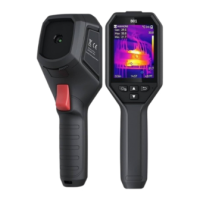
The HIKMICRO B Series Handheld Thermal Camera (V5.5.61) is an advanced solution designed for accurate, touch-free temperature measurement and detailed heat distribution imaging. This versatile device is ideal for a wide range of industrial and commercial applications, including electrical predictive maintenance, building inspections, HVAC system analysis, and manufacturing monitoring. Its core function is to detect temperature anomalies, making it an invaluable tool for identifying potential problems before they escalate.

Function Description

The thermal camera excels at providing a visual representation of heat, allowing users to "see" temperature variations across surfaces. This capability is crucial for tasks such as detecting radiator inefficiency in HVAC systems, pinpointing heat loss in buildings, and identifying hot spots or invisible defects in mechanical or electrical systems. The camera's ability to survey hard-to-reach areas further enhances its utility, offering a comprehensive diagnostic tool where conventional methods might fall short.

The device operates with Firmware Version V5.5.61 build240205 and Algorithm Version V2.09.05, ensuring reliable performance and accurate data processing. It supports various models, including B01, B10, B11, B20, B21L, BX20, B01S, B10S, B11S, and FB21, indicating a broad range of configurations to suit different professional needs.

Usage Features

The HIKMICRO B Series camera is designed with user convenience and operational efficiency in mind.

  • First-Time Setup Instructions: For new users, the camera provides on-device setup instructions upon the first power-on. This guided process helps users configure essential settings such as language, time and date, emissivity, and distance, ensuring optimal performance from the outset.
  • Screen Brightness Adjustment: Users can easily adjust the screen brightness via Settings > Display Settings > Screen Brightness, allowing for comfortable viewing in various lighting conditions.
  • Auto Sleep Function: To conserve power, the camera features an auto-sleep mode. Users can set a waiting time for auto-sleep in More Settings > Auto Sleep. If no buttons are pressed within the set time, the device automatically enters sleep mode, which can be exited by pressing any button.
  • USB Modes: The camera offers flexible USB connectivity options when connected to a PC. Users can select between "USB Drive" mode to export files or copy firmware updates, or "USB Cast Screen" mode to stream the camera's display to a PC using a UVC protocol-based player. The camera's storage is recognized as "HIKMICRO" when in USB Drive mode.
  • Wi-Fi Connectivity (for Wi-Fi and Hotspot models): For models equipped with Wi-Fi and Hotspot capabilities, the camera allows mobile devices to join the same Wi-Fi network by scanning a QR code displayed on the camera. This feature simplifies data transfer and remote viewing via the HIKMICRO Viewer mobile client.
  • Scheduled Capture Mode: This mode enhances efficiency for repetitive tasks. Users can set an Interval (time between snapshots) and Number (total snapshots, from 1 to 10,000). A single trigger press initiates the capture sequence, and another press stops it.
  • New File Naming Rules: The camera allows users to customize file naming conventions. Files can be named based on Time Stamp or Numbering (filename header + sequence number), configurable in Settings > Capture Settings > File Naming.
  • Improved Palettes Display: The camera offers enhanced visualization of thermal data through improved palettes display, making it easier to interpret temperature differences.
  • Thumbnail Display in Album: For a better user experience, the album now displays thumbnails of files instead of just file names, facilitating quicker identification and navigation.
  • Improved User Interface (UI): The camera features an updated UI design and revised menu names, such as "About" for checking camera information, contributing to a more intuitive user experience.

Maintenance Features

The HIKMICRO B Series camera includes features that support easy maintenance and troubleshooting.

  • Firmware Upgrade via USB: The device's firmware can be upgraded by downloading the latest version from the HIKMICRO website, saving it to a PC, and then copying the .dav file to the root directory of the camera's storage when connected via USB. The camera automatically initiates the upgrade process upon reboot, which takes several minutes.
  • Operation Log Collection: For troubleshooting purposes, the camera can collect and save operation logs (.log files) to its storage. This function can be enabled or disabled in Settings > More Settings > Save Logs. These logs can then be provided to the HIKMICRO tech support team for diagnosis.
  • Compatibility with PC Clients: HIKMICRO provides dedicated PC clients for various functions:
    • HIKMICRO Viewer (Mobile Client): For camera models with Wi-Fi and Hotspot, this client allows mobile device connectivity.
    • HIKMICRO Analyzer: A PC client for detailed analysis and report generation from captured thermal data.
    • UVC Client: A PC client for USB Cast Screen functionality, enabling real-time display of the camera's screen on a computer.
  • Troubleshooting USB Connectivity: The manual provides guidance for common USB connectivity issues, such as the PC failing to detect the camera as a USB drive, power surges on the USB port, or the USB device not being recognized. It recommends using the supplied USB cable, selecting the correct USB mode, keeping the camera powered on, and trying different USB ports or unpowered hubs.
  • Addressing USB Drive Problems: If a PC notifies that the USB drive has a problem to be fixed, the manual advises either scanning and fixing the drive (which Windows will confirm is fine) or skipping the scan, as it often does not affect the ability to access the drive.

The HIKMICRO B Series Handheld Thermal Camera is a robust and user-friendly device, designed to provide accurate thermal imaging and facilitate efficient problem-solving across various industrial and commercial applications. Its comprehensive features, from guided setup to advanced diagnostic tools and streamlined maintenance options, ensure a reliable and effective experience for professionals.

Hikmicro B Series Specifications

General IconGeneral
Digital CameraYes
Display3.2" LCD
Protection levelIP54
IP RatingIP54
Temperature Measurement Range-20 °C to 550 °C (-4 °F to 1022 °F)
Accuracy±2°C or ±2%
Battery TypeLi-ion
Drop Test Height2m
Spectral Range8-14μm

Related product manuals