DS-7600 Series NVR User Manual
47
• Mouse Pointer Speed: Set the speed of mouse pointer and four levels are configurable.
• Double Click Speed: Set the speed of mouse double clicking, and three levels are configurable.
• Enable Password: Enable or disable the password of live view screensaver.
• Enable HDMI Resolution Auto: Enable or disable the auto adjust of HDMI resolution.
Figure 52, More Settings Menu
2. Set device name, device no. and auto lock time by going to Menu > System Configuration > General > More Settings, as shown in
Figure 52. The settings available to configure in this menu include:
• Device Name: Edit the name of the device.
• Device No.: Edit the number of the device.
• Auto Locktime: Set the auto lock time of menu.
• Menu Output Mode: The menu output mode is HDMI/VGA adaptable.
Figure 53, Live View Menu
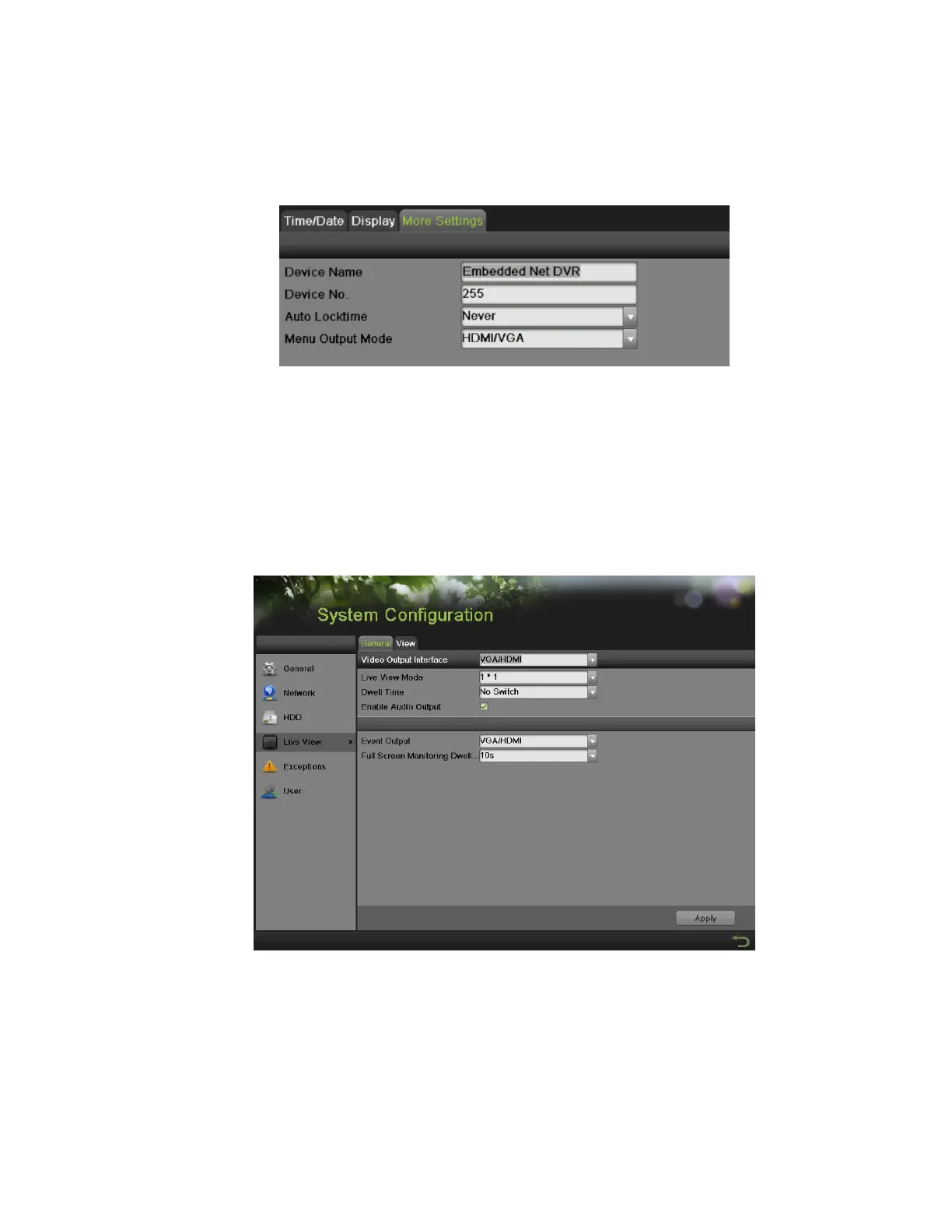
3. Set the live view interface parameters and event output by going to Menu > System Configuration > Live View > General, as shown in
Figure 53. The settings available to configure for each video output include:
• Video Output Interface: The video output interface is VGA/HDMI adaptable.
• Live View Mode: Designates the display mode for Live Preview.
• Dwell Time: Set the time to dwell between switching of channels when Start Auto-switch is selected in Live Preview.
• Enable Audio Output: Enable or disable audio output for the selected video output.
• Event Output: Designates the output to show event video. It is VGA/HDMI adaptable.


 To Next Page
 Loading...