2
CONTROLLER SETTINGS
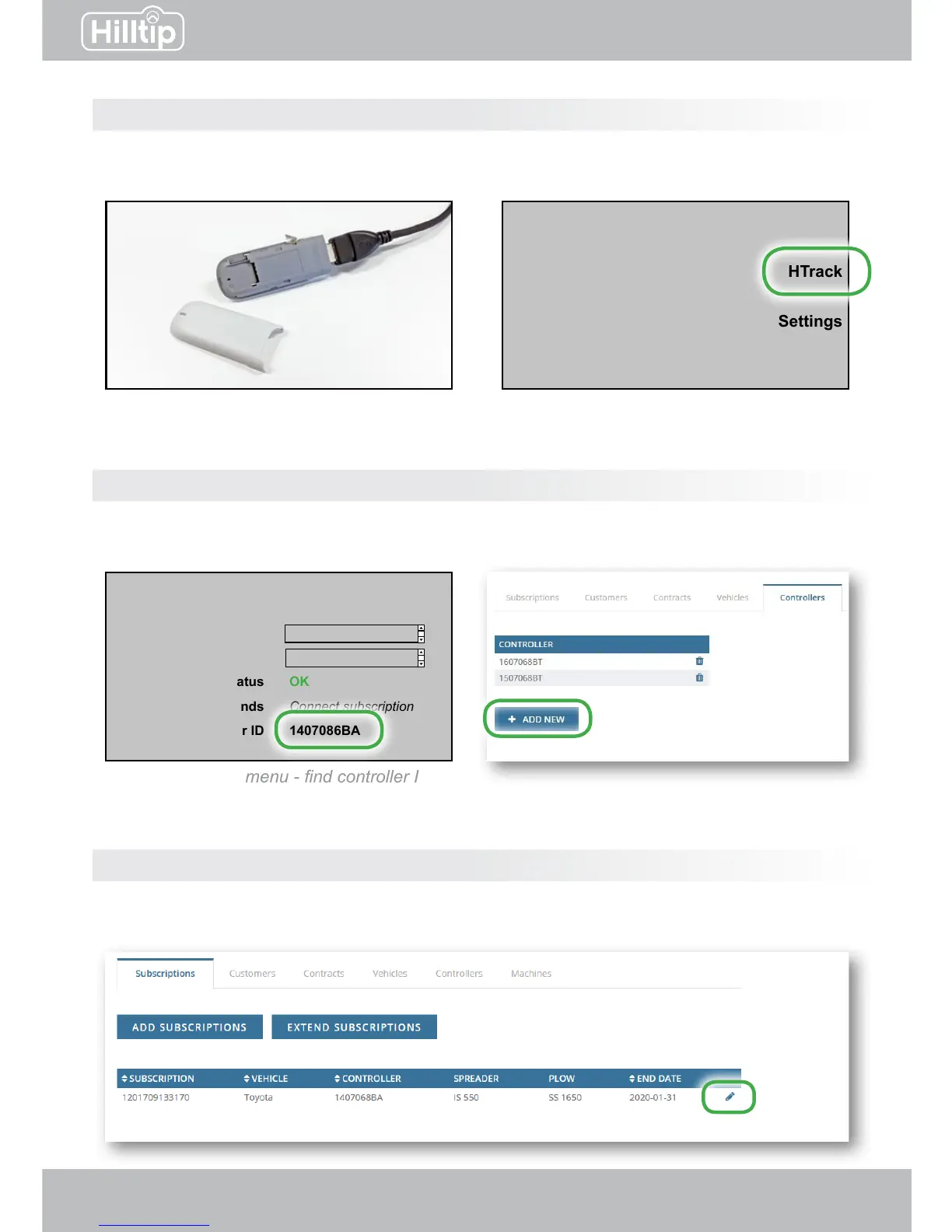
Open the cover of the Hilltip USB modem and insert a sim-card. Connect it to your spreader or
sprayer controller with a USB cable. Turn on the controller. In the main menu, select HTrack.
Hand spray
Automatic
Manual
Main menu
Settings
Info
HTrack
HTrack
Customer
Contract
SIM status
Subscription ends
Controller ID
Connect subscription
Connect subscription
OK
Connect subscription
1407086BA
Controller HTrack menu - nd controller ID
Insert sim-card into USB modem Controller main menu
Step 1
Step 2
On rst setup, in the HTrack controller menu, nd the controller ID. Go to the HTrack webpage, and
under settings → controllers, click “Add new” to insert the controller ID and connect it to your account.
HTrack webpage - Add controller ID
Step 3
Go to settings → subscriptions on the webpage and edit one of your subscriptions to connect it
to the controller you just registered.


 To Next Page