6 Use of the Central Unit
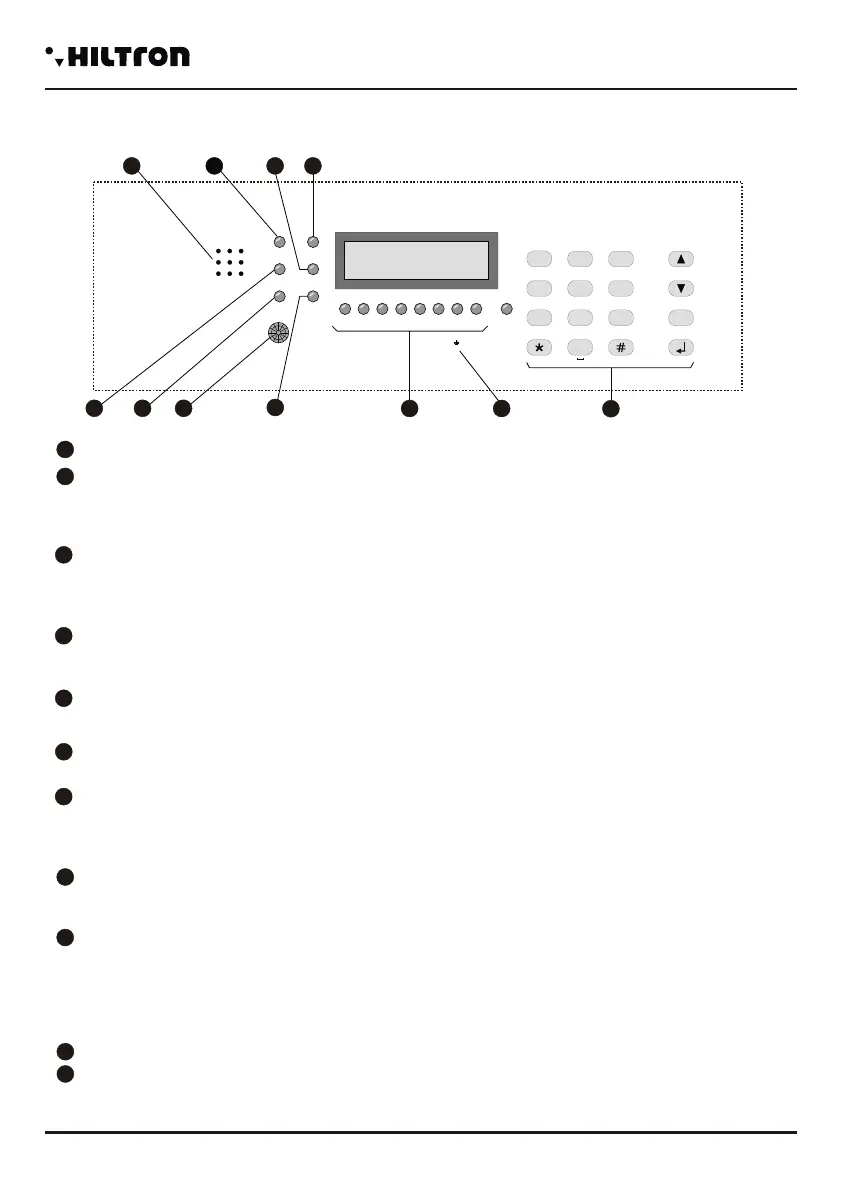
6.1 - Description of the Panel
SPEAKER Holes Listening messages and recording
LED “POWER”
On On Presence of line voltage and battery ok
Flashing Assenza tensione di rete / errore batteria
Off Assenza alimentazione
LED “EXIT”
On Impianto disinserito
Flashing Tempo di uscita in corso
Off Impianto inserito
LED “ALARM”
On Impianto in allarme
Flashing Tempo d'entrata in corso dopo rilevazione su zona rit.
Detector passive infrared Quando rileva una presenza accende la
retroilluminazione della tastiera e del display e
- se programmato - allarma la zona 1.
LED “MEMORY ”
Flashing Memoria allarme attiva
LED “STATUT”
On Centrale operativa
Slow flashing Modulo GSM in attività Fast
Fast flashing Controllo Remoto
LED “GSM”
A fast flashing every 3 seconds Modulo GSM registrato sulla rete
Others flashing Attività GSM
LEDs di controllo stato (4 per PROTEC4GSM), (8 per PROTEC8GSM) zone e 24h
Acceso Zona aperta
Spento Zona chiusa
Un lampeggio veloce ogni secondo Zona esclusa
Acceso con uno spegnimento veloce ogni sec. Zona esclusa e aperta
Lampeggiante(durante la visualizz, memoria) Memoria allarme
Microfono Per ascolto ambientale
Tastiera alfanumerica di comando
POWER
ALL
USCITA
ZONA
1
ZONA
2
ZONA
3
ZONA
4
1
4
7
2
5
8
3
6
9
ESC
0
GSM
MEM
STAT O
tuv wxyzpqrs OFFON
jkl mnoghi
abc def
mic
5
4
1
7
11
2
3
6
8
9
10
HILTRON
24hZONA
5
ZONA
6
ZONA
7
ZONA
8
9
3
5
6
4
7
8
10
11
2
1
5 - LISTENING ENVIRONMENT
Listening environment is allowed during the phone connection only.
Dial to activate it and to close it.
If you wish to extend the duration of listening for more than a minute, you'll need to dial any button (but
) to extend the duration of listening for another minute.
If you dial the listening stops and you listen to the leading voice again listing all the possible
commands.
If you don't dial and press any button for more than a minute, the phone call ends.
6 - ACTIVATING OUTPUT
This command is available only if you program the output +INT to function on the command ON/OFF.
Dialling the leading voice indicates:
<Output inactive, press to activate o press asterisk to come back to the former
menu>
Or
<Output active, press to deactivate or press asterisk to come back to the former
menu.>
Activating the output, it appears a voltage of 12 V on the clamp +INT of the central. At the end the leading
voice restarts to indicate the status of the central and lists the options available in the voice menu.
7 - TOTAL INSERTION
This command is available when the central is disconnected only.
Dialling the central tries to execute the command and the voice guide restarts the voice menu that
indicates
<System connected totally> if the central accepts the command or <System
disconected> in case there was no execution of command due to an immediate open
zone and not excluded that impedes the insertion of the system.
8-PARTIAL INSERTION A
Also this command is available when the central is disconnected only.
Dialling you command to the central to insert the system according to the scheme of partialization A.
The voice guide restarts to indicate the status of the central with
<System connected partial A> if the command is accepted otherwise with <System
disconnected > if the command is not executed.If the command fails, you'll need to verify
that the immediate zones included in the scheme of partialization aren't open, impeding,
thus, the connection of the system.
9 - PARTIAL INSERTION B
This command, similar to the previous, is available when the central is disconneted only.
Dial to command to the central the partial insertion B.
If the command is followed by the leading voice, it indicates the new status of the central:
<System connected partial B>.
8
5
9
6
7
9
7
Use of the central unit
security
PROTEC4GSM - PROTEC8GSM - Installation guide and use
security
4544


 To Next Page
 Loading...