EasyManua.ls Logo

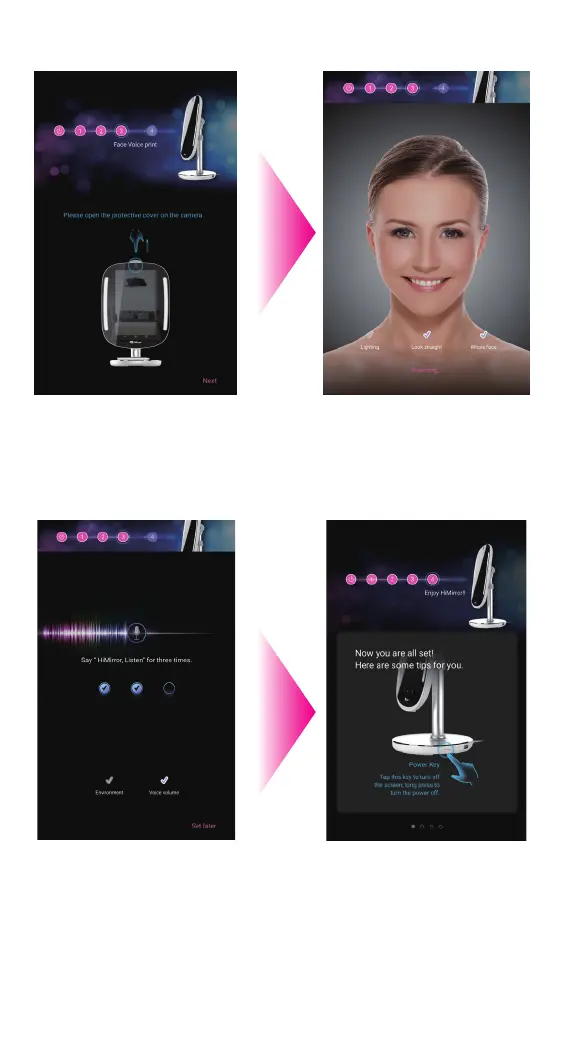
HiMirror Mini - Facial Recognition and Voiceprint Setup; Camera Preparation and Face Scanning; Voice Command Setup and Tutorial

Default Icon
34 pages
Print Icon
To Next Page IconTo Next Page
To Previous Page IconTo Previous Page
Loading...
10
Please say “HiMirror”
until all the check mark is
checked. You can skip
this process by pressing
set later. You won’t be
able to login via your
voice until you have setup
your voice recognition.
Please uncover your
camera protective cover
as instructed on screen.
11
Please look straight
into the screen to
record your facial
recognition data.
12
Create your facial recognition data voiceprint
13
You’re all set! Please
go through the tutorial
to learn more about
HiMirror Mini. Swipe
left to move forward.
When you are done.
Press Enjoy to start.
14

Other manuals for HiMirror Mini