■
Functions
■
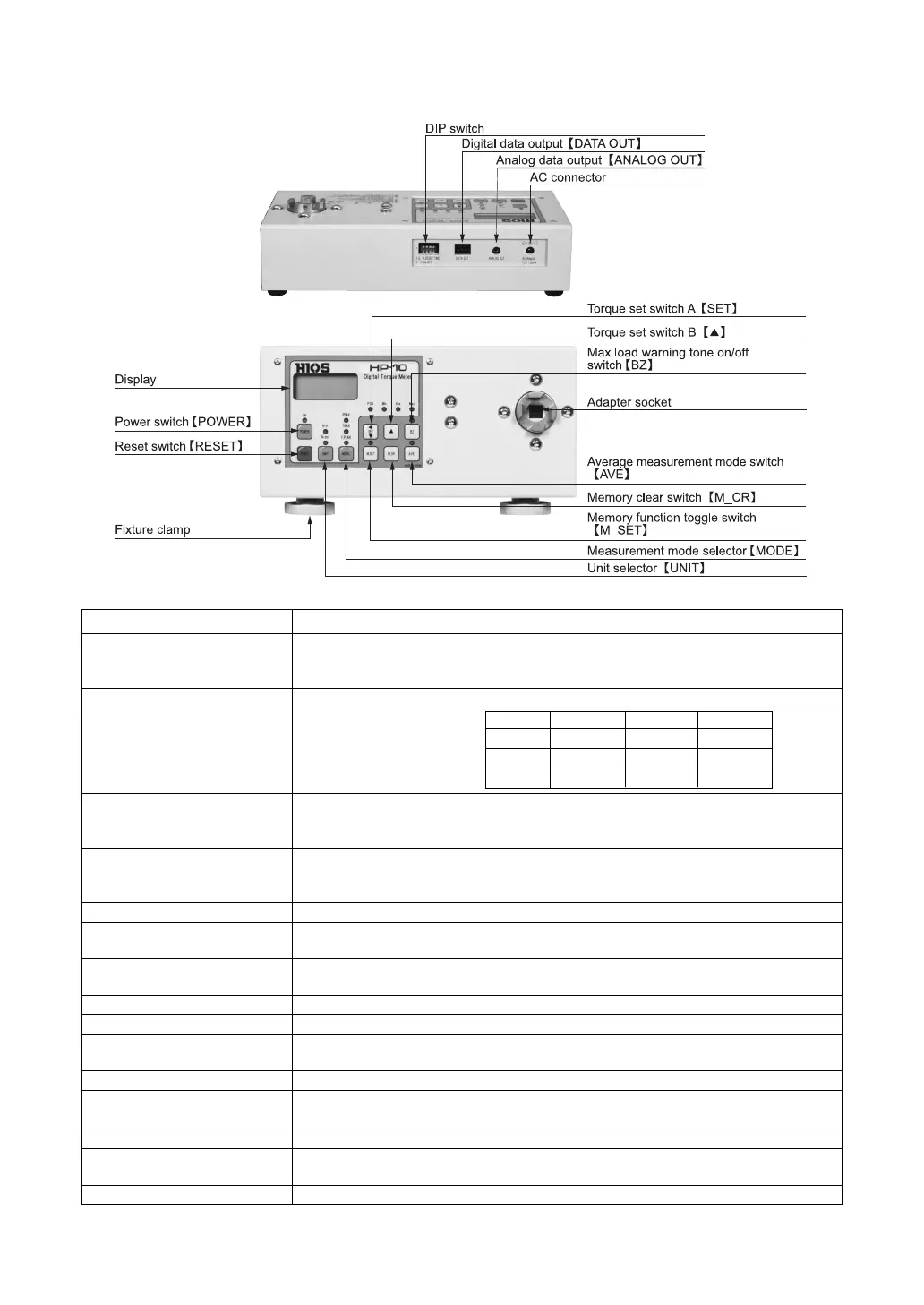
HIOS Digital Torque Meter controls
Control Function
Power switch
【
POWER
】
Button switch. The LED lights when the power is on. *
1
The power is automatically turned off when the instrument is not operated (or torque
load is less than 10) for a period of 10 minutes.
Reset switch
【
RESET
】
Used to return the display to zero or print out data.
Display Measuring unit display
Unit selector
【
UNIT
】
Switches between one of the following combinations of torque measurement units,
depending on which combination the purchaser ordered: N
m
lbf
in, N
m
N
cm,
N
m
kgf
cm
Measuring mode selector PEAK: Freezes display at peak torque value. (Press reset to cancel)
【
MODE
】
TRACK: Displays current torque value.
F.PEAK: Freezes display at fi rst peak torque value.
AC connector For battery charger.
Analog data output Port for analog voltage data output.
【
ANALOG OUT
】
Digital data output Press reset to output measurement data. This functions makes it possible to use the
【
DATA OUT
】
instrument in statistical process control systems.*
2
DIP switch For setting auto reset timer and turning data output on ("P.ON" LED indicates "on" setting).
Torque set switch A
【
SET
】
Sets maximum torque load at which warning tone will sound
Memory function toggle switch The LED lights when the memory function is on.
【
M_SET
】
Torque set switch B
【▲】
Sets the torque level at which the warning tone sounds.
Max load warning tone The LED lights when this function is on.
on/off switch
【
BZ
】
Memory clear switch
【
M_CR
】
Deletes data in memory.
Average measurement When average measurement mode is on, the LED lights and the torque measure-
mode switch
【
AVE
】
ment average values are displayed.
Adapter socket For connecting of torque tool, using a HIOS Fidaptor or other type of adapter.
Model N
m N
cm N
mm
HP-1 — 0.00 0.0
HP-10 0.000 0.0 —
HP-100 0.00 0 —
*
1
Please push the power switch and detach it immediately until a buzzersounds.
*
2
Statistical Process Control (SPC) uses statistical techniques to monitor variations in manufacturing processes for use in quality control.
-4-


 To Next Page