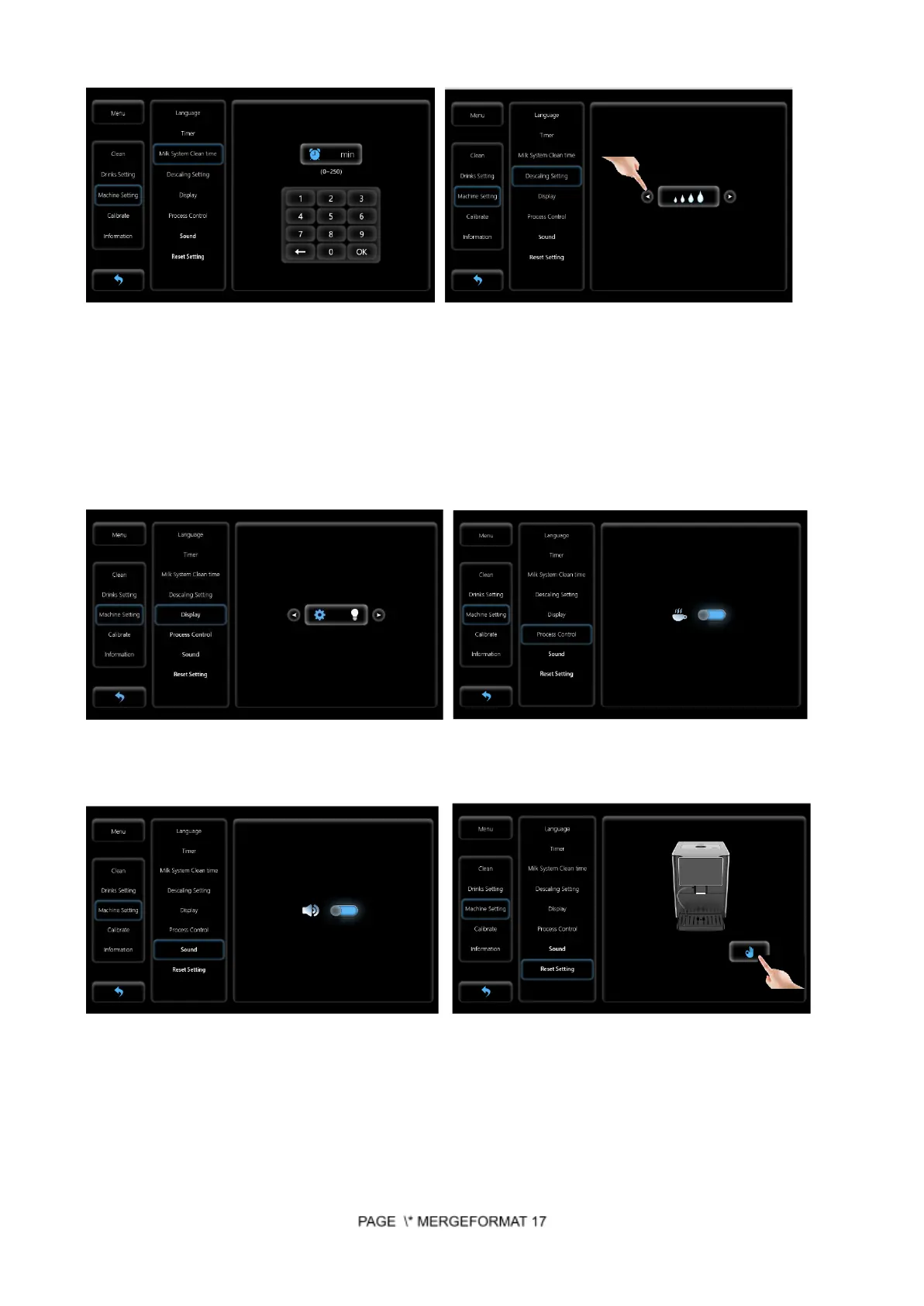
Touch Machine Setting-Milk System Clean Time Touch Machine Setting-Descaling Setting
(4 levels for option)
Level 1: 880 cups, equal to Hardness test indicator paper 50mg/L and below
Level 2: 440 cups, equal to Hardness test indicator paper 120mg/L and below
Level 3: 280 cups, equal to Hardness test indicator paper 250mg/L and below
Level 4: 220 cups, equal to Hardness test indicator paper 425mg/L and below
Touch Machine Setting-Display (3 light levels for option) Touch Machine Setting - Process Control
Touch Machine Setting - Sound (on) Touch Machine Setting - Reset Setting
Calibrate - Setting by professional only.
Contact manufacturer or local dealer for details. Touch Information - indicate drinks count
6.3 Turning the appliance off
Step 1: Touch the main menu icon in the bottom left corner


 To Next Page