3. Dismounting and cleaning
Suggest cleaning frequency: Every week
Method: Dismount the brewing group from the appliance and rinse thoroughly under water.
9.1.4 Descaling
Level 1: 880 cups, equal to Hardness test indicator paper 50mg/L and below
Level 2: 440 cups, equal to Hardness test indicator paper 120mg/L and below
Level 3: 280 cups, equal to Hardness test indicator paper 250mg/L and below
Level 4: 220 cups, equal to Hardness test indicator paper 425mg/L and below
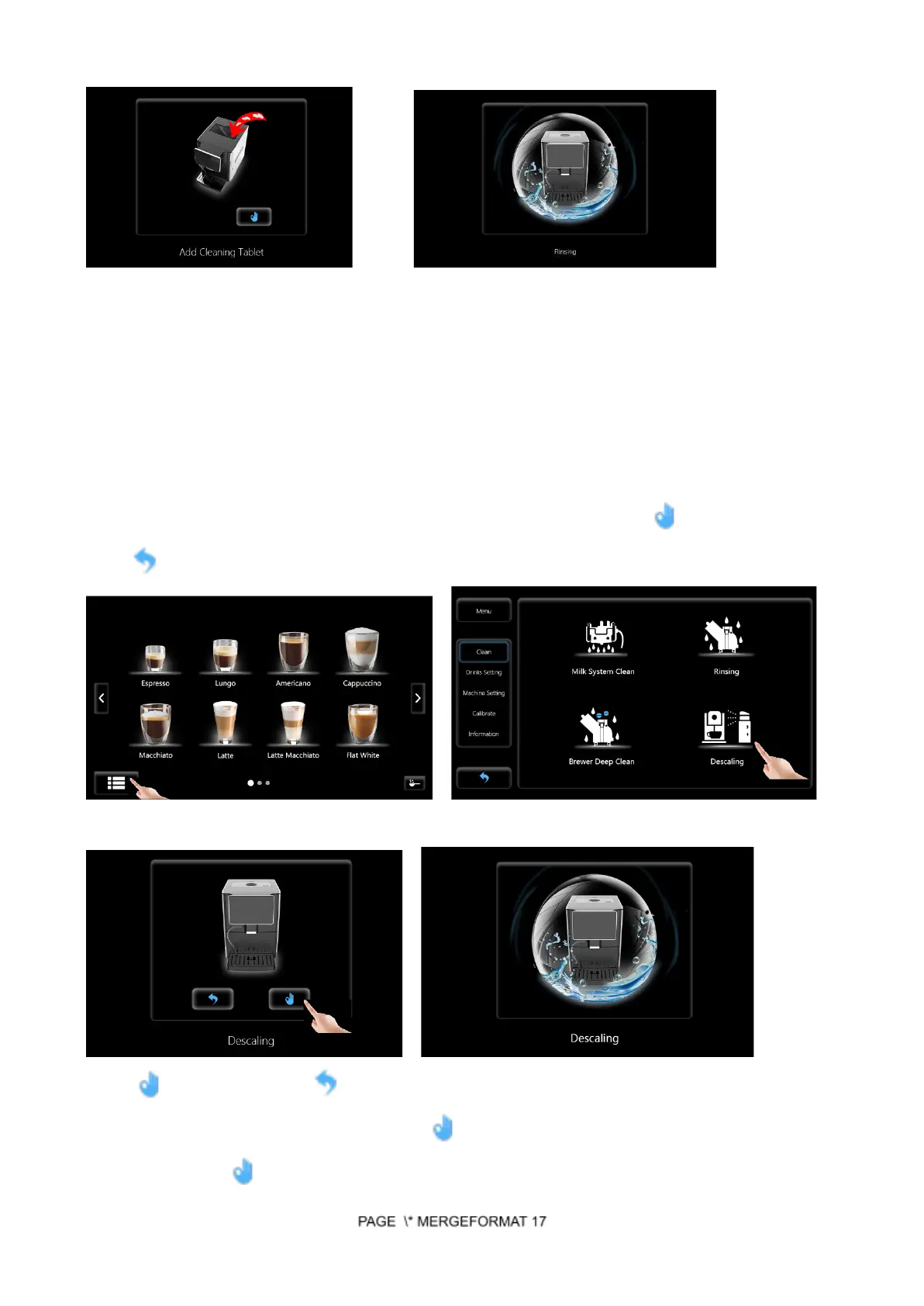
Step 1: Touch Main Menu Icon and choose Menu-Clean-Descaling. Touch to start cleaning or
touch to cancel.
Touch Main Menu Icon Choose Descaling
Touch to confirm or touch to cancel Descaling
Step 2: Add descaler in the water tank, touch to start descaling. Add fresh water in the descaling
process and touch to resume descaling.


 To Next Page