Redundant coupling
Redundancy L2E
Release
4.1
03/08
3.2
Configuring the redundant coupling
43
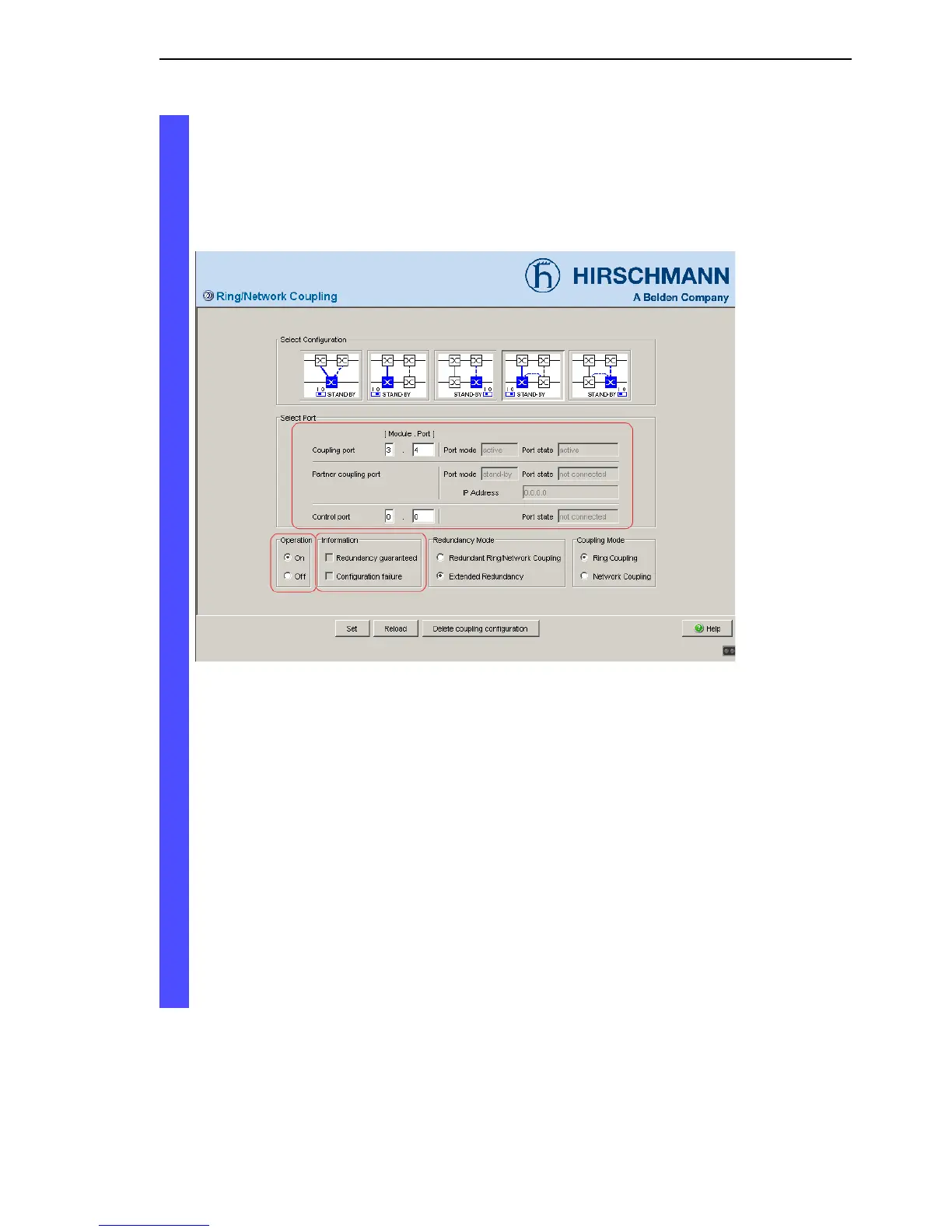
The displays in the “Information” frame mean (see fig. 22):
– “Redundancy guaranteed”: One of the lines affected can fail, as a
redundant line will then take over the function of the failed line.
– “Configuration failure”: The function is incomplete or incorrectly
configured.
Figure 22: Selecting the port and enabling/disabling operation
To avoid continuous loops, the Switch sets the port state of the coupling
port to “off” if you:
– switch off operation or
– change the configuration
while the connections are in operation at these ports.
Note: The following settings are required for the coupling ports (you
select the Basic Settings:Port Configuration dialog):
– Port: on
– Automatic configuration (autonegotiation):
on for twisted-pair connections
– Manual configuration: 100 Mbit/s FDX
for glass fiber connections







 To Next Page