11
Remote Control
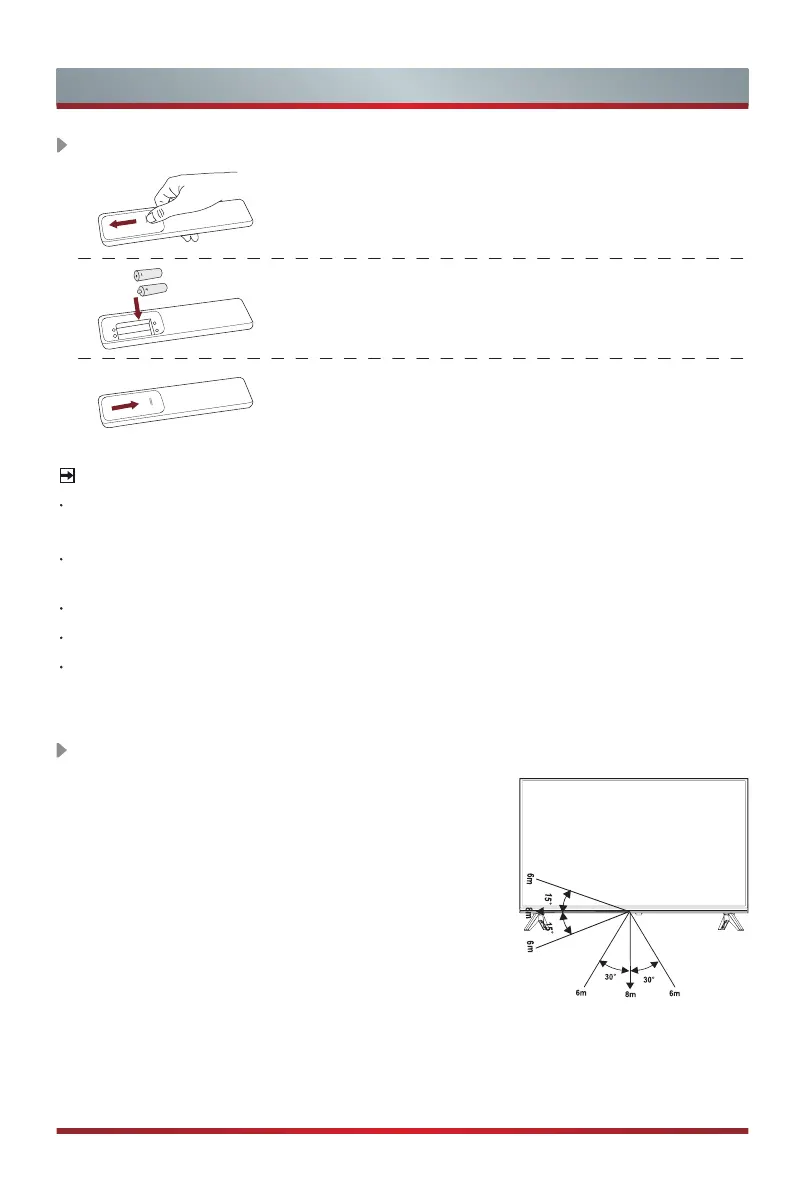
1. Slide the back cover to open the battery compartment
of the remote control.
2. Insert two AAA size batteries. Make sure to match
the (+) and ( - ) ends of the batteries with the (+)
and ( - ) ends indicated in the battery compartment.
3. Close the battery compartment with the cover.
Installing Batteries in the Remote Control
NOTES
Product image is only for reference, actual product may vary in appearance.
Handling the Batteries
Incorrect use of batteries may cause corrosion or battery leakage, which could
cause fire, personal injury or damage to property.
Only use the battery type indicated in this manual.
Do not mix old and new batteries or different types of batteries .
Do not dispose of used batteries as domestic waste. Dispose of them in
accordance with local regulations.
Remote Control Operation Range
1. The remote control can work at a distance of up
to 8 meters in
front of the TV set.
2. The remote control angle: taking the remote
sensor as an apex, 6 meters away, its controlled
horizontal angle is within ±30°, while the vertical
angle is within ±15°.
3. The operating distance may vary depending on
the brightness of the room.
Disposal of this unit
Product should not be damaged, dismantled or thrown in municipal waste.
It should be packed and handed over to authorised re-cycler.



 To Next Page