10
Step 4. Power on the TV
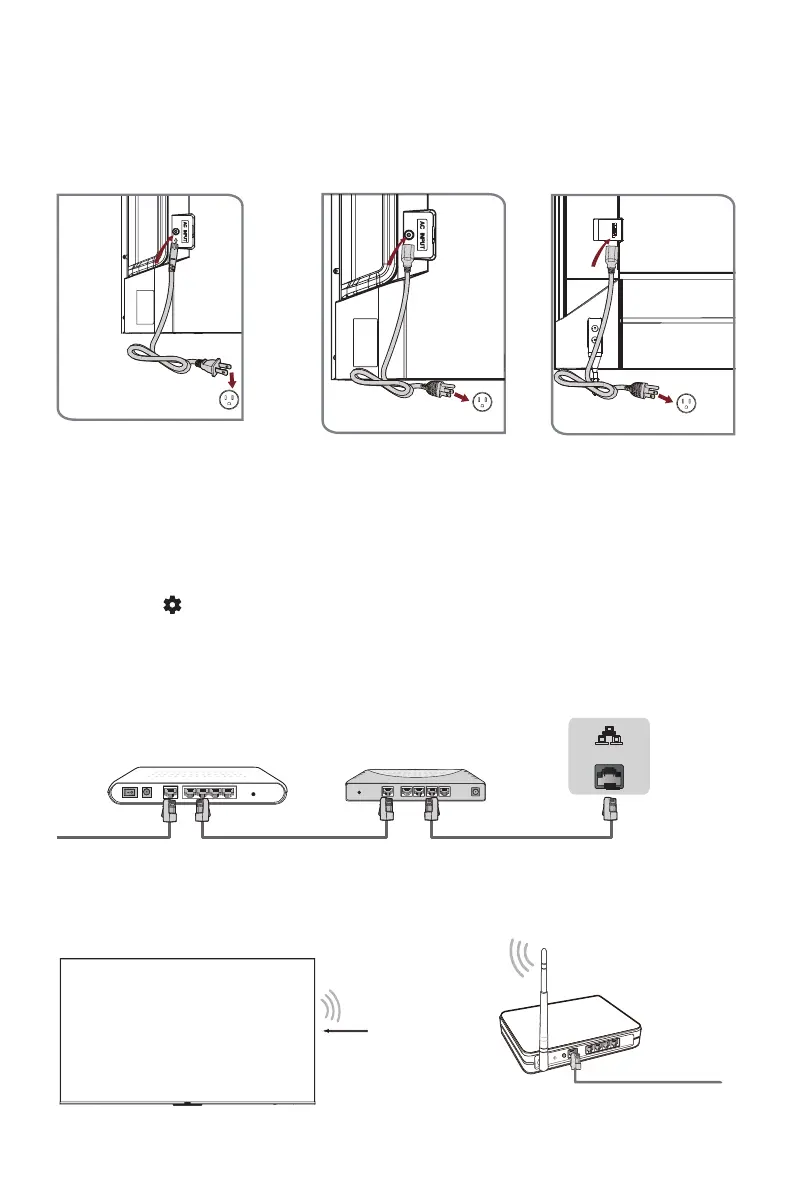
Connect your power cord to the TV and plug it into a power outlet.
Your TV will display a launch screen showing the Hisense logo.
Step 5. Complete the first-time setup
The first time you turn on your TV, there is a guided setup to make it easy to connect
your TV to the Internet and complete the setup of your TV.
Step 6. Establish a network connection
1. Press
the [
]
button
on the remote,
and select Settings to enter the Settings menu
.
2. Select
Network & Internet.
Wall Outlet
Power Cord
Power Cord
Wall Outlet
Modem Cable LAN CableLAN Cable
External Modem
(ADSL / VDSL / Cable TV)
IP Sharer (Router)
(with DHCP server)
LAN
Establish a wired network connection
Establish a wireless network connection
Wireless router with DHCP
LAN Cable
Wireless LAN Adapter
built-in TV set
75" (190.5cm)55" (139.7cm)/65" (165.1cm) 85" (215.9cm)
Wall Outlet
Power Cord



 To Next Page