13
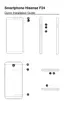
1.Distance/Lightsensor 10.Speaker
2.Frontcamera 11.Volumeupbutton
3.Receiver 12.Volumedownbutton
4.Flashlight 13.Powerkey
5.Touchscreen 14.Cardtray
6.Maincamera 15.MicroUSBport
7.De-noisingmike 16.Mike
8.Mainashlight 17.Headsetsocket
9.Fingerprintsensor
Power button
• Pressittoturnonorlockthescreen.
• Pressandholdittoturnthedeviceonoroff.
• PressitandVolumedownbuttonsimultaneouslytocapture
ascreenshot.
• Pressandholditforabout14stoshutdownthephone,and
keeppressingittorebootthephone.
Home key (virtual)
TapittotheHomescreen.
Recent key (virtual)
Tapittoopenthelistofrecentapps.
Return key (virtual)



 To Next Page