27
3
Addrecievedcallstoacontact.
Importing contacts
Youcanimportcontactsfromstorageservicestoyourdevice.
1
Tap ontheHomescreenortheAppsscreen.
2
Tap IMPORT CONTACTS.
3
Selectanimportoption.
Searching for contacts
Tap ontheHomescreenortheAppsscreen.
Useoneofthefollowingsearchmethods:
• Scrollupordownthecontactslist.
• Dragangeralongtheindexattherightsideofthecontacts
listtoscrollthroughitquickly.
• Tap
atthetopofthescreentosearchforacontact.
Messages
Sending messages
1
Tap ontheHomescreenortheAppsscreen.
2
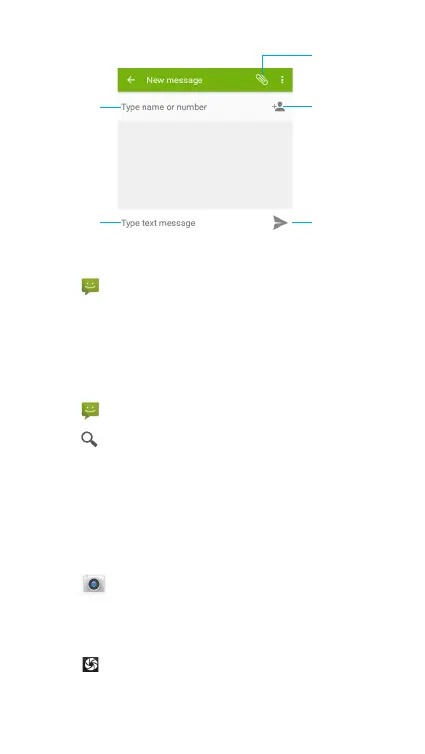
Tap tocreateamessage.
3
Addrecipientsandenteramessage.
4
Tap tosendthemessage.
Select contacts
from contact list
Attach files
Send the message
Enter a message
Type name
or number
Viewing messages
1
Tap ontheHomescreenortheAppsscreen.
2
Selectacontactonthemessagelist.
3
Viewyourconversation.
Searching messages
1
Tap ontheHomescreenortheAppsscreen.
2
Tap toenterkeywordstosearchmessages.
Camera
Youcantakephotosorrecordvideos.
Taking photos
1
Tap ontheHomescreenortheAppsscreen.
2
Frameyoursubjectonthescreen.Agreensquareappears
wherethecameraisfocused.
3
Tap totakea photo.Your picturewillbeautomatically



 To Next Page