12
Tips:
- Your TV must support the HDMI-CEC and ARC function. HDMI-CEC and
ARC must be set to On.
- The setting method of HDMI-CEC and ARC may dier depending on the
TV. For details about ARC function, please refer to your TV owner’s manual.
- Only HDMI 1.4 compatible cables can support the ARC function.
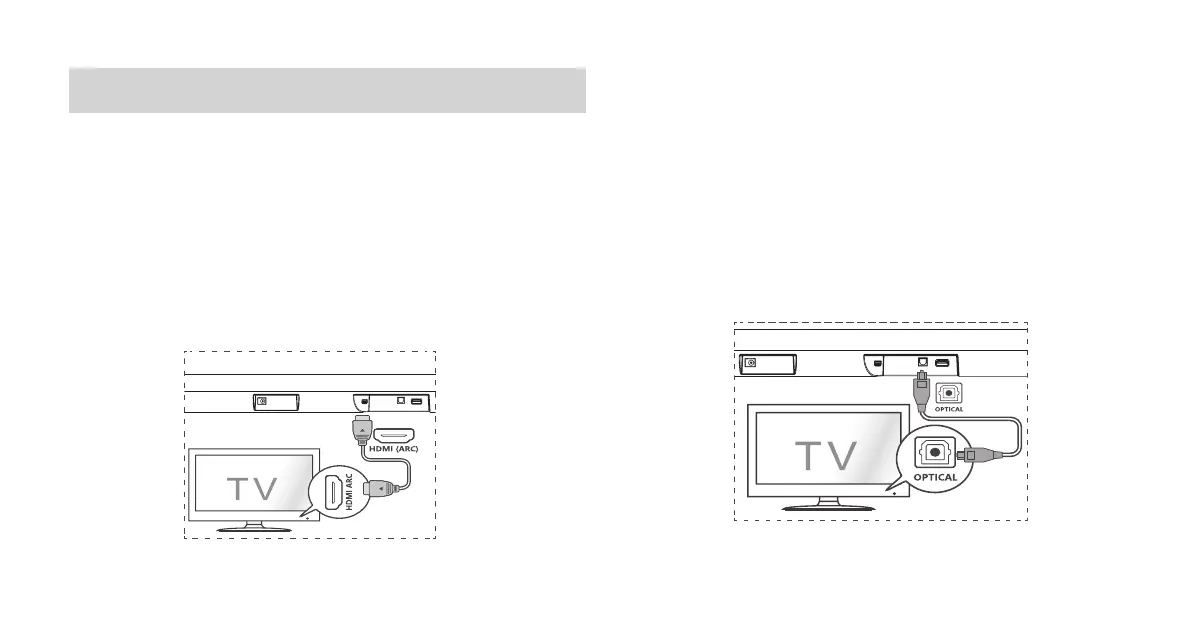
Connect to OPTICAL Socket
- Remove the protective cap of the OPTICAL cable, then connect an
OPTICAL cable to the TV’s OPTICAL OUT socket and the OPTICAL socket
on the unit.
Connections
Connect to HDMI (ARC) Socket
Your Soundbar supports HDMI with Audio Return Channel (ARC). If your TV is
HDMI ARC compliant, you can hear the TV audio through your Soundbar by
using a single HDMI cable.
1 Using a High Speed HDMI cable, connect the HDMI ARC connector on your
Soundbar to the HDMI ARC Connector on the TV.
- The HDMI ARC connector on the TV might be labeled differently. For
details, see the TV user manual.
2 On your TV, turn on HDMI-CEC operations. For details, see the TV user
manual.


 To Next Page
 Loading...