18
USB Operation
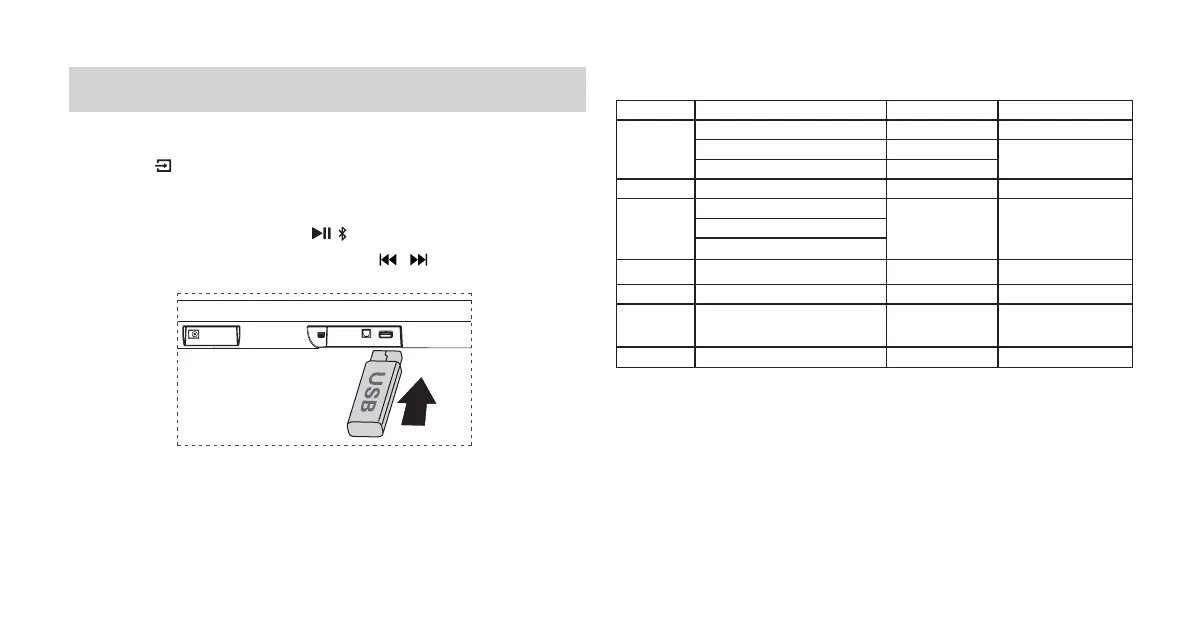
1 Insert the USB device.
2 Press the button repeatedly on the unit or press the USB button on the
remote control to select USB mode.
3 During playback:
- To pause or resume play, press the / button on the remote control.
- To skip to the previous/next le, press the / buttons on the remote
control.
Tips:
• The unit can support USB devices with up to 32 GB of memory.
• This unit can play MP3/WMA/AAC/OGG/FLAC/WAV/AIFF.
File Format Type Compatibility list
Extension Codec Sampling Rate Bit Rate
*.mp3
MPEG-1 Layer1/2/3 32kHz~48kHz 32kbps~320kbps
MPEG-2 Layer1/2/3 16kHz~24kHz
8kbps~160kbps
MPEG-2.5 Layer3 8kHz~12kHz
*.wma WMA7/8/9/STD 8kHz~48kHz ≤320kbps
*.aac
AAC
8kHz~96kHz ≤1728kbps
AAC-LC
HE-AAC
*.ogg Vorbis codec 8kHz~48kHz ≤ 500kbps
*.ac - 8kHz~192kHz ≤9Mbps
*.wav
PCM
、
LPCM
、
IMA_ADPCM
、
MPEG
、
ALAW
、
MULAW
8kHz~192kHz ≤9Mbps
*.AIFF PCM
、
ALAW
、
MULAW 8kHz~192kHz ≤9Mbps
• Only USB Format Type FAT 32 is supported for USB storage device
connection.
• for *.ogg audio les, below are unspported formats:
1). block size 0 < 64 block size 0 > 2048; 2). block size 1 < 64 , block size 1
> 4096; 3). codebook counter > 64; 4). codebook entry > 640; 5). floor
counter > 4; 6). oor type 0; 7). residua counter > 4; 8). dimension != 2; 9).
mapping counter > 2; 10). mode couter > 2.


 To Next Page