8
Product Diagram
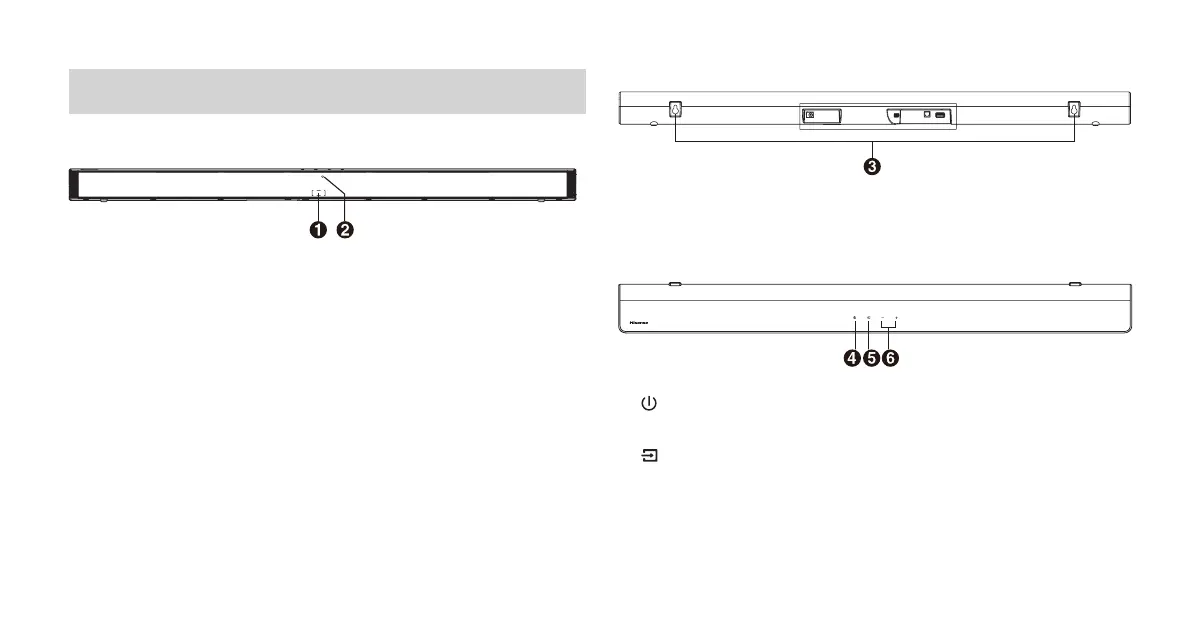
Main Unit
1 Remote Control Sensor
Receive signal from the remote control.
2 LED Indicators
• Red : In STANDBY mode.
• Orange : In Optical mode.
• Blue : In Bluetooth mode.
• White : In HDMI ARC mode.
• Green: In USB mode.
* You can quickly check the above LED Indicators mode on the back label of the remote
control.
3 Screws
Install the wall mounting screws into the wall mount of the unit
.
4 (ON/OFF) Button
Switch the unit between ON and Standby mode.
5 (SOURCE) Button
Select the play function.
6 +/- (Vol+/Vol-) Buttons
Increase/decrease the volume level.


 To Next Page