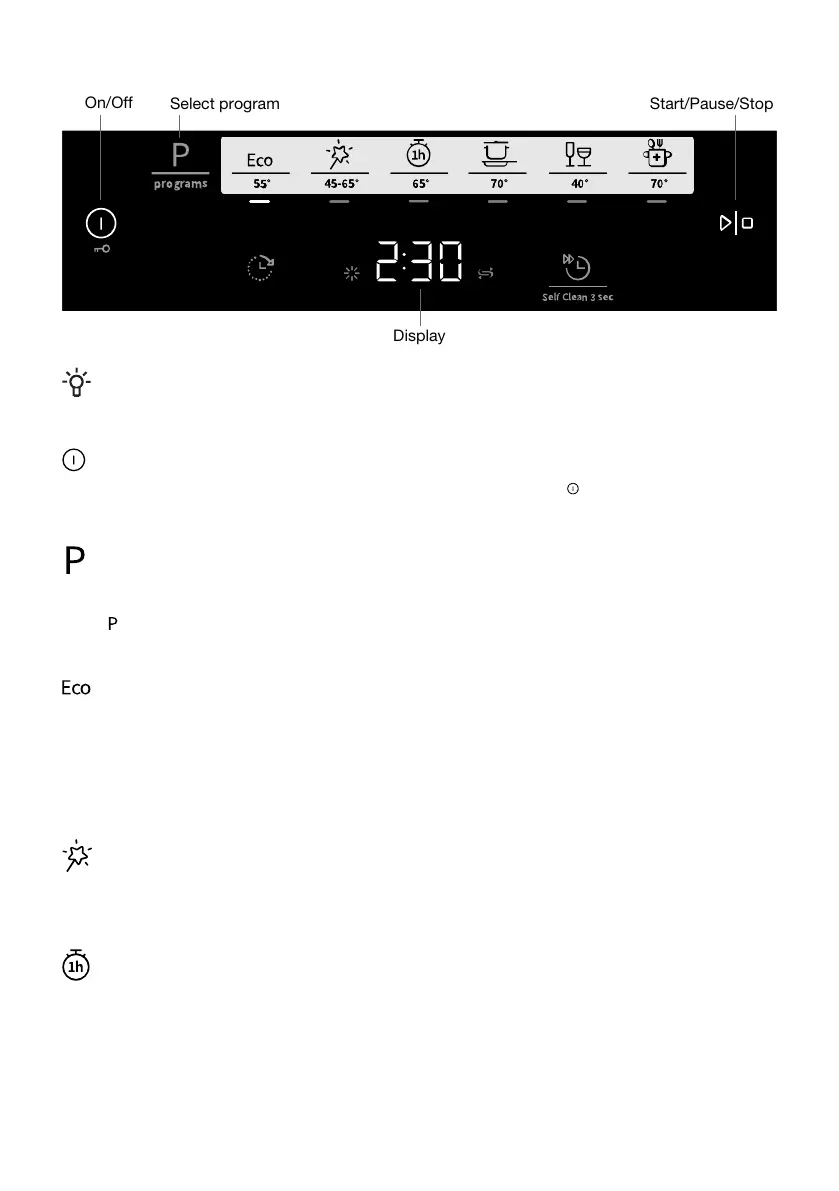
Display
Start/Pause/StopSelect program
On/Off
NOTE!
The control panel only reacts to use when the door is closed.
On/Off
Close the door properly, otherwise the dishwasher will not start. Press . Also turn on the water tap
if it is turned off.
Select program
Select a program to suit the type of dishes and how dirty they are. Eco 55° is always pre-selected.
Press one or more times until the desired program is activated, which is indicated by an indicator
light.
Eco 55°
This program is suitable for washing normally soiled dishes and is the most effective program in terms
of combined energy and water consumption. This program is used to assess compliance with EU
legislation on ecodesign.
You can read more about greener dishwashing in the chapter Greener dishwashing.
For heavily soiled dishes with a lot of grease, a program with higher temperatures should be used.
Auto 45-65°
The dishwasher can measure how dirty the dishes are and adjust water consumption and temperature
accordingly. When newly installed, the program needs to be run five times before it is fully adapted
and can provide the best results.
1h 65°
A quick program for slightly dried leftovers. (This program is not intended for burnt food, such as on
oven dishes.)
The Auto Dry option is important for ensuring the best drying results.
14




 To Next Page