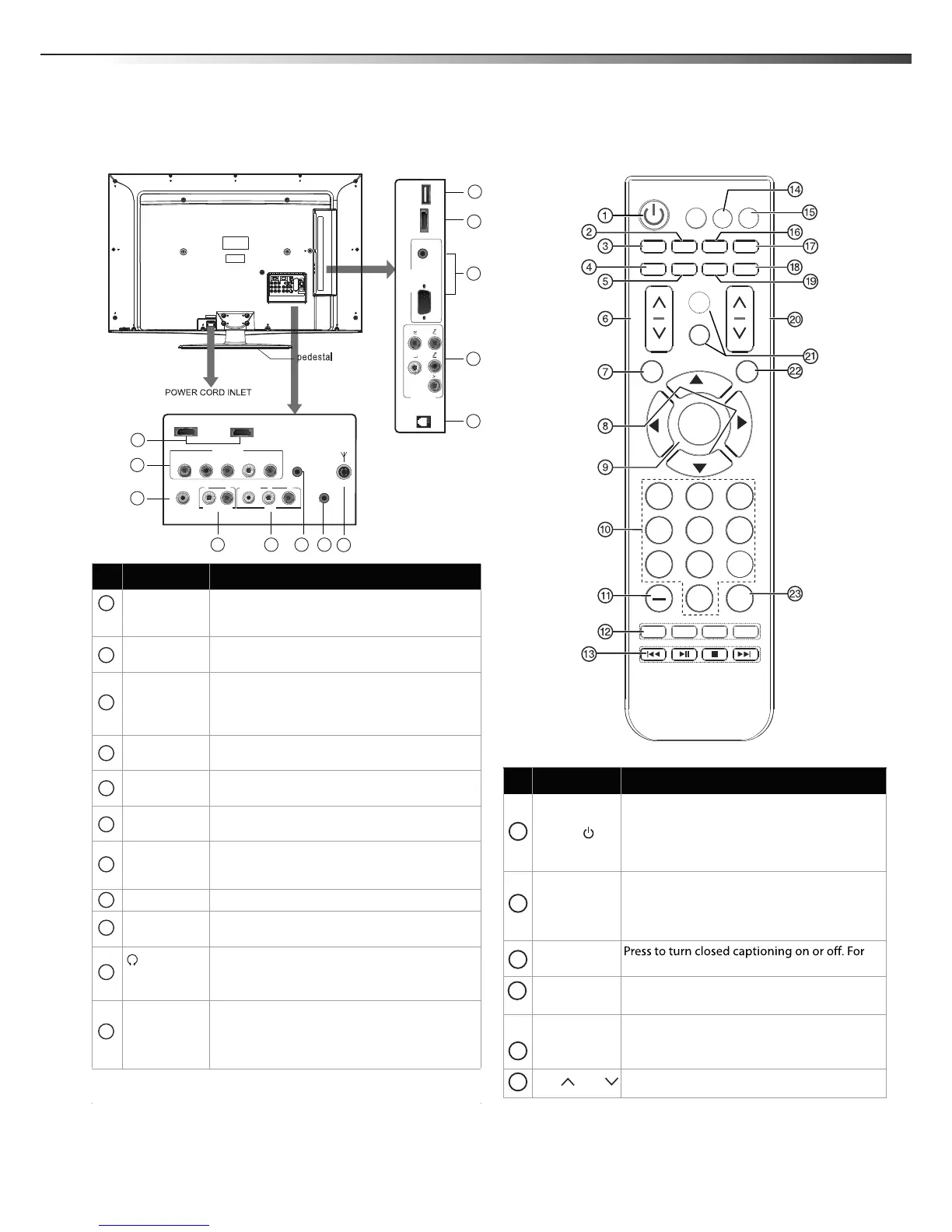
TV components
5
Remote controlBack connections
Item Name Description
USB
HDMI 1/2/3
Connect an HDMI device to one of these jacks.
For more information.
PC AUDIO
jacks
VGA jack
Connect a computer (audio and video) to these
jacks.
Plug headphones into this jack. For more
information.
COMP1
COMP2
Connect component video devices to these
jacks. For more information.
AUDIO OUT
jack
AV
Connect a standard AV device, such as a
camcorder or game console, to these jacks.
jack
ANT IN
Connect an antenna or cable TV to this jack. For
more information.
DIGITAL
AUDIO
OUT
jack
Connect a digital coaxial cable to this connector,
then to a digital sound system. For more
information.
1
2
3
4
5
6
7
8
9
10
(headphone)
jack
Item Name Description
POWER
Press to turn on the TV or put the TV in standby
mode.
Caution: The TV continues to receive power
even in standby mode. Unplug the power cord
to disconnect power.
INPUT
ENTER
7
8
0
EN-31205
ASPECT
GUIDE
INFO
MENU
CH
VOL
DMP
CCD
MTS/SAP
SLEEP
SOUND
EXIT
TV
1
2
3
5
6 4
7 8 9
0
LAST
PICTURE
MUTE
1
2
VOL /
VOL
Press to increase or decrease the volume.
CCD
SOUND
more information.
Press to select the sound mode. You can select
Standard, Custom, Vivid, Game, Cinema and
standard , custon , music and clear voice.
MTS/SAP
In analog TV mode, press to select STEREO,
SAP (secondary audio language), or MONO.
In digital TV mode (DTV), press to select the
audio track. For more information.
PICTURE
Press to select the video mode. You can select
Power Saver.
3
4
5
6
LTDN40V86MH
11
RJ12
Connect a RS-232C(serial port) cable to this jack,
then to an external control device(such as a
computer or A/V control system), to control the
TV functions externally.
Connect a RJ-12 Cable to this jack,
then to an
external control device(such as a
computer or
A/V control system), to control the
TV functions
externally.
SERVICE
2
6
4
7
98 310
HDMI2
COMP 2
HEADPHONE
AUDIO OUT
VIDEO L RLR
AV
DIGITAL
AUDIO OUT
YP
B PR LR
HDMI1
5
6
4
1
11
HDMI3
COMP1
PC AUDIO
RJ12
PC
SERVICE
ANT IN
USB
VGA
Connect a audio cable to this connector.
Thise unit has standmd USB interface and can
be connected the standavd USB 1.1 and USB
2.0 udisks.



 To Next Page