7Getting Started
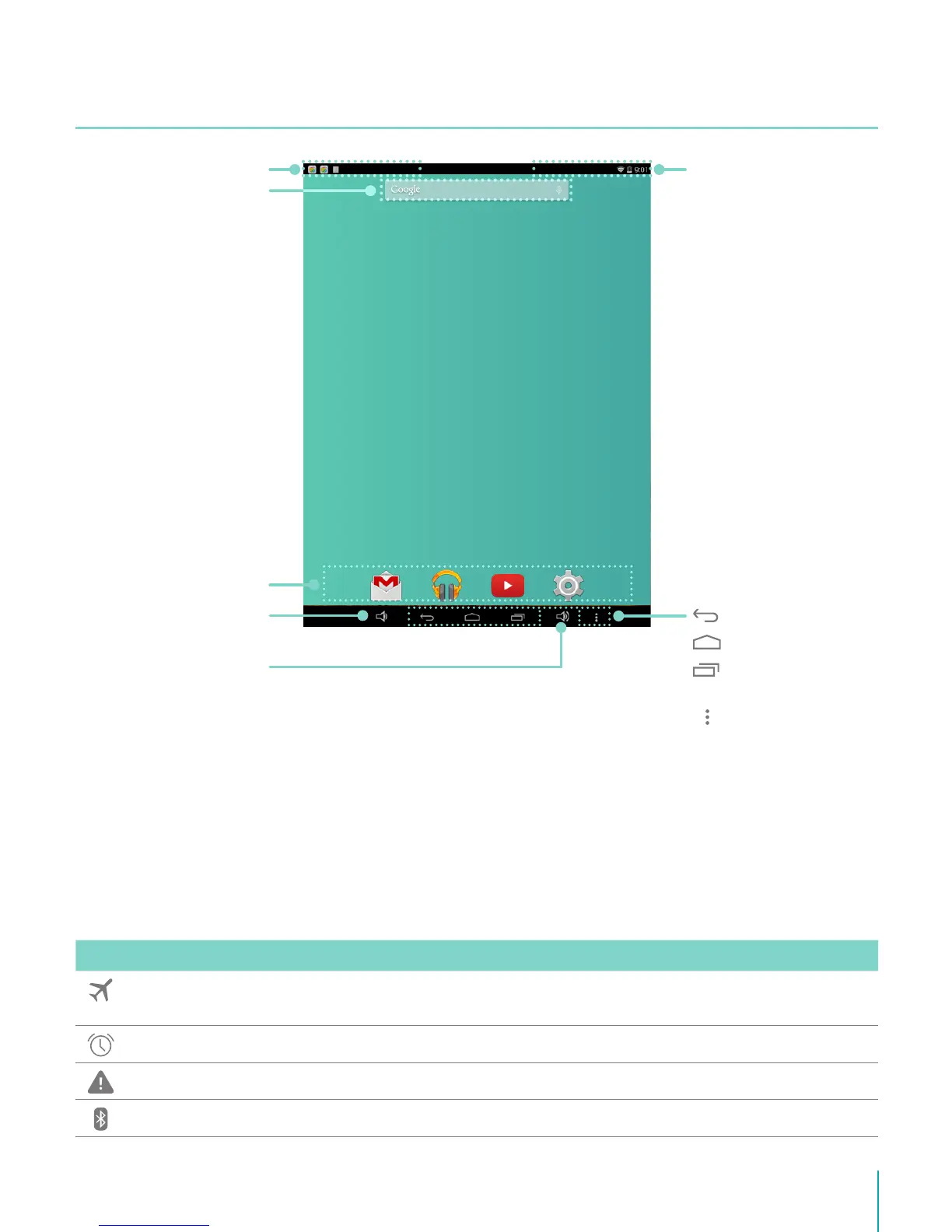
Home Screen
To move between Home screens, slide left or right.
Notification and Status Bar
At the top of the screen, you’ll see indicators that inform you about the status of your Sero 8
pro. You can open the Notification Tray or the Quick settings by pressing the Notification or
Status bar and dragging it down.
The table below lists icons that appear the most frequently in the Notification and Status Bar.
Icon What it means
Airplane mode Shows that airplane mode is on. You can not access the Internet. Non-wireless
features are available.
Alarm An alarm is set.
Alert Install/update/enable Google Play service.
Bluetooth Sero 8 pro is using Bluetooth function.
Status Bar
Navigation
Buttons
Back
Home
Recent
Apps
Menu
Notification Bar
Google Search
App Icons
Volume Down
Button
Volume Up
Button



 To Next Page