Need help?
Do you have a question about the Hisense Sero 8 and is the answer not in the manual?
Instructions on how to find the device's model and serial numbers.
Lists the items included in the Sero 8 box.
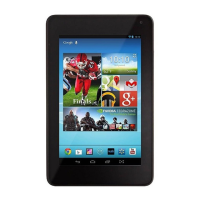
Identifies and describes the physical components of the Sero 8 tablet.
Introduces the main screen interface and its elements.
Explains the indicators and information displayed in the status bar.
Details how to view, manage, and dismiss notifications.
Describes accessing and using quick settings for common tasks.
Lists and explains common icons found in the status and notification bars.
How to input queries into the search box.
Instructions for turning the device on, off, and managing sleep mode.
How to adjust volume and silent mode settings.
Explains the function of the All Apps, Back, Home, and Recent Apps buttons.
How to capture screenshots and access the screenshot button.
Information about the device's battery, charging, and status.
How to connect the device to computers for data transfer.
Instructions for inserting and managing microSD cards.
How to connect headphones to the device.
Steps for connecting to Wi-Fi networks.
Details on configuring advanced Wi-Fi options and proxy settings.
Steps to pair new Bluetooth devices with the Sero 8.
How to connect to already paired Bluetooth devices.
Instructions for sending files via Bluetooth.
Instructions for receiving files via Bluetooth.
Step-by-step guide for the initial setup of the Sero 8.
Explains how to interact with the device using touch gestures.
How to customize the home screen layout by moving and deleting icons.
Steps to create and manage app folders on the home screen.
How to view, manage, and delete downloaded files.
How to adjust screen rotation settings for portrait and landscape modes.
Setting up and unlocking the device's screen lock.
Instructions on using the on-screen keyboard for text input.
How to edit text, select, cut, copy, and paste.
Using voice commands to input text.
Ways to share content with others using the device.
Setting up screen locks and encrypting device data.
Steps to encrypt all data on the tablet for added security.
Overview of device settings configuration.
Managing network connections like Wi-Fi and data usage.
Configuring device-specific settings like sound, display, and storage.
Managing installed applications, including viewing details and force stopping.
Managing personal settings like backup, reset, date, time, and accessibility.
Managing system settings like date, time, accessibility, and updates.
Managing location services and app access to location data.
Information on setting up and using a Google account for device services.
How to add Google and other types of accounts to the device.
Steps to remove existing accounts from the device.
Configuring synchronization options for apps and accounts.
How to use Google Now for personalized information and search.
Performing tasks using voice commands like sending messages or setting alarms.
Configuring speech input and output settings.
Technical specifications of the Hisense Sero 8 tablet.
Detailed safety precautions and warnings for using the device.
Important warnings and precautions related to device usage and handling.
Information on FCC regulations and radio frequency exposure compliance.
Declarations regarding compliance with FCC rules and regulations.
Guidelines for environmentally responsible disposal and recycling of the product.
Terms and conditions governing the use of the device and services.
Terms and conditions for using Hisense HISMART@ Services.
Definitions of key terms used in the user agreement.
Guidelines and restrictions for using Hisense HISMART@ Services.
Specific terms for using Hisense applications and services.
Prohibitions and restrictions on the use of the device and its services.
Details the license granted for using the application and content.
Terms regarding user-submitted content and Hisense's rights.
Information on advertisements and service communications.
Disclaimer of warranties and limitation of Hisense's liabilities.
Hisense's compliance with legal requirements and data retention.
Hisense's privacy policy and terms for using web services.
Continuation of Hisense's privacy policy and terms for web services.
Notices regarding copyrights and trademarks of Hisense and third parties.
 General
| Processor cores | 4 |
|---|---|
| Processor model | RK3188T |
| Processor family | Rockchip |
| Processor frequency | 1.6 GHz |
| Processor architecture | ARM Cortex-A9 |
| Internal memory | 1 GB |
| Internal memory type | - |
| Storage media | Flash |
| Card reader integrated | Yes |
| Compatible memory cards | MicroSD (TransFlash) |
| Maximum memory card size | 32 GB |
| Internal storage capacity | 16 GB |
| Display diagonal | 8 \ |
| Touch technology | Multi-touch |
| Touchscreen type | Capacitive |
| Display resolution | 1280 x 800 pixels |
| Display number of colors | 16.78 million colors |
| Rear camera type | Single camera |
| Maximum video resolution | - pixels |
| Rear camera resolution (numeric) | 2 MP |
| Front camera resolution (numeric) | 0.3 MP |
| Wi-Fi standards | 802.11b, 802.11g, Wi-Fi 4 (802.11n) |
| Bluetooth version | 3.0+HS |
| Top Wi-Fi standard | Wi-Fi 4 (802.11n) |
| Headphone connectivity | 3.5 mm |
| USB 2.0 ports quantity | 0 |
| Micro-USB 2.0 ports quantity | 1 |
| Mobile High-Definition Link (MHL) | No |
| Audio formats supported | AAC, AAC+, AMR-NB, MIDI, MP3, OGG, WAV |
| Image formats supported | BMP, GIF, JPG, PNG |
| Video formats supported | 3GP, 3GPP, H.263, H.264, MPEG4 |
| Video compression formats | H.263, H.264, MPEG4 |
| Device type | Mobile tablet |
| Form factor | Slate |
| Product color | Black |
| Standby time | 170 h |
| Battery capacity | 4000 mAh |
| Battery life (max) | 4 h |
| Operating system version | 4.4 KitKat |
| Operating system installed | Android |
| Cables included | USB |
 Weight and Dimensions
| Depth | 10.5 mm |
|---|---|
| Width | 129.5 mm |
| Height | 208.5 mm |
| Weight | 450 g |

 To Next Page