21Basic
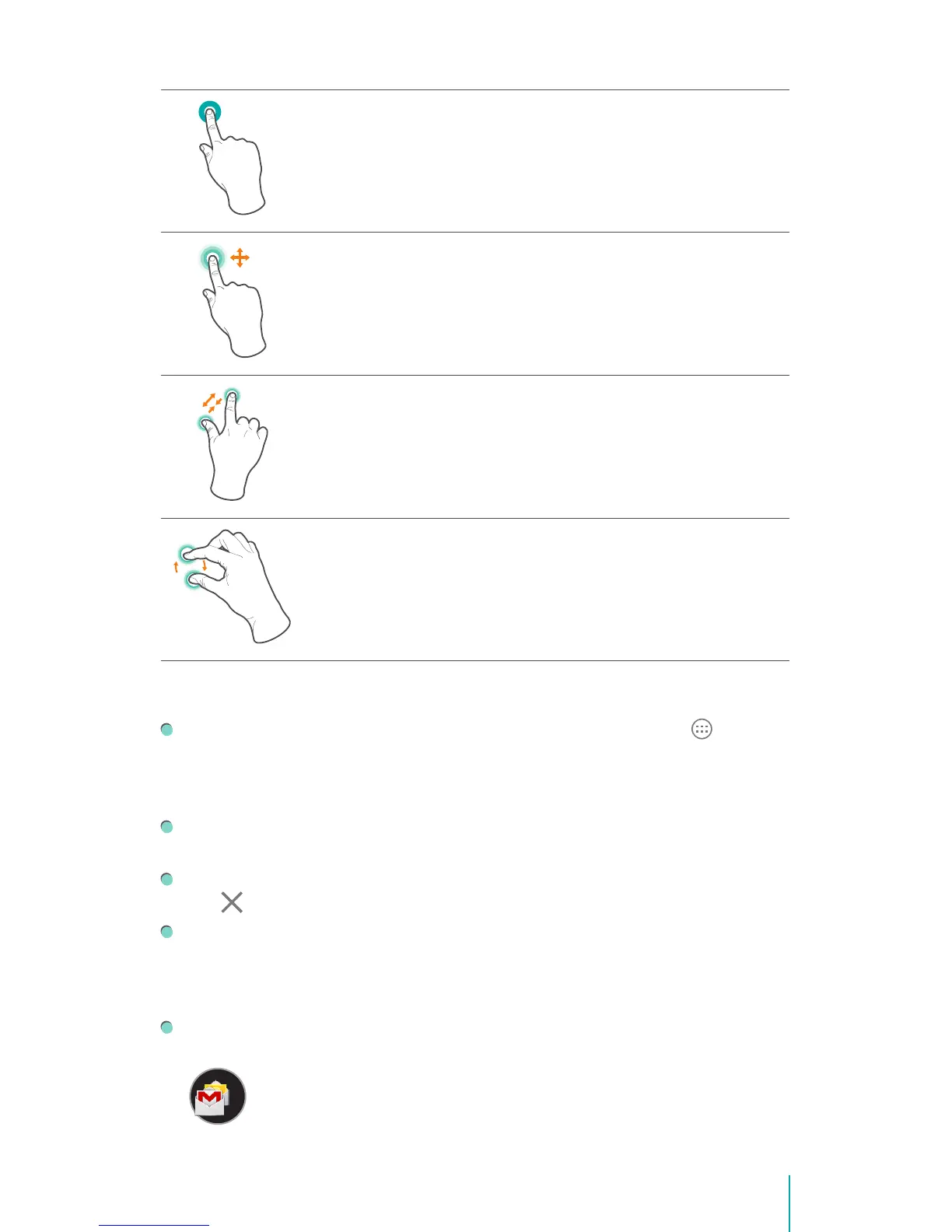
Press & Hold
Touch the screen and hold it there for 2 seconds.
In many situations, pressing and holding will open a menu.
Slide or Drag
Touch the screen and slide your nger to another location.
Press and hold on an object and slide it to another location on the
screen.
Zoom
Place two fingers about an inch apart on the screen. Slide them
together to ‘zoom out’.
Slide your ngers apart to ‘zoom in’.
Rotate
Place two ngers about an inch apart on the screen. Rotate them in
clockwise or counter-clockwise.
Rearrange Home Screen
From All Apps screen to Home screen: Tap All Apps button open All
Apps screen, press & hold an icon or widget and slowly to drag it to the
location of your choice. This makes it much easier to change your Home
screen layout.
Move apps or widgets: Press & hold an icon or widget, slowly to drag it to
the screen edge, the screen will switch.
Delete apps or widgets: Press & hold an icon or widget, when the Remove
icon appears at the top of the screen, drag the icon or widget into it.
Press & hold the wallpaper on your Home screen, choose your wallpaper
from Gallery, Live Wallpapers or Wallpapers.
Organize Your Apps With Folders
Make a new folder on your Home screen: Press & hold an icon, slowly to
drag it on top of another app.


 To Next Page