23Basic
Lock Screen
Unlock Your Sero 8
If you don’t touch the screen for several minutes, the Sero 8 will go into sleep
mode, and the screen will be locked.
To unlock your Sero 8 after waking it from sleep mode, press the lock icon and
drag it to the ridge of the circle.
Tip: You can set your Sero 8 screen lock in many ways. For more information,
see Security on page 25.
Typing
You can enter text using the on-screen keyboard. Some apps open it
automatically. In others, you open it by tapping where you want to type.
To change your Sero 8’s keyboard and input methods, go to Settings >
PERSONAL > Language & input.
Entering Text
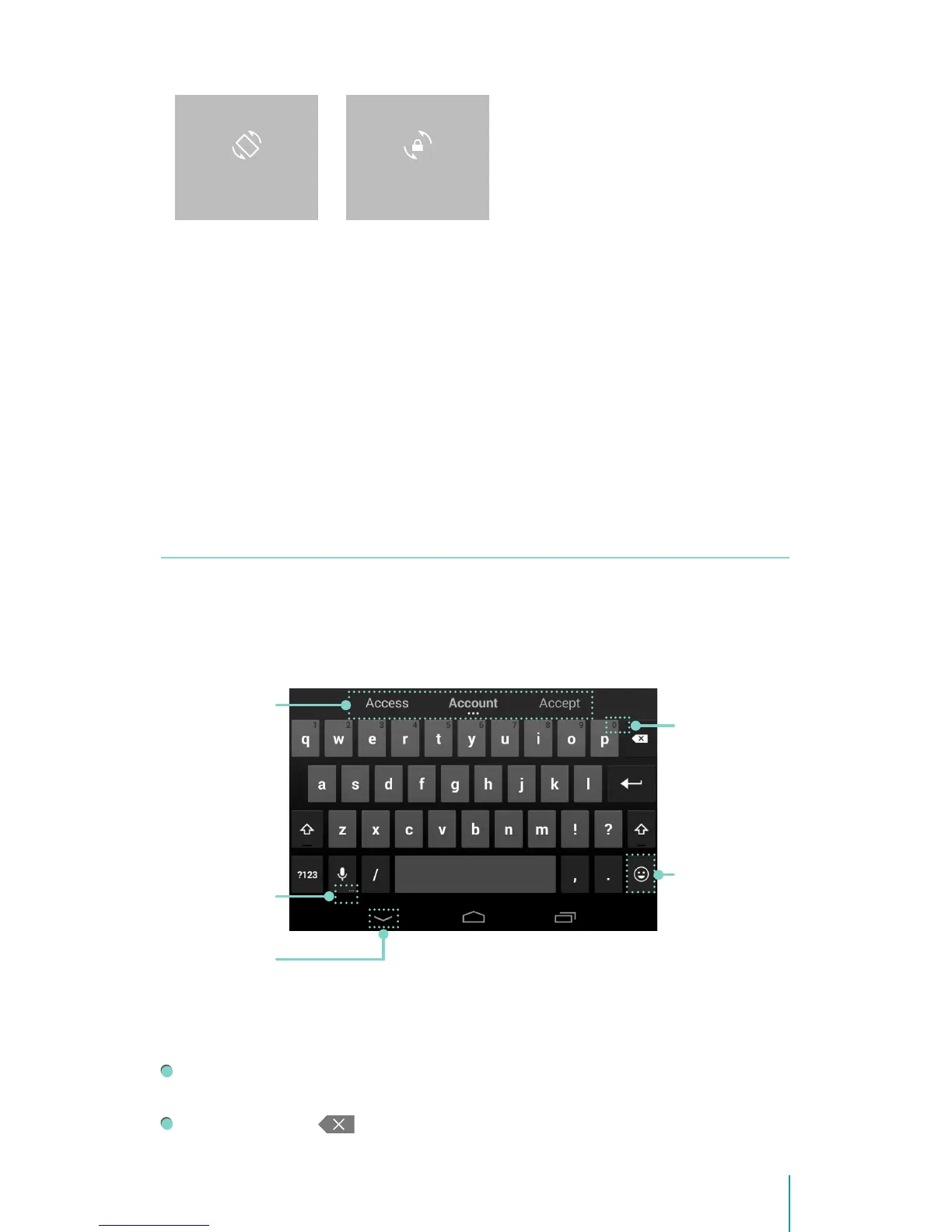
Enter text: Tap a text eld to bring up the keyboard, then tap keys on the
keyboard. The letter isn’t entered until you release your nger from the key.
Delete text: Tap to delete selected text or the characters before the
cursor.
ROTATION LOCKEDAUTO ROTATE
Tap a sugges-
tion to type it
Press & hold
it to see Input
options
Tap to hide
the on-screen
keyboard
Press & hold
it to choose a
smiley face
Press & hold
it to type
character at
upper right


 To Next Page