8Getting Started
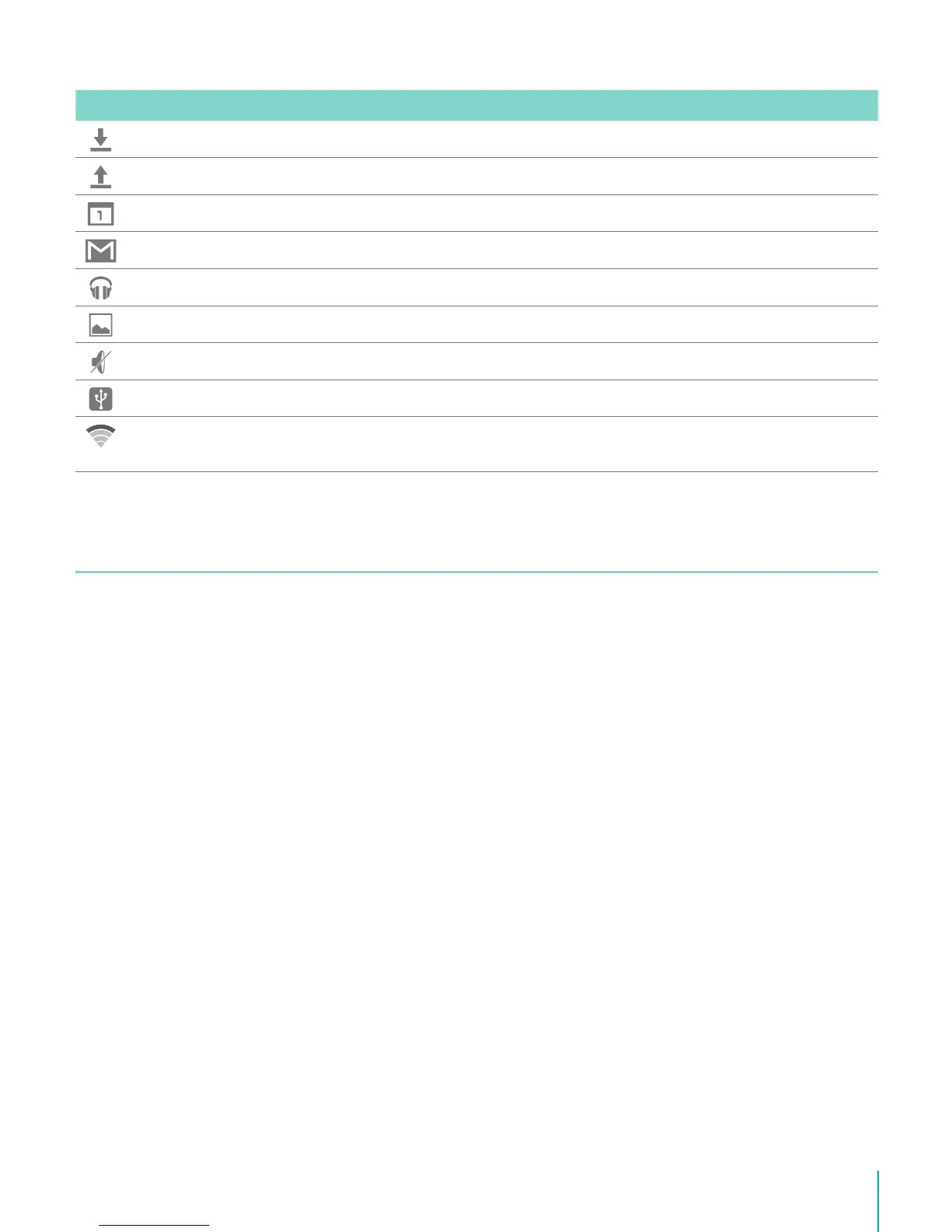
Icon What it means
Downloaded Received les
Uploaded Sent les
Calendar Task reminders.
Message Received new message.
Music Play Music application is running.
Screenshots Screenshot captured.
Silent mode Silent mode is on.
USB tethering Sero 8 pro has connected to a computer and the USB tethering is turned on.
Wi-Fi Sero 8 pro has a Wi-Fi Internet connection. The more bars, the stronger the
connection.
Buttons
Power Button
Turn Sero 8 pro On
Press & hold the Power button until the Hisense logo displays.
Turn Sero 8 pro Off
In awake mode, press & hold the Power button until a message displays. Next, tap Power Off
> OK. Your Sero 8 pro will shut down.
Set Airplane / Silent Mode
In awake mode, press & hold the Power button until a message displays. You can set
Airplane mode and Silent mode.
Put Sero 8 pro in Sleep Mode
Press the Power button to put the Sero 8 pro in sleep mode.
If you do not touch the screen for several minutes, then the Sero 8 pro will automatically go
into sleep mode.
Tip: You can go to Settings > DEVICE > Display > Sleep to set the screen timeout.



 To Next Page