- 22 -
Channels or Programmes.
Press
buttons to navigate through the
channel and programme list.
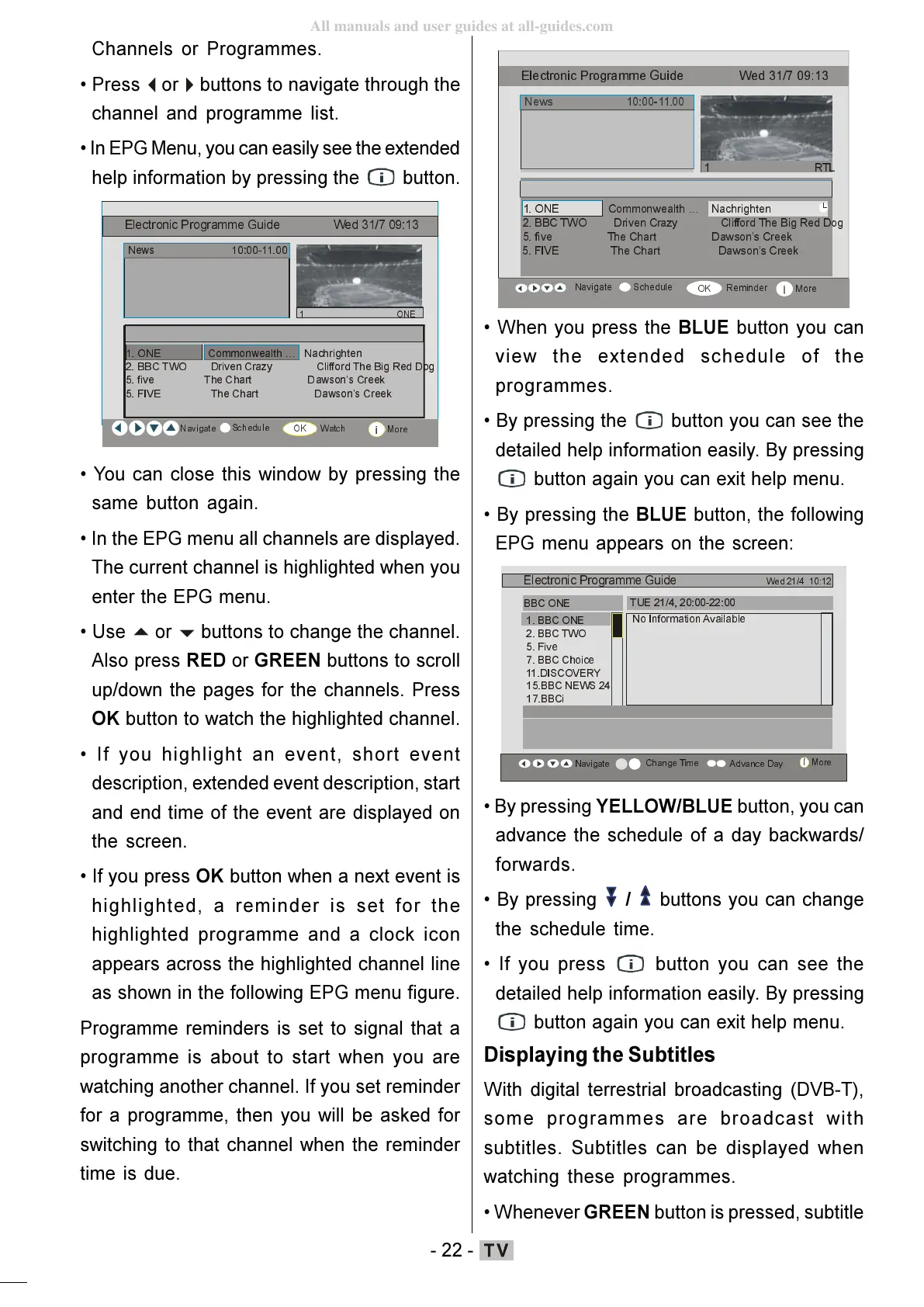
In EPG Menu, you can easily see the extended
help information by pressing the
button.
1HZV
21(&RPPRQZHDOWK«1DFKULJKWHQ
%%&7:2'ULYHQ&UD]\&OLIIRUG7KH%LJ5HG'RJ
ILYH7KH&KDUW'DZVRQ¶V&UHHN
1DYLJDWH
6FKHGXOH
:DWFK
0RUH
(OHFWURQLF3URJUDPPH*XLGH :HG
21(
),9(7KH&KDUW'DZVRQ¶V&UHHN
You can close this window by pressing the
same button again.
In the EPG menu all channels are displayed.
The current channel is highlighted when you
enter the EPG menu.
Use
buttons to change the channel.
Also press RED or GREEN buttons to scroll
up/down the pages for the channels. Press
OK button to watch the highlighted channel.
If you highlight an event, short event
description, extended event description, start
and end time of the event are displayed on
the screen.
If you press OK button when a next event is
highlighted, a reminder is set for the
highlighted programme and a clock icon
appears across the highlighted channel line
as shown in the following EPG menu figure.
Programme reminders is set to signal that a
programme is about to start when you are
watching another channel. If you set reminder
for a programme, then you will be asked for
switching to that channel when the reminder
time is due.
1HZV
21(&RPPRQZHDOWK«1DFKULJKWHQ
%%&7:2'ULYHQ&UD]\&OLIIRUG7KH%LJ5HG'RJ
ILYH7KH&KDUW'DZVRQ¶V&UHHN
1DYLJDWH
6FKHGXOH
5HPL QGHU
0RUH
(OHFWURQLF3URJUDPPH*XLGH:HG
57/
),9(7KH&KDUW'DZVRQ¶V&UHHN
When you press the BLUE button you can
view the extended schedule of the
programmes.
By pressing the
button you can see the
detailed help information easily. By pressing
button again you can exit help menu.
By pressing the BLUE button, the following
EPG menu appears on the screen:
%%&2 1(
%%&7:2
)LYH
%%&&KRLFH
',6&29(5<
%%&1(:6
%%&L
(OHFWURQLF3URJUDPPH*XLGH
:HG
1R,QIRUPDWLRQ$YDLODEOH
%% & 21(
78(
1DYLJDWH
&KDQJH7LPH
By pressing YELLOW/BLUE button, you can
advance the schedule of a day backwards/
forwards.
By pressing
/ buttons you can change
the schedule time.
If you press button you can see the
detailed help information easily. By pressing
button again you can exit help menu.
Displaying the Subtitles
With digital terrestrial broadcasting (DVB-T),
some programmes are broadcast with
subtitles. Subtitles can be displayed when
watching these programmes.
Whenever GREEN button is pressed, subtitle
ENG-01-TV-22784W-1165UK-MB29-PEUIDTV-(1SCRT-AV-YPBPR-HP-SPDIF-STRLOUT-PCIN)-10060401-5013xxxx.p6511.10.2008, 17:3722
All manuals and user guides at all-guides.com






 To Next Page