- 33 -
button. (CAM set up menu is not displayed
when it is not required.)
To see the viewing contract information:
Enter IDTV; press MENU button, then highlight
Common Interface and press OK button.
When no module is inserted, No Common
Interface module detected message
appears on the screen.
Refer to the module instruction manual for
details of the settings.
NOTE: Insert or remove the CI module only
when the TV is in STAND-BY mode or
SWITCHED OFF.
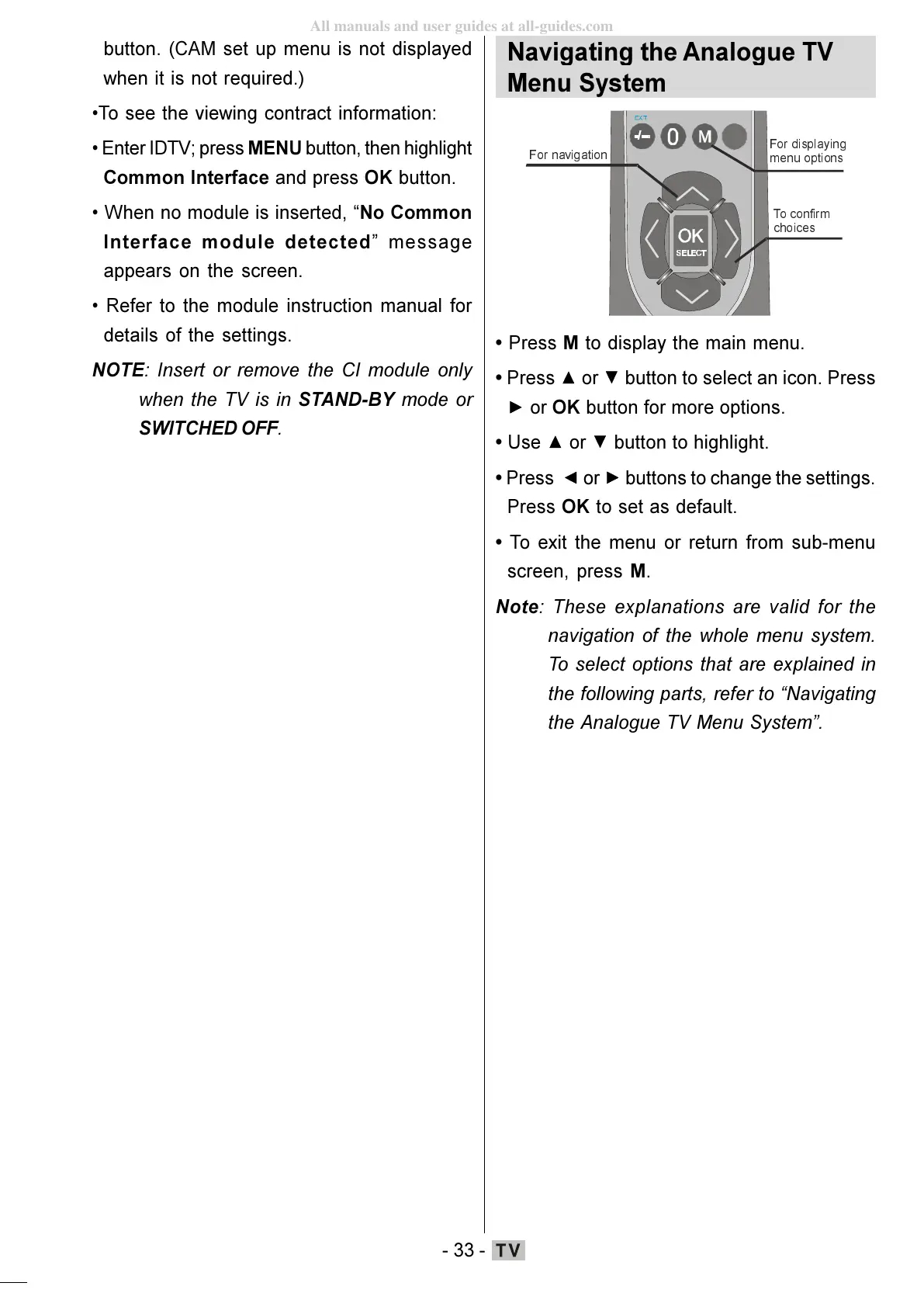
Navigating the Analogue TV
Menu System
PHQXRSWLRQV
)RUQDYLJDWLRQ
7RFRQILUP
FKRLFHV
Press M to display the main menu.
Press
or button to select an icon. Press
or OK button for more options.
Use
or button to highlight.
Press
or buttons to change the settings.
Press OK to set as default.
To exit the menu or return from sub-menu
screen, press M.
Note: These explanations are valid for the
navigation of the whole menu system.
To select options that are explained in
the following parts, refer to Navigating
the Analogue TV Menu System.
ENG-01-TV-22784W-1165UK-MB29-PEUIDTV-(1SCRT-AV-YPBPR-HP-SPDIF-STRLOUT-PCIN)-10060401-5013xxxx.p6511.10.2008, 17:3733
All manuals and user guides at all-guides.com






 To Next Page