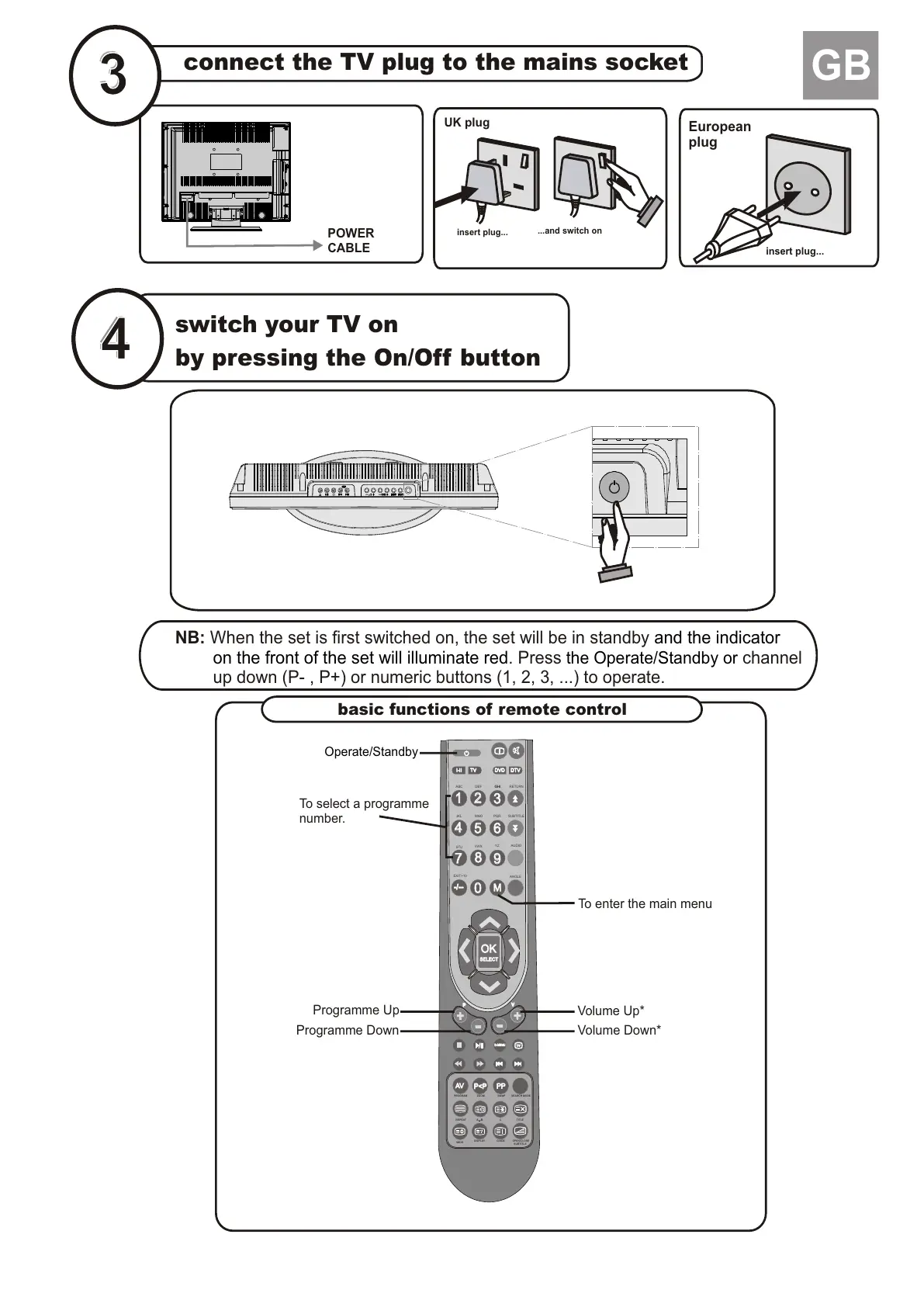
connect the TV plug to the mains socket
switch your TV on
by pressing the On/Off button
insert plug...
European
plug
...and switch on
insert plug...
UK plug
GB
POWER
CABLE
AVAV
PPPP
D-MENUD-MENU
++
++
OKOK
SELECTSELECT
11
55
22
33
44
66
77
88
99
00
MM
-/---/--
I-III-II TVTV DVDDVD
DTVDTV
ABC
DEF
GHI
JKL MNO
PQR
STU
VWX
YZ
EXIT+10
WIDE
DISPLAY GUIDE
SWAP
PP
VV
GHI RETURN
SUBTITLE
AUDIO
ANGLE
P<PP<P
OPEN/CLOSE
SUBTITLE
TITLE
C
REPEAT
A B
PROGRAM
ZOOM
SEARCH MODE
basic functions of remote control
NB: When the set is first switched on, the set will be in standby
. Press channel
up down (P-
and the indicator
on the front of the set will illuminate red the Operate/Standby or
, P+) or numeric buttons (1, 2, 3, ...) to operate.
Programme Up
Volume Up*
Volume Down*
Programme Down
To select a programme
number.
To enter the main menu
Operate/Standby







 To Next Page