- 17 -
First Time Installation
The user can use this item to load default
settings, which had been loaded to the re-
ceiver at the factory.
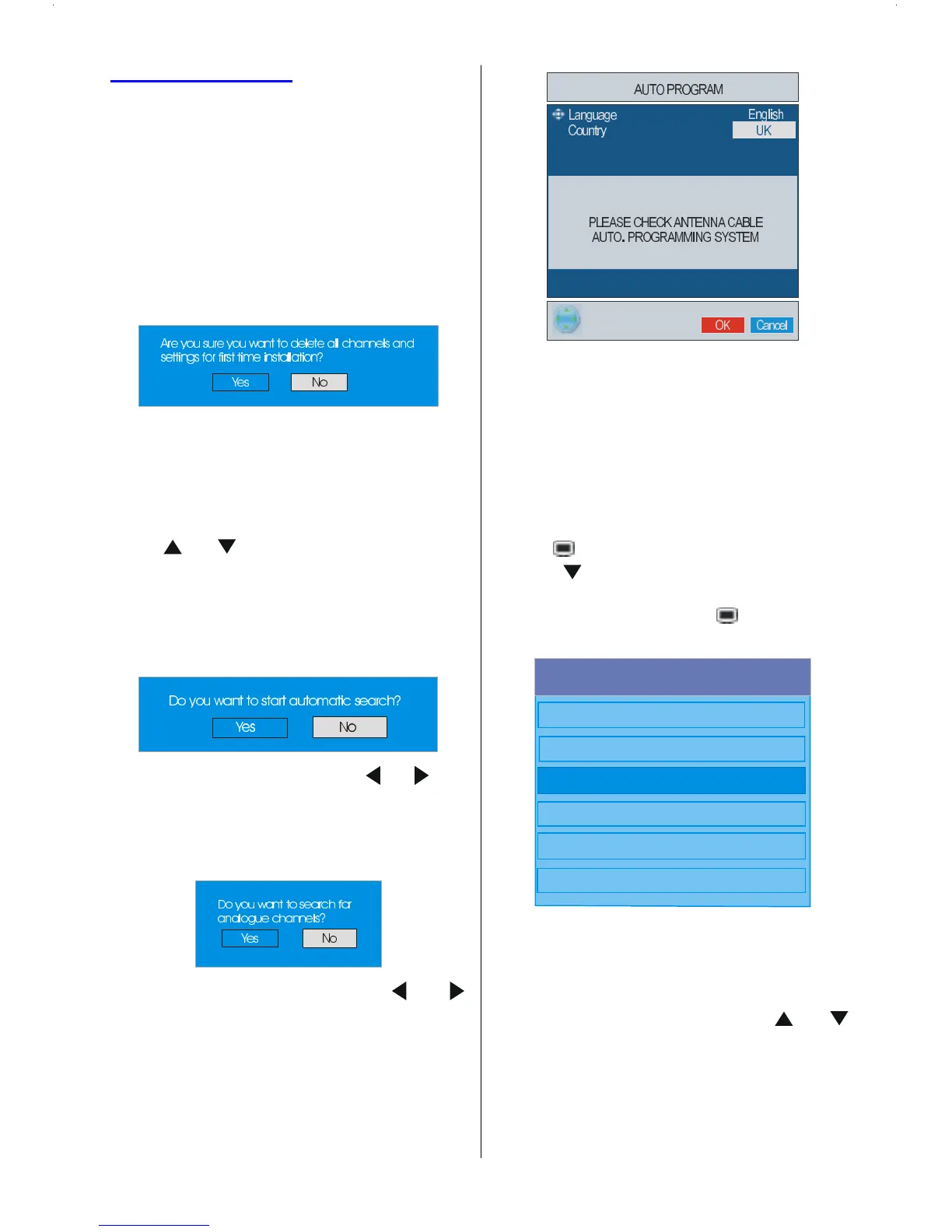
To install factory settings, highlight First
Time Installation menu item and press
OK button, then you will be asked to con-
firm for deleting all channels and settings.
Selecting Yes by pressing OK button
while the Yes is highlighted and then the
existing channel table will be deleted.
After factory settings are loaded, First Time
Installation menu will be displayed.
The menu which is displayed for language
selection appears on the screen at first. By
using
or buttons, select the desired
language option, and press OK button to
activate.
After the language is selected, a message
asking for automatic search start appears on
the screen.
Highlight Yes item by pressing or but-
tons and press OK button to start installa-
tion. After search is completed for digital
channels, a message asking search for ana-
logue channels appears on the screen.
Highlight Yes item by pressing or
buttons and press OK button to search for
analogue channels.The following menu ap-
pears on the screen for analogue channel
search.
Press the BLUE button to cancel APS if you
do not want to delete your existing
programme list.
To continue APS, first select the language
and country by pressing
_
/
`
button and then
press the RED or OK button.
Configuration
Press button to display the Main Menu
and the
button twice to highlight Configu-
ration, then press OK button to display the
Configuration menu. Press
button to exit
the menu.
0DLQ0HQX
&KDQQHO/LVW
,QVWDOODWLRQ
&RQILJXUDWLRQ
7LPHUV
796HWXS
&RPPRQ,QWHUIDFH
The various configuration functions are dis-
played in a list, along with a quarter-screen
image of the currently selected channel. You
can select a function by highlighting the cor-
responding menu line using the
or
buttons.









 To Next Page