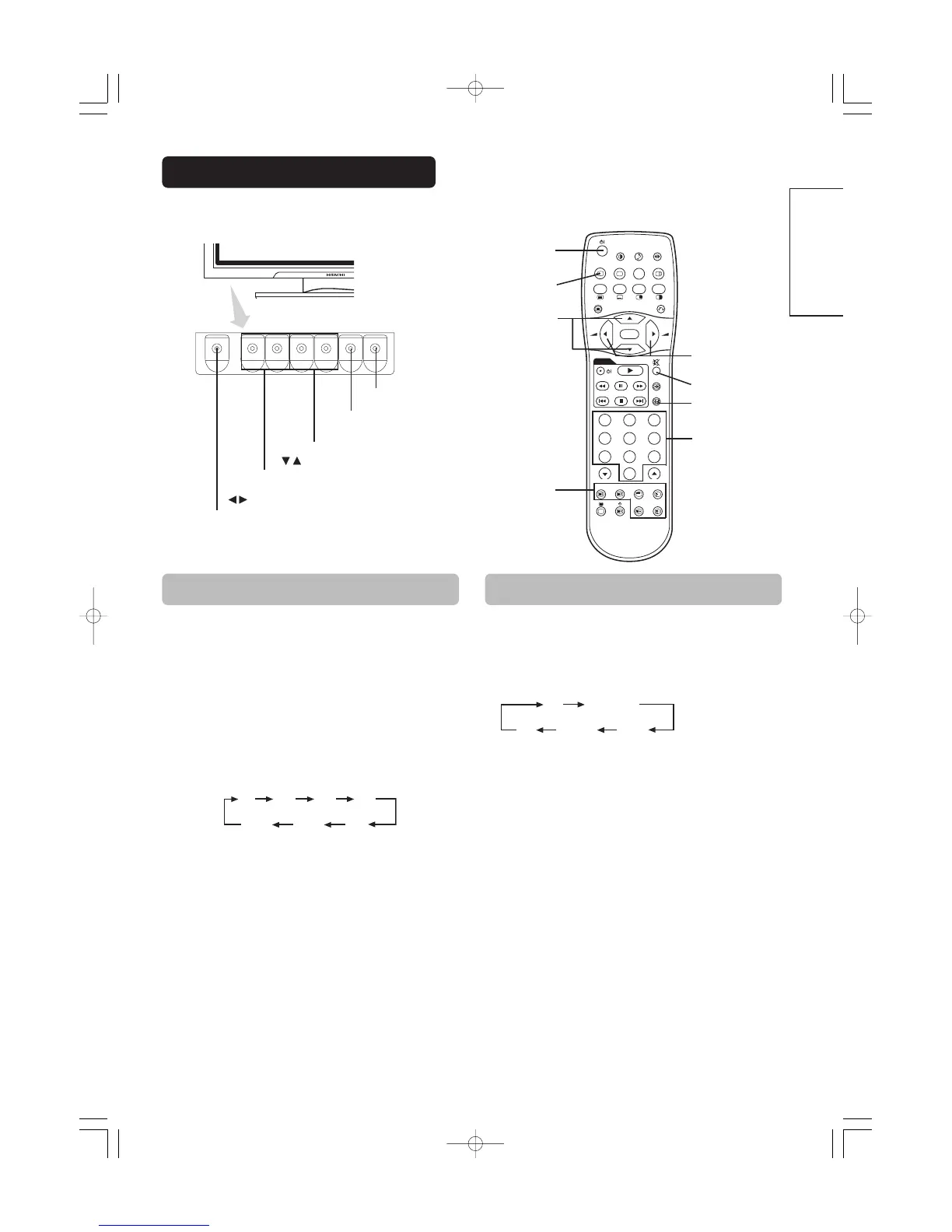
POWER ON/OFF
button
・・
Input can be switched by pressing the AV1, AV2, AV3,
AV4, RGB1 or RGB2 buttons of the remote control. And
the way to return to a TV channel is as follows:
• Pressing INPUT SELECT button at RGB2 input screen.
• Pressing some PROGRAM SELECT buttons and select a TV
channel.
• Pressing PROGRAM UP/DOWN buttons at the screen without
OSD(On-screen display).
・・
Input can be switched in the sequence of TV
→→
AV1
→→
AV2
→→
AV3
→→
AV4
→→
RGB1
→→
RGB2 by pressing the
INPUT SELECT button of the monitor or the remote
control.
VOLUME
UP/DOWN buttons
INPUT SELECT button
(OK button)
▲
▼
PROGRAM UP/DOWN
buttons
Each time the ZOOM button of the remote control is
pressed, the screen display size will change in sequence
and the status will be displayed at the bottom of the
screen.
• During TV mode
Input Switching Size Switching
INPUT SELECT
button
MUTE button
PROGRAM SELECT
buttons
RGB/VIDEO
buttons
The functions of the buttons located on the bottom
of the monitor change as shown below:
ZOOM button






 To Next Page