EasyManua.ls Logo

Hitachi 42PD5000 - Page 49

Hitachi 42PD5000
76 pages
Print Icon
To Next Page IconTo Next Page
To Previous Page IconTo Previous Page
Loading...
49
ENGLISH
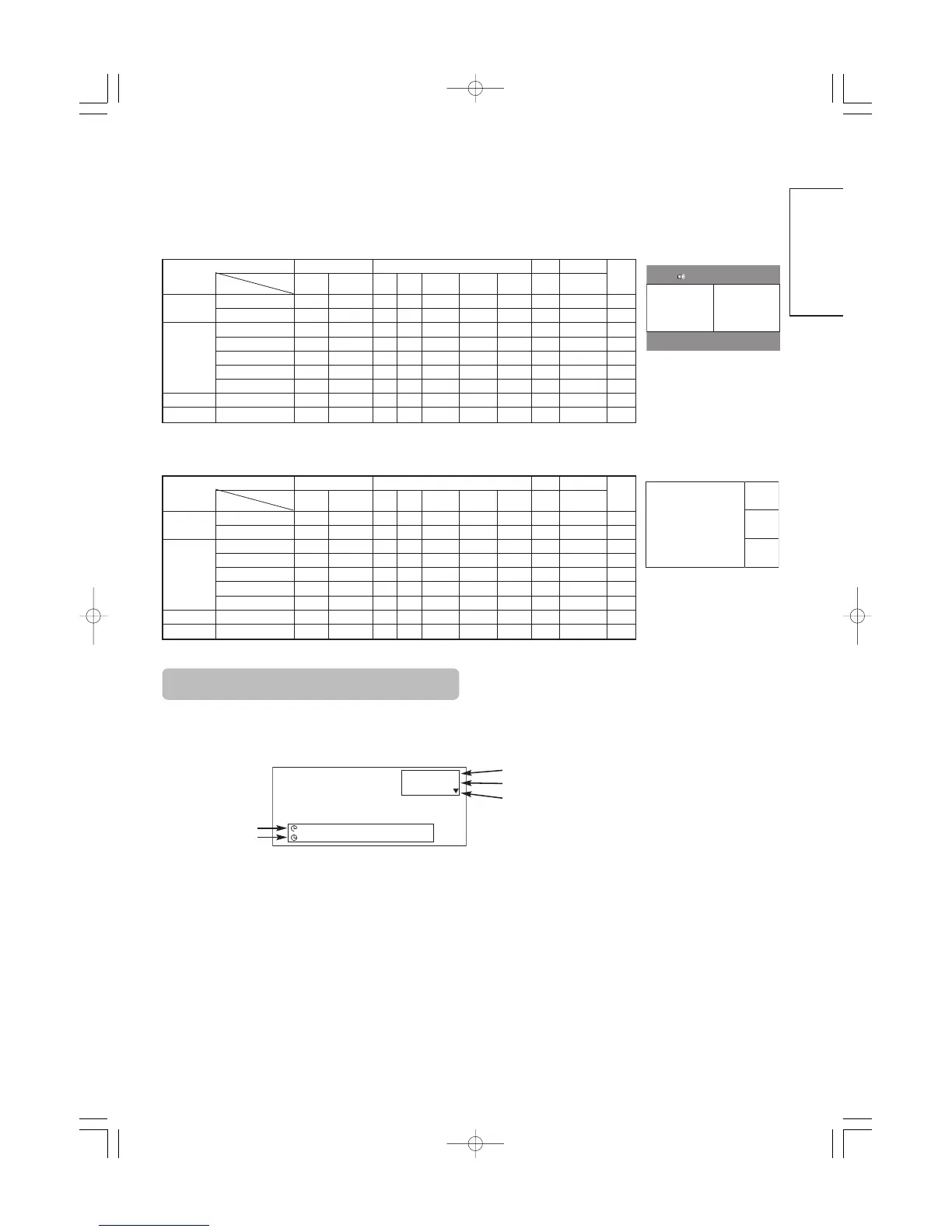
Input Signal Screen Display
The TV channel status can be displayed on the screen by
pressing the RECALL button of the remote control.
The display will go out in approximately 6 seconds.
1
ABCDE
-- -- Min.
-- -- : -- --
OFF
TV position
Name
Sound mode
Off-timer
On-timer
TV
4 Pictures
2 Pictures (Split)
Main Sub
Sub 1
Sub 2
Sub 3
Main
Input terminal
AV1
AV4
AV1, AV2 RGB1 RGB2
TELE
TEXT
PAL
SECAM
NTSC3.58
NTSC4.43
576i
576p
480i
480p
1080i/50 1080i/60 720p/60 STB Component
AV1
AV4
PAL, SECAM
NTSC3.58/4.43
AV1
AV2
576i, 576p
480i, 480p
1080i/50
1080i/60
720p/60
RGB1 STB
RGB2 Component
(
:Available)
Main
Sub
Input terminal
AV1
AV4
AV1, AV2 RGB1 RGB2
TELE
TEXT
PAL
SECAM
NTSC3.58
NTSC4.43
576i
576p
480i
480p
1080i/50 1080i/60 720p/60 STB Component
AV1
AV4
PAL, SECAM
NTSC3.58/4.43
AV1
AV2
576i, 576p
480i, 480p
1080i/50
1080i/60
720p/60
RGB1 STB
RGB2 Component
(
:Available)
Main
Sub
01 QR58553-英語-初校03.10.1510:47AMページ49

Other manuals for Hitachi 42PD5000

Related product manuals