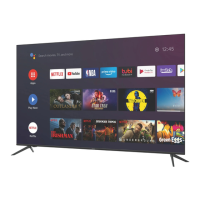
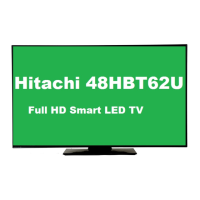
This document describes a television, detailing its features, technical specifications, usage, and maintenance.
Function Description
The television supports a wide range of functionalities, including standard broadcast reception (DVB-T/T2/C/S/S2), high dynamic range (HDR) formats like HDR10, HLG, and Dolby Vision, and various smart TV features. It can connect to the internet via wired (Ethernet) or wireless (Wi-Fi) connections, enabling access to online content, streaming services (e.g., Netflix, YouTube, Amazon Prime Video), and a web browser. The TV integrates with smart home ecosystems through Google Assistant and Alexa Built-in, allowing voice control for various functions. It also supports multimedia playback from USB devices and network shares, as well as screen mirroring from compatible devices. The device is designed for both entertainment and informational purposes, offering a comprehensive viewing experience.
Important Technical Specifications
Display:
- Resolution: Supports Ultra HD (UHD) 4K (3840 x 2160 pixels) and can display 4K content at 60Hz.
- HDR Support: Compatible with HDR10, Hybrid Log-Gamma (HLG), and Dolby Vision for enhanced contrast and color.
- Picture Modes: Offers various picture modes such as Cinema, Game, Sports, Dynamic, and Natural, with customizable settings for contrast, brightness, sharpness, color, energy saving, backlight, and advanced picture settings like dynamic contrast, color temperature, white point, blue stretch, micro dimming, noise reduction, film mode, and MEMC.
- DVI Resolutions: Supports various DVI resolutions up to 1920x1080 at different refresh rates (50Hz, 60Hz, 66Hz, 70Hz, 72Hz, 75Hz).
Audio:
- Audio Output: Supports digital audio output (SPDIF) and headphone output.
- Sound Modes: Includes Smart, Movie, Music, News, Sports, Cinema, and Off modes, with customizable settings for equalizer, bass gain, and DTS DRC.
- DTS Virtual:X: Enhances the audio experience by creating a virtual surround sound.
- eARC: Supports enhanced Audio Return Channel for high-quality audio passthrough to compatible sound systems.
Connectivity:
- HDMI: Multiple HDMI inputs supporting various resolutions up to 4K (3840x2160p and 4096x2160p) at 24Hz, 25Hz, 30Hz, 50Hz, and 60Hz. HDMI inputs are compatible with HDMI 1.4 and HDMI 2.0 standards.
- USB: Multiple USB ports for multimedia playback and connecting external devices. Supports USB 2.0 and USB 3.0.
- Ethernet (LAN): RJ45 port for wired internet connection.
- Wi-Fi: Built-in wireless connectivity (IEEE 802.11a/b/g/n) supporting 2.4 GHz and 5 GHz bands.
- CI Slot: Common Interface slot for conditional access modules (CAM) to decrypt pay-TV channels.
- Antenna Input: F-type connector for satellite (LNB) and terrestrial/cable (RF) signals.
- Bluetooth: For connecting wireless audio devices and other peripherals.
Multimedia Playback (from USB):
- Video File Formats: Supports .mpg/.mpeg/.dat/.vob, .ts/.trp/.m2ts, .avi, .mp4/.m4a/.m4v/.mov/.3gp/.3g2/.3gpp, .mkv, .flv, .asf/.wmv, .webm.
- Video Codecs: MPEG1/2, H.264, VC1, HEVC/H.265, MJPEG, MPEG4, H.264, HEVC/H.265, AVI, Sorenson Spark, MPEG4, H.264, HEVC/H.265, VP9, VP8, AV1.
- Audio Codecs (for video files): MPEG Layer 1/2/3, AC3, E-AC3, AAC, WMA, AAC LC, ADPCM, AACP, OPUS, Vorbis.
- Picture File Formats: Supports .jpg/.jpeg, .bmp, .png.
- Audio File Formats: Supports .mp3, .aac, .wma, .mkv, .m4a.
- Audio Codecs (for audio files): mp3, AAC, WMA, MPEG Layer 1/2/3, AAC, PCM, M4A.
- Subtitle File Formats: Supports .ssa, .ass, .srt, .sub, .txt, .smi (external subtitles) and .mkv, .dat, .mpg, .mpeg, .vob, .mp4 (internal subtitles).
Power Consumption:
- Power Supply: 220-240V AC, 50 Hz.
- Standby Mode: Low power consumption in standby mode.
Environmental:
- Disposal: Complies with WEEE directives for proper disposal of electrical and electronic equipment and batteries.
Usage Features
TV Control and Operation:
- Remote Control: Full-featured remote control for navigating menus, changing channels, adjusting volume, and accessing smart TV functions.
- TV Control Button & Operation: A single joystick-like button on the TV allows basic operations like power on/off, volume adjustment, channel change, and source selection.
- On-Screen Display (OSD): Intuitive graphical user interface for settings and features.
- First Time Installation: Guided setup process for language, country, network, and channel scanning.
- Channel Management: Automatic and manual channel scanning, channel list editing, favorite channel lists, and parental controls.
- Electronic Programme Guide (EPG): Provides program information for broadcast channels, allowing users to view schedules and set reminders or recordings.
- Teletext: Access to teletext services for information.
Smart TV Features:
- Internet Browser: Built-in web browser to surf the internet.
- HBbTV System: Supports Hybrid Broadcast Broadband TV for interactive services.
- Apps: Access to a variety of pre-installed and downloadable applications from an app market.
- Smart Center: Mobile application for controlling the TV and sharing content.
- Alexa Ready/Built-in: Integration with Amazon Alexa for voice commands, smart home control, and information retrieval.
- Google Assistant: Integration with Google Assistant for voice commands, smart home control, and information retrieval.
- Wireless Display: Screen mirroring functionality to cast content from compatible devices.
- Connectivity Troubleshooting: Provides guidance for resolving network connection issues.
Multimedia and Recording:
- USB Recording (PVR): Allows recording of broadcast programs to an external USB hard drive. Features include instant recording, scheduled recording, and timeshift.
- Media Browser: Access and playback of photos, music, and videos from USB devices or network shares (DLNA/UPnP).
- FollowMe TV: Allows streaming of TV broadcasts to a mobile device within the home network.
- Audio Video Sharing: Enables sharing of media files (photos, music, videos) from smartphones or tablets to the TV.
Accessibility Features:
- Accessibility Menu: Provides options for visually and hearing-impaired users.
- High Contrast: Enhances text and menu visibility.
- Hard of Hearing: Enables a special feature for the hard of hearing.
- Audio Description: Provides narration for visual content for visually impaired users.
- Dialogue Enhancement: Improves dialogue clarity.
- Spoken Subtitles: Displays subtitles in spoken form.
- Magnification: Enlarges parts of the screen.
- Minimap: Displays a small map of the magnified area.
- Click Sound: Provides audible feedback for menu navigation.
- Highlight Programmes with Subtitles/Sign Language/Audio Description: Highlights programs in the EPG that offer these accessibility features.
- Language: Sets the display language for the broadcaster and the country.
- Conditional Access: Controls conditional access modules when available.
- Privacy Settings: Manages privacy settings related to smart TV applications.
- Show All Cookies/Delete All Cookies: Manages browser cookies.
- Do Not Track: Option to prevent tracking for HbbTV services.
Maintenance Features
Software Updates:
- Software Upgrade: Allows updating the TV's firmware to improve performance, add new features, and fix bugs. Updates can be performed via USB or over the internet.
Troubleshooting:
- Troubleshooting & Tips: Provides guidance for common issues such as no picture, poor picture quality, no sound, no signal, and recording problems.
- USB is too slow: Provides information on potential issues with USB storage device speed affecting recording functionality.
- Internet Connection Not Available: Helps diagnose and resolve issues related to wired and wireless internet connectivity.
Environmental Care:
- Environmental Information: Encourages energy consumption reduction and proper disposal of the device.
- Disposal Information: Detailed instructions for the proper disposal of the TV and batteries, adhering to local regulations and environmental protection guidelines. This includes information on collection points for recycling.
Safety Information:
- General Safety Warnings: Important safety instructions regarding installation, placement, power supply, and handling to prevent electric shock, fire, or injury.
- Child Lock: Parental control features to restrict access to certain channels or content based on age ratings.
- Cleaning: Instructions for safe cleaning of the TV screen and exterior.
- Battery Disposal: Specific instructions for the safe disposal of batteries.
E-Manual:
- E-Manual Access: Provides an integrated electronic manual within the TV's menu system for quick access to detailed instructions and features.

 Need help?

 To Next Page
 General