EasyManua.ls Logo

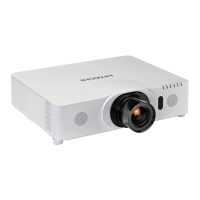
Hitachi CP-WX9210 - User Manual

Hitachi CP-WX9210
129 pages
Print Icon
To Next Page IconTo Next Page
Loading...
1
0DF
®
LVDUHJLVWHUHGWUDGHPDUNRI$SSOH,QF
:LQGRZV
®
'LUHFW'UDZ
®
DQG'LUHFW'
®
DUHUHJLVWHUHGWUDGHPDUNVRI0LFURVRIW&RUSRUDWLRQ
LQWKH86DQGRURWKHUFRXQWULHV
9(6$DQG''&DUHWUDGHPDUNVRIWKH9LGHR(OHFWURQLFV6WDQGDUG$VVRFLDWLRQ

+'0,
70
WKH+'0,ORJRDQG+LJK'H¿QLWLRQ0XOWLPHGLD,QWHUIDFHDUHWUDGHPDUNVRUUHJLVWHUHG
WUDGHPDUNVRI+'0,/LFHQVLQJ//&LQWKH8QLWHG6WDWHVDQGRWKHUFRXQWULHV

7UDGHPDUN3-/LQNLVDWUDGHPDUNDSSOLHGIRUWUDGHPDUNULJKWVLQ
-DSDQWKH8QLWHG6WDWHVRI$PHULFDDQGRWKHUFRXQWULHVDQGDUHDV
%OXUD\'LVF
70
DQG%OXUD\
70
DUHWUDGHPDUNVRI%OXUD\'LVF$VVRFLDWLRQ
',&20
®
LVWKHUHJLVWHUHGWUDGHPDUNRIWKH1DWLRQDO(OHFWULFDO0DQXIDFWXUHUV$VVRFLDWLRQ
IRULWVVWDQGDUGVSXEOLFDWLRQVUHODWLQJWRGLJLWDOFRPPXQLFDWLRQVRIPHGLFDOLQIRUPDWLRQ
'/3
®
DQGWKH'/3ORJRDUHUHJLVWHUHGWUDGHPDUNVRI7H[DV,QVWUXPHQWV
+'%DVH7DQGWKH+'%DVH7$OOLDQFHORJRDUHWUDGHPDUNVRIWKH+'%DVH7$OOLDQFH
$OORWKHUWUDGHPDUNVDUHWKHSURSHUWLHVRIWKHLUUHVSHFWLYHRZQHUV
Projector
CP-X9110/CP-WX9210/CP-WU9410
User's Manual (detailed)
Operating Guide
Thank you for purchasing this projector.
Ź%HIRUHXVLQJWKLVSURGXFWSOHDVHUHDGDOOPDQXDOVIRUWKLV
SURGXFW%HVXUHWRUHDGSafety Guide¿UVW$IWHUUHDGLQJWKHPVWRUHWKHPLQD
VDIHSODFHIRUIXWXUHUHIHUHQFH
WARNING
NOTE
Trademark acknowledgment
9DULRXVV\PEROVDUHXVHGLQWKLVPDQXDO7KHPHDQLQJVRIWKHVHV\PEROVDUH
GHVFULEHGEHORZ
$ERXWWKLVPDQXDO
WARNING
CAUTION
7KLVV\PEROLQGLFDWHVLQIRUPDWLRQWKDWLILJQRUHGFRXOGSRVVLEO\
UHVXOWLQSHUVRQDOLQMXU\RUHYHQGHDWKGXHWRLQFRUUHFWKDQGOLQJ
7KLVV\PEROLQGLFDWHVLQIRUPDWLRQWKDWLILJQRUHGFRXOGSRVVLEO\
UHVXOWLQSHUVRQDOLQMXU\RUSK\VLFDOGDPDJHGXHWRLQFRUUHFWKDQGOLQJ
3OHDVHUHIHUWRWKHSDJHVZULWWHQIROORZLQJWKLVV\PERO
NOTICE 7KLVHQWU\QRWLFHVRIIHDURIFDXVLQJWURXEOH
7KHLQIRUPDWLRQLQWKLVPDQXDOLVVXEMHFWWRFKDQJHZLWKRXWQRWLFH
7KHLOOXVWUDWLRQVLQWKLVPDQXDODUHIRULOOXVWUDWLYHSXUSRVHV7KH\PD\GLIIHU
VOLJKWO\IURP\RXUSURMHFWRU
7KHPDQXIDFWXUHUDVVXPHVQRUHVSRQVLELOLW\IRUDQ\HUURUVWKDWPD\DSSHDULQ
WKLVPDQXDO
7KHUHSURGXFWLRQWUDQVIHURUFRS\RIDOORUDQ\SDUWRIWKLVGRFXPHQWLVQRW
SHUPLWWHGZLWKRXWH[SUHVVZULWWHQFRQVHQW

Other manuals for Hitachi CP-WX9210

Questions and Answers

  • K
    Kimberly CombsAug 21, 2025
    How to fix out of focus or not superimposed images on Hitachi CP-WX9210 Projector?
    • K
      Kim ToddAug 21, 2025
      If the images on your Hitachi Projector are out of focus or not superimposed well, it's likely that the two images are not correctly aligned. Adjust the images using the FOCUS and SHIFT features to superimpose them properly.
  • E
    Erik TerryAug 23, 2025
    How to fix Hitachi CP-WX9210 wired network communication issues?
    • J
      jayalaAug 25, 2025
      If your Hitachi Projector cannot communicate over a wired network, here are some possible solutions: * Ensure the projector and network device are turned on. * Verify the LAN cable is properly connected to the correct port (LAN or HDBaseT, depending on your settings). * If STANDBY MODE is set to SAVING, change it to NORMAL to enable network functions. * Ensure that wireless LAN and wired LAN have different network addresses. * Enable the wired network adapter in your computer's settings. * Check the network settings in the NETWORK INFORMATION – WIRED menu and consult your network administrator for assistance.
  • K
    kathybaldwinAug 26, 2025
    Why is my Hitachi CP-WX9210 Projector still failing to connect to the wireless network after troubleshooting?
    • F
      fdiazAug 26, 2025
      If your Hitachi Projector continues to have wireless network connectivity issues, consider these points: * Ensure you are using a supported encryption method. This projector does not support all encryption methods. * Verify that the projector is close enough to the wireless device, and that no steel doors are obstructing the signal. Interference from other wireless devices may also be a factor; consult your network administrator. * Note that the USB wireless adapter (USB-WL-11N) only supports 2.4GHz, not 5GHz. * Make sure that wireless LAN and wired LAN have different network addresses. * Enable the wireless network adapter in your computer's settings. * Try setting the encryption settings of the projector again and reconnect.
  • A
    Andrew KaufmanAug 28, 2025
    How to fix Hitachi CP-WX9210 Web Control display issues?
    • B
      Brenda MontgomeryAug 28, 2025
      If the Web (Projector Web Control) is not displaying correctly, try the following: * Enter the IP address of the projector in your web browser. * Enable JavaScript in your web browser. Consult your browser's help resources for instructions. * Use a recommended web browser such as Internet Explorer 6/7/8/9/10/11. The Projector Web Control may not display correctly in other browsers. * Clear your browser's cache. Refer to your web browser's help for instructions.
  • M
    Mike CoxAug 29, 2025
    How to correct time settings on my Hitachi CP-WX9210 Projector?
    • I
      ijacksonAug 30, 2025
      To correct the time settings on your Hitachi Projector: * Set the battery. If the time is off soon after setting the date and time, the battery may be exhausted and need replacement. * Check the settings of the Date/Time Settings menu of the Projector Web Control or the DATE AND TIME menu of the projector. * Connect to the network. * Check the settings of the SNTP server. Consult with your network administrator regarding the settings of the SNTP server. * Set the time difference.
  • A
    Anthony BarkerSep 1, 2025
    What to do if Hitachi CP-WX9210 cannot send e-mails?
    • H
      Hannah BrownSep 1, 2025
      If your Hitachi Projector is unable to send emails correctly, please verify the following: * Check if a test email is sent correctly by pressing the [Send Test Mail] button on the Mail Settings screen of the Projector Web Control. * Review the settings on the Mail Settings screen of the Projector Web Control. * Ensure a valid email address is set. * Confirm that the specific Error/Warning is set to be sent on the Mail Settings screen of the Projector Web Control.
  • R
    Ryan MorganSep 2, 2025
    Why is the schedule not running correctly on my Hitachi CP-WX9210?
    • Z
      Zachary GrahamSep 2, 2025
      If the schedule is not executing correctly on your Hitachi Projector: * Ensure the projector is turned on. * If STANDBY MODE is set to SAVING, set it to NORMAL to use the schedule function. * Check the Date and Time settings. * Ensure that the lamp of the projector is lighting. Set the program of the schedule function so that the event of MyImage, Messenger and Blank can be executed when the lamp is lighting.
  • K
    Kimberly HallSep 4, 2025
    How to enable both wireless and wired LAN on Hitachi Projector?
    • A
      Amanda JordanSep 5, 2025
      To use both wireless LAN and wired LAN on your Hitachi Projector: * Set different network addresses for wireless LAN and wired LAN. * Set the default gateway of either wired LAN or wireless LAN to 0.0.0.0.
  • C
    copelandallisonSep 6, 2025
    Why Crestron e-Control® is not displayed on my Hitachi CP-WX9210?
    • F
      friedmankathrynSep 7, 2025
      If Crestron e-Control® is not displayed on your Hitachi Projector, make sure that: * Adobe® Flash® Player is installed. * You are using a web browser that supports Adobe® Flash® Player. * Crestron e-Control® settings are enabled on the Network Settings – Other Setup screen of the Projector Web Control.
  • G
    Gregory MooneySep 8, 2025
    What to do if e-mails from Hitachi CP-WX9210 don't reach a specific address?
    • S
      Sherry SmithSep 8, 2025
      If emails from your Hitachi Projector are not reaching a specific address: * Check the settings on the Mail Settings screen of the Projector Web Control. * Consult with your network administrator.

Summary

Status Monitoring and Diagnostics

Indicator Lamp Diagnostics

Understanding LED states for troubleshooting issues.

Power Management and Basic Operation

Powering On;Off and Input Signal Selection

Procedures for turning the projector on/off and selecting input signals.

Lens and Image Adjustments

Menu System Navigation

Navigating Menus and Understanding OSD Icons

Overview of using EASY/ADVANCED menus and OSD symbols.

Maintenance Procedures

Lamp Replacement and Air Filter Care

Step-by-step guides for lamp and air filter maintenance.

Troubleshooting Common Issues

Diagnosing Issues via Indicator Patterns

Troubleshooting based on indicator light behavior.

Resolving Non-Defect Phenomena

Fixing common issues not related to hardware failure.

Hitachi CP-WX9210 Specifications

General IconGeneral
BrandHitachi
ModelCP-WX9210
CategoryProjector
LanguageEnglish

Related product manuals