EasyManua.ls Logo

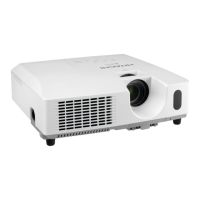
Hitachi CP-X2541WN - User Manual

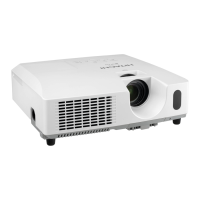
Hitachi CP-X2541WN
113 pages
Print Icon
To Next Page IconTo Next Page
Loading...
1
Projector
User's Manual (detailed)
Operating Guide
Thank you for purchasing this projector.
Ź%HIRUHXVLQJWKLVSURGXFWSOHDVHUHDGDOOPDQXDOVIRUWKLV
SURGXFW%HVXUHWRUHDGSafety Guide¿UVW$IWHUUHDGLQJWKHPVWRUHWKHPLQD
VDIHSODFHIRUIXWXUHUHIHUHQFH
WARNING
7KHLQIRUPDWLRQLQWKLVPDQXDOLVVXEMHFWWRFKDQJHZLWKRXWQRWLFH
7KHLOOXVWUDWLRQVLQWKLVPDQXDODUHIRULOOXVWUDWLYHSXUSRVHV7KH\PD\GLIIHU
VOLJKWO\IURP\RXUSURMHFWRU
7KHPDQXIDFWXUHUDVVXPHVQRUHVSRQVLELOLW\IRUDQ\HUURUVWKDWPD\DSSHDULQ
WKLVPDQXDO
7KHUHSURGXFWLRQWUDQVIHURUFRS\RIDOORUDQ\SDUWRIWKLVGRFXPHQWLVQRW
SHUPLWWHGZLWKRXWH[SUHVVZULWWHQFRQVHQW
NOTE
Trademark acknowledgment
9DULRXVV\PEROVDUHXVHGLQWKLVPDQXDO7KHPHDQLQJVRIWKHVHV\PEROVDUH
GHVFULEHGEHORZ
$ERXWWKLVPDQXDO
WARNING
CAUTION
7KLVV\PEROLQGLFDWHVLQIRUPDWLRQWKDWLILJQRUHGFRXOGSRVVLEO\
UHVXOWLQSHUVRQDOLQMXU\RUHYHQGHDWKGXHWRLQFRUUHFWKDQGOLQJ
7KLVV\PEROLQGLFDWHVLQIRUPDWLRQWKDWLILJQRUHGFRXOGSRVVLEO\
UHVXOWLQSHUVRQDOLQMXU\RUSK\VLFDOGDPDJHGXHWRLQFRUUHFW
KDQGOLQJ
3OHDVHUHIHUWRWKHSDJHVZULWWHQIROORZLQJWKLVV\PERO
0DF
®
LVDUHJLVWHUHGWUDGHPDUNRI$SSOH,QF
:LQGRZV
®
'LUHFW'UDZ
®
DQG'LUHFW'
®
DUHUHJLVWHUHGWUDGHPDUNVRI0LFURVRIW&RUSRUDWLRQ
LQWKH86DQGRURWKHUFRXQWULHV
9(6$DQG''&DUHWUDGHPDUNVRIWKH9LGHR(OHFWURQLFV6WDQGDUG$VVRFLDWLRQ

+'0,WKH+'0,ORJRDQG+LJK'H¿QLWLRQ0XOWLPHGLD,QWHUIDFHDUHWUDGHPDUNVRUUHJLVWHUHG
WUDGHPDUNVRI+'0,/LFHQVLQJ//&LQWKH8QLWHG6WDWHVDQGRWKHUFRXQWULHV
%OXUD\'LVF
70
DQG%OXUD\
70
DUHWUDGHPDUNVRI%OXUD\'LVF
$VVRFLDWLRQ
$OORWKHUWUDGHPDUNVDUHWKHSURSHUWLHVRIWKHLUUHVSHFWLYHRZQHUV
NOTICE 7KLVHQWU\QRWLFHVRIIHDURIFDXVLQJWURXEOH
CP-X2541WN/CP-X3041WN/CP-X4041WN
CP-WX3041WN/CP-WX3541WN/CP-WX4041WN

Other manuals for Hitachi CP-X2541WN

Questions and Answers

  • M
    millerjamesAug 12, 2025
    Why is the NETWORK function not working on my Hitachi CP-X2541WN Projector?
    • C
      Colleen DennisAug 12, 2025
      If the NETWORK function isn't working on your Hitachi Projector, it might be because the same network address is set for both wireless and wired LAN connections. To fix this, change the network address settings for either the wireless or wired LAN.
  • B
    Bridget ParkerAug 16, 2025
    What to do if the internal temperature is rising in my Hitachi CP-X2541WN?
    • S
      Sandra StevensAug 16, 2025
      If your Hitachi Projector's internal temperature is rising, it might be operating in low power. Turn the power off and let the projector cool down for at least 15 minutes.
  • M
    mcordovaAug 19, 2025
    What to do if the interior of my Hitachi Projector has become heated?
    • L
      Linda Hoffman DDSAug 19, 2025
      If there's a possibility that the interior of your Hitachi Projector has become heated, turn the power off and allow the projector to cool down for at least 15 minutes.
  • D
    Derek CarterAug 23, 2025
    What to do if the cooling fan is not operating in my Hitachi CP-X2541WN Projector?
    • S
      Stacy CunninghamAug 23, 2025
      If the cooling fan isn't operating on your Hitachi Projector, turn the power off and let the projector cool down for at least 15 minutes.
  • L
    lisa07Aug 27, 2025
    How to fix 'no input signal' on a Hitachi CP-X2541WN?
    • J
      John DavisAug 27, 2025
      If your Hitachi Projector shows 'no input signal', confirm the signal input connection and the status of the signal source.
  • M
    Michael Brown MDAug 30, 2025
    What to do if the frequency of the input signal is not within range on my Hitachi Projector?
    • P
      preston83Aug 30, 2025
      If the horizontal or vertical frequency of the input signal is not within the specified range on your Hitachi Projector, confirm the specs for your projector or the signal source specs.
  • V
    Victoria FreySep 3, 2025
    What to do if an improper signal is input to my Hitachi CP-X2541WN?
    • M
      Michael WongSep 3, 2025
      If an improper signal is input to your Hitachi Projector, confirm the specs for your projector or the signal source specs.
  • S
    Stacy JohnsonSep 7, 2025
    How to disable the SAVING function on my Hitachi CP-X2541WN?
    • Z
      Zachary LewisSep 7, 2025
      To resolve the SAVING function working on your Hitachi Projector, select 1250$ for the STANDBY MODE item in the 6(783 menu.

Summary

Introduction and Setup

Connecting External Devices

Explains how to connect various external devices like computers and AV sources.

Power and Security Setup

Covers connecting to power and securing the projector.

Remote Control

Battery Installation and Signal

Guides on installing batteries and understanding remote signal range.

Power and Operation

Power On;Off Procedures

Step-by-step instructions for turning the projector on and off.

Volume, Input, and Aspect Ratio

Covers adjusting volume, selecting input signals, and aspect ratio.

Picture Adjustments and Menu Navigation

Details zoom, focus, height adjustment, auto-adjust, and menu system.

Menu System Overview

USB Display

Maintenance Procedures

Troubleshooting Guide

Hitachi CP-X2541WN Specifications

General IconGeneral
ResolutionXGA (1024 x 768)
Contrast Ratio2000:1
Aspect Ratio4:3
Display TechnologyLCD
Lamp TypeUHP
Projection Size30 - 300 inches
Keystone CorrectionVertical ±30°
Zoom1.2x
Input PortsHDMI, VGA, USB
Throw Ratio1.5 - 1.8:1
Speakers2W
Video ModesPAL, NTSC, SECAM
Data ModesVGA, SVGA, XGA

Related product manuals