EasyManua.ls Logo

Hitachi CP-X4021N - User Manual

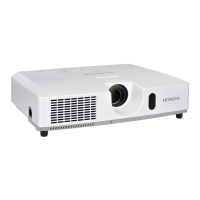
Hitachi CP-X4021N
277 pages
Print Icon
To Next Page IconTo Next Page
Loading...
1
Projector
CP-X4021N/CP-X5021N/
CP-WX4021N
User's Manual (detailed)
Operating Guide
Thank you for purchasing this projector.
Before using this product, please read all manuals for this
product. Be sure to read User's Manual - Safety Guide rst. After reading them,
store them in a safe place for future reference.
WARNING
• The information in this manual is subject to change without notice.
• The manufacturer assumes no responsibility for any errors that may appear in
this manual.
• The reproduction, transfer or copy of all or any part of this document is not
permitted without express written consent.
NOTE
Trademark acknowledgment
Various symbols are used in this manual. The meanings of these symbols are
described below.
About this manual
WARNING
CAUTION
This symbol indicates information that, if ignored, could possibly
result in personal injury or even death due to incorrect handling.
This symbol indicates information that, if ignored, could possibly
result in personal injury or physical damage due to incorrect
handling.
Please refer to the pages written following this symbol.
Mac
®
is a registered trademark of Apple Inc.
Windows
®
, DirectDraw
®
and Direct3D
®
are registered trademarks of Microsoft Corporation
in the U.S. and/or other countries.
VESA and DDC are trademarks of the Video Electronics Standard Association.
HDMI, the HDMI logo, and High-Denition Multimedia Interface are trademarks or registered
trademarks of HDMI Licensing LLC in the United States and other countries.
Trademark PJLink is a trademark applied for trademark rights
in Japan, the United States of America and other countries and
areas.
• Blu-ray Disc is a trademark.
All other trademarks are the properties of their respective owners.
NOTICE This entry notices of fear of causing trouble.

Table of Contents

Other manuals for Hitachi CP-X4021N

Questions and Answers

  • R
    Rachel CoxAug 10, 2025
    How to adjust overlapping images on Hitachi CP-X4021N?
    • J
      Jessica EdwardsAug 10, 2025
      If images from your Hitachi Projector are not overlapping correctly or appear defocused, adjust the ZOOM ring, VERTICAL adjuster, HORIZONTAL adjuster, and FOCUS ring to superimpose them accurately. If needed, fine-tune using PERFECT FIT and KEYSTONE settings.
  • J
    jasminecarlsonAug 16, 2025
    How to fix Hitachi Projector Intellectual Stack if it does not work?
    • J
      John DavisAug 16, 2025
      To resolve an inoperative Intellectual Stack on your Hitachi Projector, ensure that both the Main and Sub projectors are properly connected to AC power. Verify that the RS-232C cable connects the Main and Sub projectors correctly. Also, confirm that the STACK MODE is set to MAIN on one projector and SUB on the other via the STACK menu. Finally, check all signal cable connections and ensure they match the port settings in the menu.
  • R
    richardsimmonsAug 21, 2025
    How to fix Hitachi Projector images not overlapping properly?
    • M
      Mr. Jesus WagnerAug 22, 2025
      If the images from your Hitachi Projector are not overlapping correctly or appear defocused, adjust the ZOOM ring, VERTICAL adjuster, HORIZONTAL adjuster, and FOCUS ring to superimpose them. If needed, fine-tune with PERFECT FIT and KEYSTONE adjustments.
  • A
    Anthony SmithAug 27, 2025
    How to troubleshoot Hitachi CP-X4021N Intellectual Stack not working?
    • A
      Alyssa HarringtonAug 28, 2025
      If the Intellectual Stack feature isn't working on your Hitachi Projector, check the following: ensure both Main and Sub projectors are connected to AC power. Verify the RS-232C cable is correctly connected between the Main and Sub projectors. Confirm the STACK MODE is set to MAIN on one projector and SUB on the other via the STACK menu. Ensure all signal cables are properly connected and that the cable connections match the port settings in the menu. To use Intellectual Stack feature, supply Main and Sub projectors with AC power. To use Intellectual Stack, connect Main and Sub projectors with RS-232C cross cable.
  • J
    james66Sep 2, 2025
    How to enable Hitachi Projector STACK menu?
    • M
      matthew56Sep 3, 2025
      To operate the STACK menu on your Hitachi Projector, verify these settings on both Main and Sub projectors: Set STANDBY MODE in the SETUP menu to NORMAL. Ensure COMMUNICATION TYPE in COMMUNICATION within the SERVICE menu is set to OFF. Confirm that STACK LOCK in the SECURITY menu is set to OFF.

Hitachi CP-X4021N Specifications

General IconGeneral
ResolutionXGA (1024 x 768)
Contrast Ratio2000:1
Display Technology3LCD
Projection Size30 - 300 inches
Projection LensManual Zoom and Focus
Audio10W Mono Speaker
Brightness4000 ANSI Lumens
ConnectivityHDMI, VGA, USB
Aspect Ratio4:3
Lamp TypeUHP
Keystone CorrectionVertical ±30°
Video CompatibilityNTSC, PAL, SECAM
Output TerminalsAudio Out, VGA Out
Throw Ratio1.5 - 1.8:1

Related product manuals