Need help?
Do you have a question about the Hitachi CU-UHD4000-S7 and is the answer not in the manual?
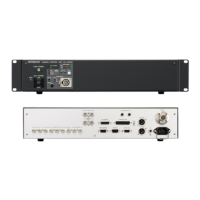
Details the identification and function of rear panel 4K 12G, 4K 3G, and HD SDI output connectors.
Covers CU function, system format, LAN, IP, time/date, and gateway settings.
Details output signal selection, 4K output combinations, and HD output assignments.
Includes HDR/SDR, detail enhancement (DTL), knee, and clip adjustments.
Configuration for PIX display, CAM ID SUB, CCU ID/IP, and microphone gain.
Settings for system timing, phase adjustments, and color bar generation.
Details signal types and connectors for 4K 12G, 4K 3G, HD OUT, and return inputs.
Lists connector types for MIC OUT, INTERCOM, COMMUNICATION, TALLY, WFM, MIC REMOTE, and TRUNK.
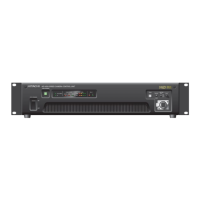
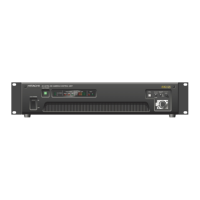
The Hitachi CU-UHD4000-S7 is a sophisticated Camera Control Unit (CCU) designed to enhance the capabilities of the SK-UHD4000-S7 camera head and CA-UHF4000-S7 adapter. This CCU introduces a range of new functions that significantly improve 4K signal handling, monitoring, and operational flexibility, making it a powerful tool for professional broadcast and production environments.
At its core, the CU-UHD4000-S7 manages and processes video signals, offering advanced 4K output options. It provides two 12G-SDI outputs specifically for 4K signals, ensuring high-bandwidth connectivity. Additionally, it supports simultaneous 2K SDR (Standard Dynamic Range) and 4K HDR (High Dynamic Range) signal outputs, allowing for versatile production workflows where both formats are required concurrently. This dual-format output capability is crucial for productions that need to deliver content across different platforms and standards.
A key feature is the independent 2K DTL (Detail) function, which allows for precise control over the detail enhancement of 2K signals, separate from the 4K processing. The CCU also incorporates a BT.2020 matrix function for 4K signals, ensuring accurate color reproduction in the wider BT.2020 color space, which is essential for high-quality HDR content.
For monitoring and diagnostics, the CU-UHD4000-S7 offers several enhancements. It can display the HD output signal format directly on Color Bars, providing quick visual confirmation of the current output settings. The inclusion of Moving Color Bars adds a dynamic element to test patterns, aiding in the identification of display issues. Audio test tones, specifically 400Hz and 1000Hz, can be generated on Color Bars, facilitating audio system calibration and troubleshooting.
The CCU also enhances camera identification with a CAM ID SUB display that supports up to twenty characters on Color Bars. This allows for clear and detailed labeling of camera feeds, which is particularly useful in multi-camera setups.
Communication and monitoring within the production environment are also improved. The return SDI signal, complete with embedded audio, can be output at the camera head and mixed into the intercom headset. This feature provides camera operators with real-time audio feedback, enhancing coordination and responsiveness during live productions or complex shoots. Furthermore, the optical level of both the camera head and the CCU can be displayed on the PIX OUT, offering a convenient way to monitor signal integrity and troubleshoot optical fiber connections.
The CU-UHD4000-S7 is designed for intuitive operation, with its functions accessible through a comprehensive CCU MENU structure. The menu is organized logically, allowing users to quickly navigate and adjust various parameters. New functions introduced in this model are clearly marked within the menu, making them easy to identify and utilize.
The OUTPUT SELECT menu provides extensive control over signal outputs. Users can choose between different 4K output formats, including 2SI (2-Sample Interleave) and SQD (Square Division), and specify the mapping link (A/B, QUAD/DUAL). The color matrix for 4K output can be set to BT.709 or BT.2020, depending on the production requirements. HD output signals can be configured with various resolutions and scanning modes (1080p, 1080i, 720p), and the CUT-OUT function allows for precise positioning of HD screen cuts from the 4K signal. Horizontal and vertical phase adjustments, along with HD filter settings, offer fine-tuning capabilities for signal timing and quality.
The HDR/SDR menu is critical for managing dynamic range. It allows users to select SDR or HDR for both 4K and HD outputs and choose specific HDR curves such as HLG600, HLG1200, or HPQ. When simultaneous SDR and HDR output is enabled, the CCU provides independent gain and black level adjustments for the SDR signal, ensuring optimal image quality across both formats.
The KNEE/CLIP (HD) menu, accessible when simultaneous SDR and HDR are active, offers detailed control over knee and clip functions for HD signals. Users can adjust total knee and slope levels, as well as individual R and B channel knee and slope levels. White clip settings are also available for precise control over highlight handling.
For system synchronization, the SYSTEM TIMING menu allows for adjustment of the overall system phase against a genlock signal, ensuring perfect timing in multi-camera setups.
The PIX DISPLAY menus (CAMERA and BARS) offer extensive customization for on-screen displays. Users can choose to show ND filter type, color temperature correction filter type, lens iris F-number, and CUT-OUT area markers on the camera's PIX OUT. The CABLE COND. setting allows for monitoring of the optical level between the camera head and CCU, with options for numerical data or a four-segment graph display. On the Color Bars, users can display camera ID, CCU ID, CCU IP address, and SDI format information, providing comprehensive on-screen diagnostics. The CAMERA ID SUB menu allows for the creation of custom camera labels, supporting up to twenty characters with various character types (capital, small, number, symbol) and editing functions.
The COLOR BARS menu provides control over the test tone generation (400Hz, 1KHz) and the moving color bars feature, including horizontal and vertical speed adjustments.
The HD DTL1 and HD DTL2 menus offer granular control over detail enhancement. HD DTL1 includes settings for overall detail level, horizontal and vertical gain, crispness, DTL frequency, and level dependency. HD DTL2 focuses on knee-related detail adjustments, allowing control over detail knee, white and black limits, and skin tone detail. The skin tone detail function includes options for selecting specific channels (CH1, CH2, CH1+2) and adjusting their respective levels, along with a skin tone detail gate.
While the manual primarily focuses on operational features, several aspects contribute to ease of maintenance and troubleshooting. The CABLE COND. display, showing the optical level between the camera head and CCU, is a valuable diagnostic tool for identifying issues with fiber optic connections. The ability to display CCU IP address and SDI format information on Color Bars aids in network configuration and signal path verification.
The BUZZER function, which can be enabled or disabled, provides audible feedback for certain operations or warnings, assisting operators in recognizing system states without constantly monitoring the screen. The detailed diagnostic information available through the PIX DISPLAY menus, such as optical levels and signal formats, helps technicians quickly pinpoint potential problems.
The CCU's software and FPGA versions are clearly stated, indicating that new functions are available with specific versions or later. This information is crucial for ensuring compatibility and for future software updates, which are typically released to improve performance, add features, or address issues. Keeping the software up-to-date is a standard maintenance practice to ensure the CCU operates optimally and benefits from the latest enhancements.
The modular design implied by the various input/output connectors and communication ports suggests that individual components can be serviced or replaced if necessary, although detailed service instructions are not provided in this operating manual. The clear labeling of connectors on the rear panel facilitates correct setup and troubleshooting of physical connections.
 General
| Category | Control Unit |
|---|---|
| Model | CU-UHD4000-S7 |
| Manufacturer | Hitachi |
| Input Voltage | 100-240V AC |
| Frequency | 50/60 Hz |
| Operating Temperature | 0°C to 40°C |
| Storage Temperature | -20°C to 60°C |
| Humidity | 20% to 80% (non-condensing) |

 To Next Page