English
34
4. Change rotation speed
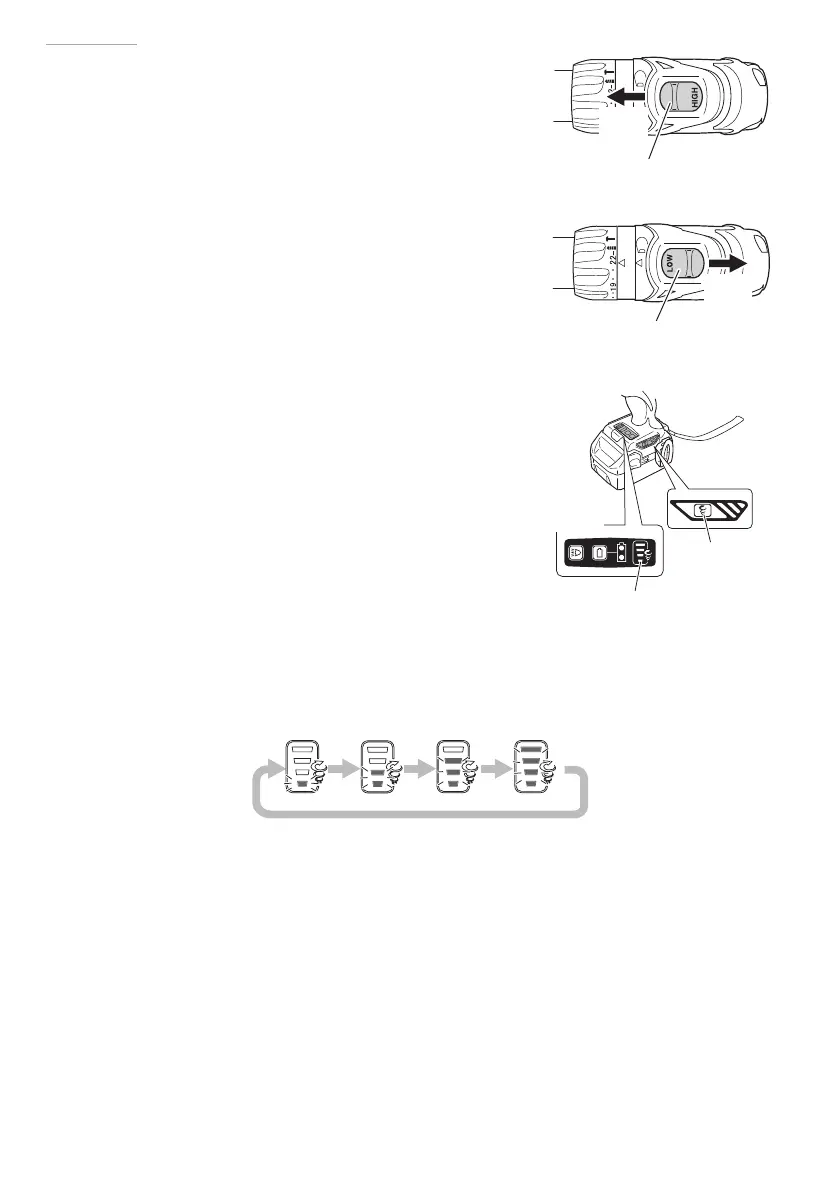
Operate the shift knob to change the rotational
speed. Move the shift knob in the direction of the
arrow (See Figs. 7 and 8).
When the shift knob is set to “LOW”, the drill rotates
at a low speed. When set to “HIGH”, the drill rotates
at a high speed.
CAUTION
○
When changing the rotational speed with the
shift knob, confi rm that the switch is off .
Changing the speed while the motor is rotating
will damage the gears.
○
If the motor is locked, immediately turn the
power off . If the motor is locked for a while, the
motor or battery may be burnt.
Be sure to turn the shift knob.
5. Change rotation speed mode selector function (Fig. 9)
CAUTION
○
Do not subject the switch panel to shock or
damage.
○
Select high/low mode while the trigger switch
is released. Failure to do so could result in
malfunction.
(1) Change rotation speed selector switch
The rotation speed changes in 4 steps each time the high/low selector switch is pressed.
Shift knob
High
speed
Fig. 7
Shift knob
Low
speed
Fig. 8
Switch
panel
Change rotation
speed selector
switch
Change rotation
speed indicator
lamp
Fig. 9
000Book_DV14DBL_ChS.indb 34000Book_DV14DBL_ChS.indb 34 2015/4/28 16:10:182015/4/28 16:10:18


 To Next Page