English
18
CAUTION
○
Do not use the impact drill in the IMPACT function if the material can be bored by
rotation only. Such action will not only reduce drill effi ciency, but may also damage
the drill tip.
○
Operating the impact drill with the change lever in mid-position may result in
damage. When switching, make sure that you shift the change lever to the correct
position.
NOTE
The change lever may not shift smoothly when
changing from impact drill mode to drill mode.
In this case, switch ON and operate the
machine for a few seconds. The spindle shaft
will then be pushed forward, and the change
lever can be moved smoothly.
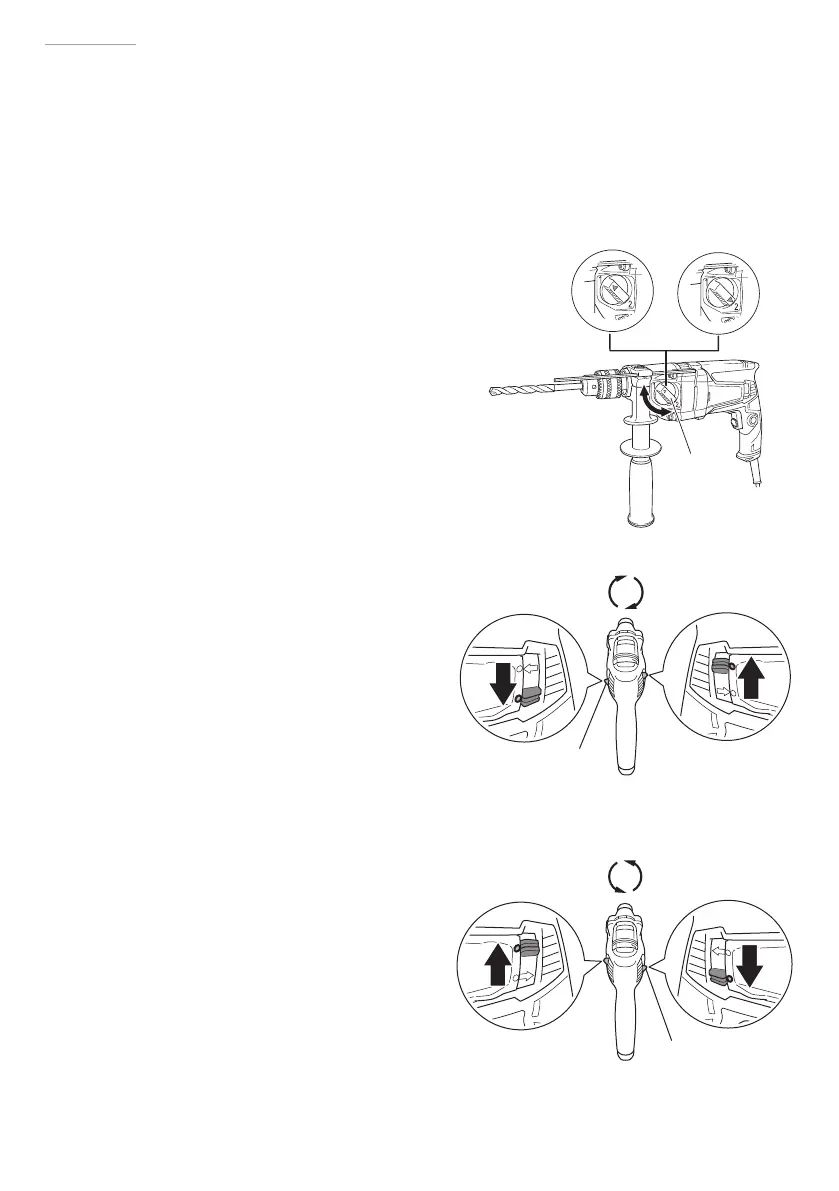
10. High-speed/Low-speed changeover:
Prior to changing speed, ensure that the
switch is in the OFF position, and the drill has
come to a complete stop. To change speed,
rotate the gear shift dial as indicated by the
arrow in Fig. 5. The numeral “1” engraved on
the drill body denotes low speed, the numeral
“2” denotes high speed.
If it is hard to turn the gear shift dial, turn the
chuck slightly in either direction and then turn
the gear shift dial again.
11. Check the rotational direction (Fig. 6, 7)
The bit rotates clockwise (viewed from the
rear side) by turning the rotational change
lever counterclockwise.
The bit rotates counterclockwise (viewed
from the rear side) by turning the rotational
change lever clockwise.
NOTE
Actuate the rotational change lever only
when the machine is at standstill.
The rotational change lever is used to
reverse the rotational direction of the
machine. However, this is not possible with
the On/Off switch actuated.
Gear
Shift Dial
Fig. 5
Fig. 6
Rotational change
lever
Rotational change
lever
Fig. 7
000BookDV20VDChS.indb18000BookDV20VDChS.indb18 2015/06/159:22:552015/06/159:22:55



 To Next Page