Need help?
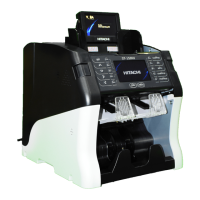
Do you have a question about the Hitachi iH-210 and is the answer not in the manual?
General safety guidelines for product usage.
Preparation steps before operating the machine.
How to select and change currency.
Explanation of different counting modes.
Details on counted notes in stacker pockets.
Displaying and viewing counting results.
Information about rejected notes.
Adjusting the counting speed.
Setting batch counts for notes.
Setting fitness level parameters.
Accessing the main menu options.
Selecting and configuring operational modes.
Printing counting results.
Using the ADD function.
Accessing the ETC screen.
Setting the machine's date and time.
Managing user profiles and information.
Viewing software and hardware details.
Configuring system parameters like time, printer.
Configuring operational settings like display, language.
Setting up network and external display connections.
Setting and managing the machine's PIN.
Updating the machine's software.
Checking the status of internal components.
Configuring sensors and internal settings.
Registering and managing user information.
Counterfeit detection settings.
Sorting notes based on their orientation.
Sorting notes based on their version.
Setting manual start for counting.
Viewing accumulated counting results.
Using the machine in a two-user mode.
Collecting data from banknotes.
Manually adding counts to results.
Managing deposit calculations and information.
Setting dispenser parameters.
Configuring batch counting options.
Managing serial numbers and image data.
Configuring fitness detection parameters.
Viewing fitness status of banknotes.
Viewing banknote images.
Customizing key assignments.
 General
| Brand | Hitachi |
|---|---|
| Model | iH-210 |
| Category | Cash Counters & Coin Sorters |
| Power Supply | AC 100-240V, 50/60Hz |
| Hopper Capacity | 500 notes |
| Reject Pocket Capacity | 100 notes |
| Counterfeit Detection | UV, MG, IR |
| Display | LCD |
| Connectivity | RS-232, USB |
| Supported Currencies | Multiple international currencies |


 To Next Page