EasyManua.ls Logo

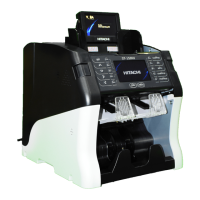
Hitachi ST-150NF - User Manual

Hitachi ST-150NF
92 pages
Print Icon
To Next Page IconTo Next Page
Loading...
Satisfied with our counterfeit detector?
Here comes a machine with a complete solution using the
most advanced state-of-the-art technology.
Introducing, the new ST-150NV and ST-150NF.
This Machine is designed to make your banknotes safe and
your duties easier than ever before.
Rev. 1.1.2
Date: 2016. 07. 26
Fitness Sorter
Question and Answer IconNeed help?

Do you have a question about the Hitachi ST-150NF and is the answer not in the manual?

Summary

Basic Operation

Currency - Change local currency.

Guides users on how to select and change the local currency for counting.

Mode - Select Operation Mode, MIX, SP and SG Mode.

Explains how to select different operation modes like MIX, SP, and SG for counting banknotes.

CF detection

Details the Counterfeit detection settings and how to enable/disable various sensors.

How to check Counting Result

Provides instructions on how to view the results of the banknote counting process.

Operation Mode 1

Operation Mode 2

GT - When GT function is on, machine settles accounts before user clears the accounts.

Enables the GT function to settle accounts before user clearance, useful for tracking totals.

ADD - The total counting result is accumulated.

Explains the ADD function for accumulating total counting results, including manual addition.

Batch

Covers setting batch numbers for counting operations, including standard and reject batches.

ETC - Select Direction, Serial and Version Mode by pressing “0” key.

Allows selection of Direction, Image, and Version modes for sorting and data transfer.

Operation 3

Auto Mode

Configures the machine to automatically sort banknotes based on predefined criteria like Suspect or Unfit.

Operation 4 (Option)

MIX Currency

Enables counting of mixed currencies together in a single operation.

VALUE [MIX]

Counts notes of installed currencies together, allowing for mixed currency counting.

VALUE [SC]

Counts only the first inserted currency, rejecting others, and sends it to the Stacker Pocket.

VALUE [SP]

Counts the first inserted currency and denomination, sending it to Stacker Pocket, rejecting others.

Fitness Level (ST-150 NF Only)

CF Level

Operation

Summary

Basic Operation

Currency - Change local currency.

Guides users on how to select and change the local currency for counting.

Mode - Select Operation Mode, MIX, SP and SG Mode.

Explains how to select different operation modes like MIX, SP, and SG for counting banknotes.

CF detection

Details the Counterfeit detection settings and how to enable/disable various sensors.

How to check Counting Result

Provides instructions on how to view the results of the banknote counting process.

Operation Mode 1

Operation Mode 2

GT - When GT function is on, machine settles accounts before user clears the accounts.

Enables the GT function to settle accounts before user clearance, useful for tracking totals.

ADD - The total counting result is accumulated.

Explains the ADD function for accumulating total counting results, including manual addition.

Batch

Covers setting batch numbers for counting operations, including standard and reject batches.

ETC - Select Direction, Serial and Version Mode by pressing “0” key.

Allows selection of Direction, Image, and Version modes for sorting and data transfer.

Operation 3

Auto Mode

Configures the machine to automatically sort banknotes based on predefined criteria like Suspect or Unfit.

Operation 4 (Option)

MIX Currency

Enables counting of mixed currencies together in a single operation.

VALUE [MIX]

Counts notes of installed currencies together, allowing for mixed currency counting.

VALUE [SC]

Counts only the first inserted currency, rejecting others, and sends it to the Stacker Pocket.

VALUE [SP]

Counts the first inserted currency and denomination, sending it to Stacker Pocket, rejecting others.

Fitness Level (ST-150 NF Only)

CF Level

Operation

Hitachi ST-150NF Specifications

General IconGeneral
BrandHitachi
ModelST-150NF
CategoryCash Counters & Coin Sorters
LanguageEnglish

Related product manuals