GB
16
• The projected image of the time on the wall or ceiling is only visible when the room is dark
enough and the room lights are turned o.
• If the power to the unit gets disconnected while the time projector is switched ON, the
LED display and the time projector will turn o. When the power is restored, the LED
display will return back to normal, and the time projector will remains switched OFF. You
must press the PROJECTOR ON/OFF button again to turn the time project back ON again.
3. Turn the FOCUS ADJUSTMENT control to adjust the focus of the image on the wall or
ceiling.
4. Press the PROJECTOR ON/OFF button to turn o the projector function.
ROTATE IMAGE
ROTATE IMAGE
ROTATE IMAGE
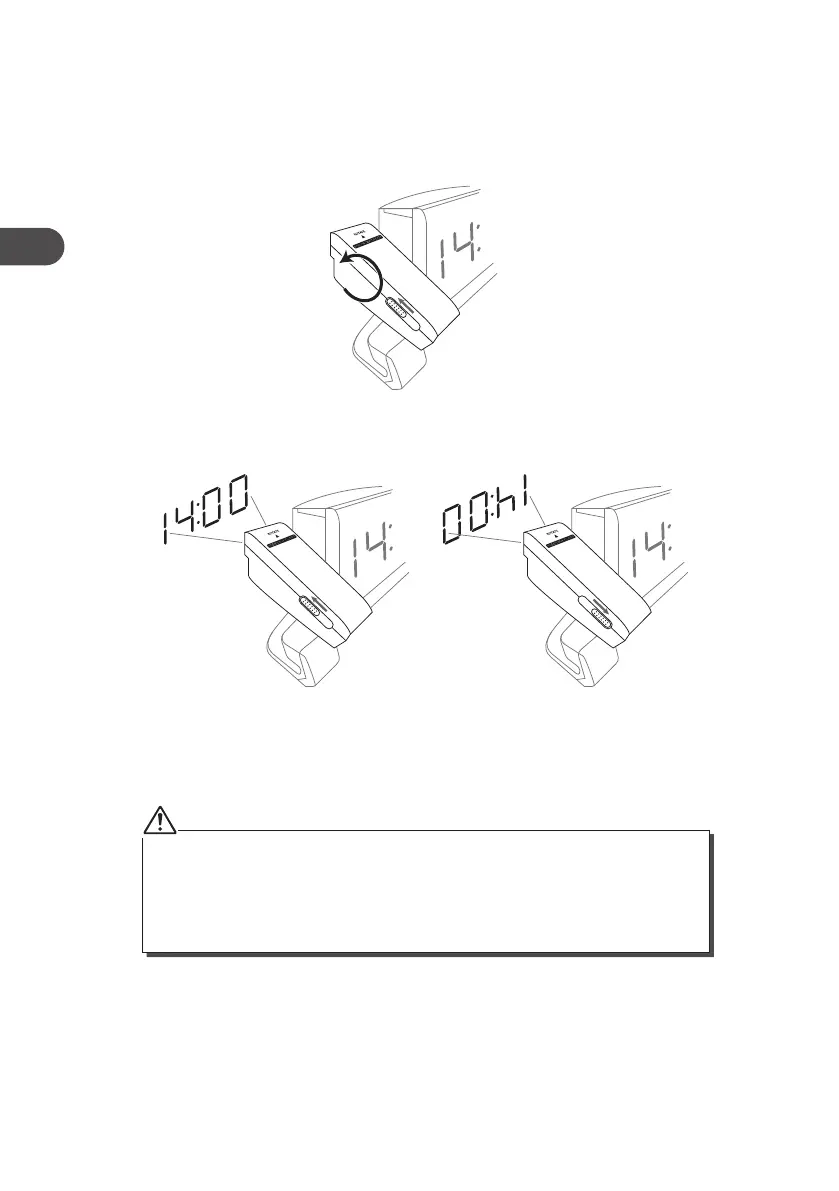
2. Slide the ROTATE IMAGE switch to turn the image 180° if necessary.
Using the Projector
1. Press the PROJECTOR ON/OFF button on the top of the radio to turn on the projector
function and then turn the projector anti-clockwise toward the wall. Time image will
be projected onto the wall or ceiling.
Hitachi KC95E_IB_GB_RC_Final130313.indd 16 14/03/2013 3:39 AM


 To Next Page